
One-Way Redirect Agents
For when you already have your variations as separate web pages
Before You StartIf you haven't already, check out Using Redirect Agents for a general overview and guidance about when to use "One-Way" versus "Two-Way" Redirect Agents.
Prerequisites
- You should already have the Conductrics Script Tag on your site.
- You should have your variation pages already created, with the URLs for each handy
Creating a One-Way Redirect Agent
To create a new One-Way Redirect Agent:
- If you haven't already, hit the Create button at the top of the Conductrics Admin to start Creating an Express Agent.
- When you get to Step 3, select Conductrics Express and then Page Redirect.
- Leave the One-Way Redirect option selected (as opposed to "Two-Way").
- Under Redirect from what page?, provide the page URL that you want to redirect some visitors FROM. Note that you can alternatively use the URL Conditions button if you need to use and/or criteria or regular expressions to match multiple pages, match on query parameters, and so on.
- Under Redirect to what page?, provide the page URLs that you want to redirect some visitors TO. Note that you only have the option to provide a redirect URL for your "alternate" variation pages ("B" and "C" and so on). This is because visitors selected for the "A" variation will remain where they are, rather than being redirected to a different page.
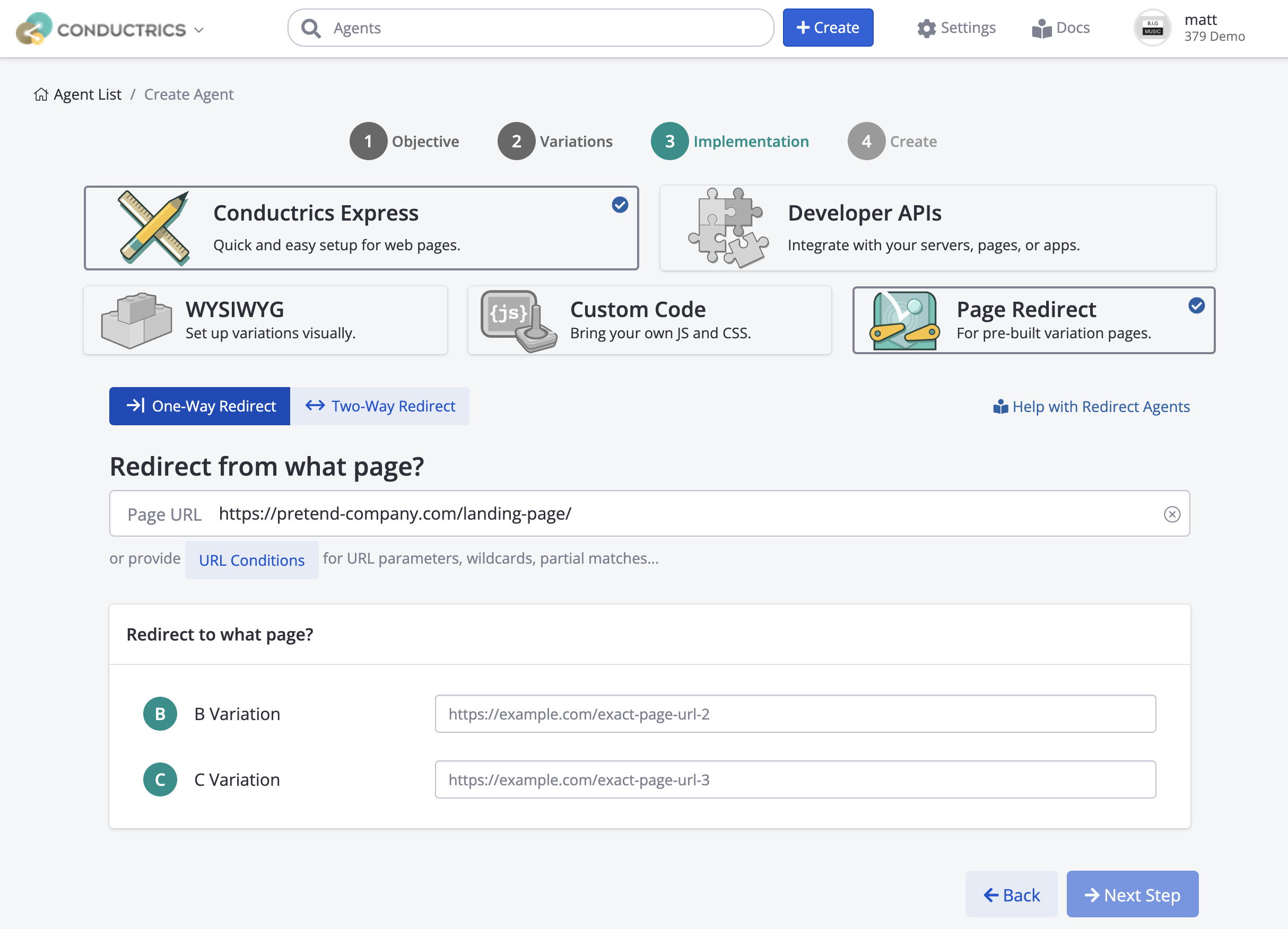
Once you've filled out the URLs as shown above, click Next Step to finish Creating your Agent.
The agent will be in Draft mode initially, which means that nothing actually rolls out to your site yet. Nothing happens on your actual public pages until you specifically change the agent's status to Live.
What Happens When Visitors Come to Your Pages?
After you start your agent, your Redirect Agent will start selecting page variations for each relevant visitor and redirecting them as appropriate.
Here's what happens:
- If the visitor arrives at the page you specified under Redirect from what page, Conductrics chooses which variation the visitor should get. Typically that's a random assignment if you're running an experiment, but you could also be using Fixed Targeting rules or Predictive assignment (see Selection Policies).
- If the visitor is selected for the "A" Variation (aka "Control" or "Default"), no redirect takes place.
- If the visitor is selected for "B" or "C" (or however many additional variations you have), the Conductrics script redirects the visitor to the corresponding URL (the Redirect to what page? URL provided above).
For all other page views - that is, when the visitor is not at one of your Page Variation URLs as defined in your Redirect Agent - your agent does nothing. (Of course, some other Conductrics agent might make its own changes.)
Any redirects are accomplished using "client-side" redirects. The standard JavaScript
window.location.replace()function is used to do the actual redirecting.
QA'ing Your RedirectsYou can use the Preview Launcher to test out the redirects for QA purposes. See QA with Express Previews for details.
Adjusting Redirect Options for Existing Agents
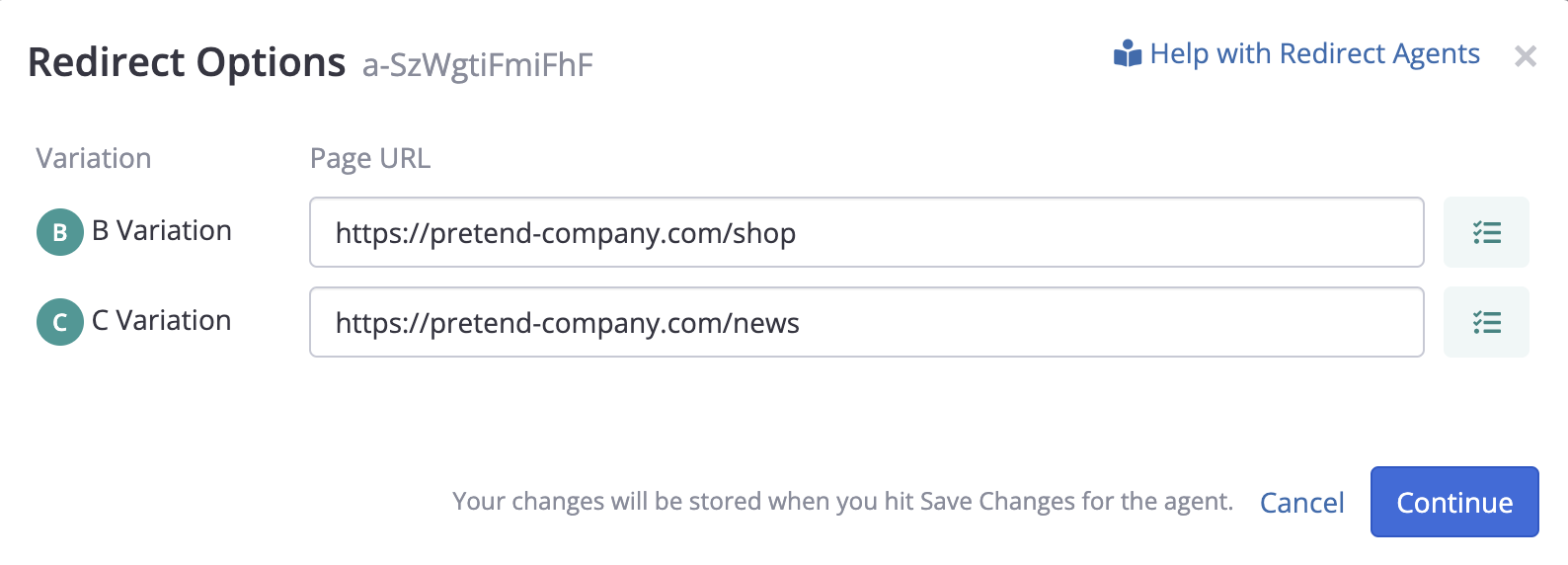
If you want to view or adjust the URLs for your page variations, hit Redirect Options in the sidebar of the Redirect Agent's main page in the Conductrics Admin. That will bring up a window where you can review or change the alternate URLs for each variation.
Advanced: Using Final URL Conditions
You may occasionally have a situation where, after your Redirect Agent does a redirect, the visitor may end up at a different URL than the one that Conductrics redirected them to.
Again, in most cases it probably won't be necessary to provide these Final URL Conditions, but they are available to handle various special cases. Feel free to reach out to Conductrics to discuss.
For instance, let's say your "B" variation is a redirect to example.com/my-account, but your servers (or some other part of your overall tech stack) may in turn redirect the visitor to a login page if the visitor is not currently logged in.
- Normally, a One-Way Redirect agent would not consider that to be a successful redirect, which means that you would likely end up with an imbalanced "split" (more confirmed "A" selections than "B" selections in the Conductrics reporting) once the experiment is launched, and thus it would likely get flagged with a Sample Ratio Mismatch (SRM).
- But let’s assume you want the redirect to have been considered successful for purposes of the test regardless of whether the visitor immediately lands at the specified Redirect URL (example.com/my-account in this theoretical example) or at the login page (perhaps example.com/login or whatever).
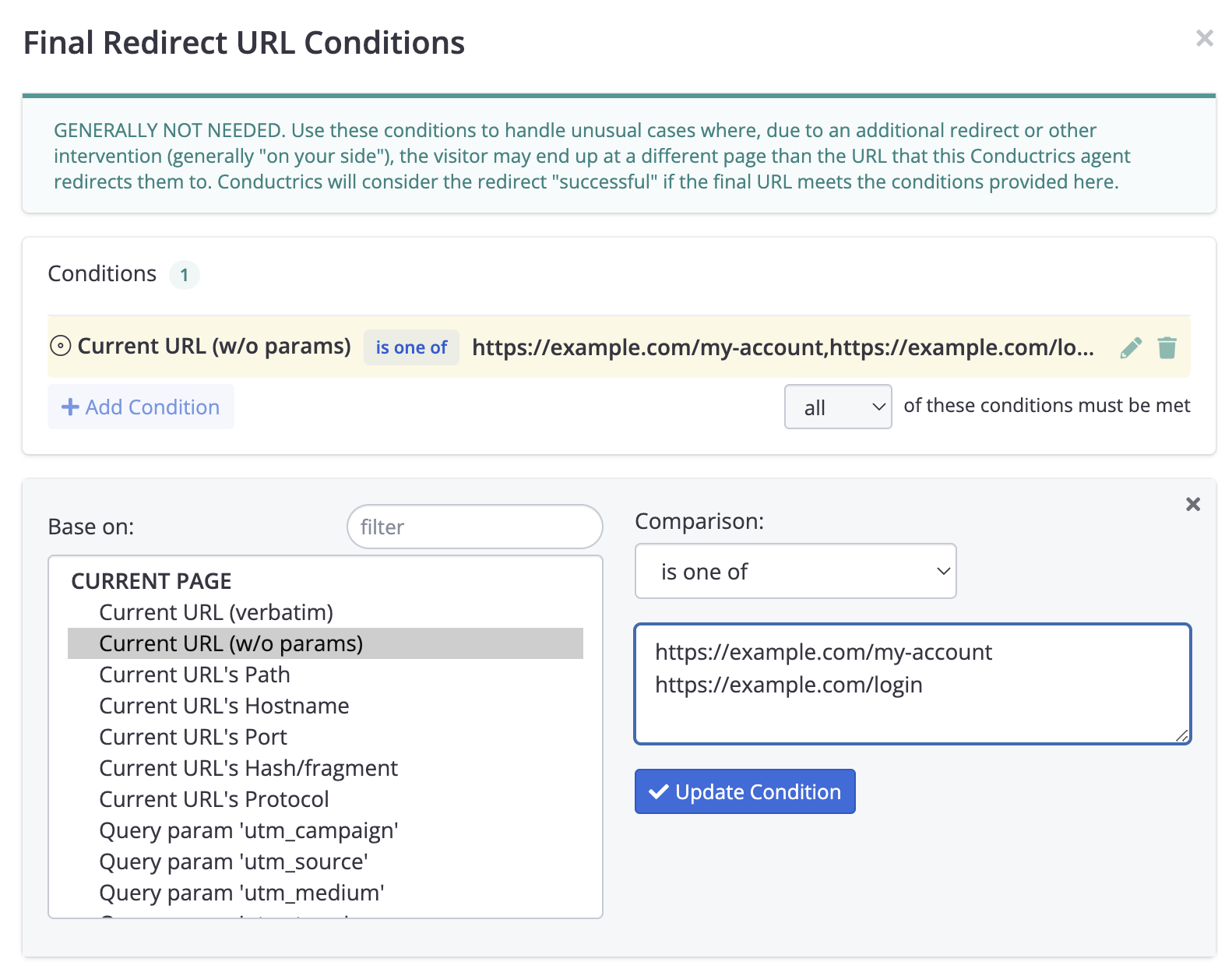
In such a case, you can use the Final URL Conditions button (the "checklist" icon) to the right of each URL in the Redirect Options window, as shown in the preceding section. From there you can specify and/or conditions or use regular expressions or whatever you need to "whitelist" the URLs that the visitor might (correctly) land at in response to the redirect. Conductrics will consider the redirect "successful" if the final URL meets the conditions you provide, perhaps something like the following:
Next Steps
Now that you've created your Redirect Agent, the rest is the same as a normal Conductrics Express agent:
-
You should assign at least one Goal / Conversion so that your agent knows what its success metrics are.
-
You can create rules to include/exclude certain visitors, or target one of your page variations to certain visitors, etc.
-
When you're ready, go ahead and Start Your Agent.
-
Once it's running, you can view its reports, such as the Activity Report, A/B Testing Report, or Audience Report.
Updated over 1 year ago