
Custom Input Params
Providing ad-hoc name/value pairs for use in conditions, filtering rules, etc.
Sometimes you may want to provide "raw" visitor information to our API, which you might use to:
- Create include/exclude filters (if certain visitors should be excluded from testing, etc)
- Create "hard-coded" targeting rules (always show the "B" variation to certain visitors, etc)
- Build Custom Visitor Traits based on conditions that use the "raw" visitor information to "tag" your visitors with Traits, which are expected to be more "bucketed" and thus cleaner conceptually.
There are 3 basic steps:
- Define the names of the input parameters that you'd like to use.
- Pass the actual values to our Runtime API as a set of name/value pairs called
inputs. - Use your custom inputs when building conditions in our admin.
No Personally Identifiable InformationNever provide Personally Identifiable Information (PII) to our system, in any form.
See AlsoThe Custom Input Parameters described here are for building conditions from your own "raw" data. They don't show up in reporting themselves, and aren't used internally by the adaptive learning system. Compare to Custom Visitor Traits, which are expected to be more "bucketed" and useful for reporting and adaptive learning.
Also, if you're using Conductrics Express (or our Local JavaScript API in browsers) and use a GTM-style "data layer" in your pages already, you may want to consider using our Data Layer Support instead of the Custom Input Parameters described here. Very similar conceptually, just "data layer aware".
Defining Input Parameters
The first step is to define the names of the input parameters.
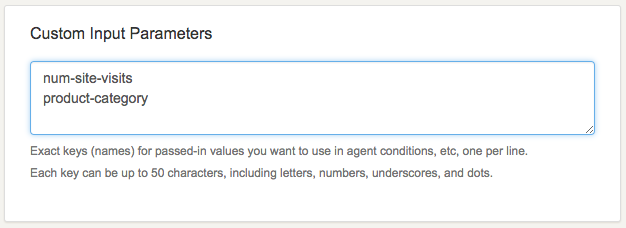
In our admin, go to Visitor Traits > Custom Input Parameters, and provide keys (unique names) for the input parameters you'd like to be able to pass to our Runtime API. The key names you use are up to you, as long as they don't contain any "illegal" characters as described on the admin page.
For instance, you might have data for "number of prior site visits" and "current product category" available on your side, which you want to pass in to Conductrics. You might set those up as follows:
Pass the actual values to the Runtime API
Your next task is to pass the values as a set of name/value pairs to the inputs parameter when using our Runtime API for decisions and rewards, etc.
- If you're using the Web Service version of our API (via HTTP/AJAX), you pass the inputs as the optional
inputsparameter of the request body when issuing your POST requests to us. - If you're using the Local JavaScript API, you pass them as the optional
inputsoption for the Conductrics.ClientApi constructor.
A few rules apply:
- Only those key names that you've defined in the admin (see above) can be used.
- Only strings, numbers, and booleans can be provided as the values (the right sides of the name/value pairs). So, no JavaScript Dates, Arrays, or "nested" Objects.
See also the Runtime API Overview and the inputs parameter in in the Runtime API Reference.
Values Not RetainedPlease note that Conductrics does not retain the values that you pass as Custom Inputs. The values you provide are available for processing the current API call only, and will disappear into the silent void of time and history once we've returned our response. If you need the values to be available to a later API call or page view, it's up to you to provide them again at that time.
Use Your Inputs in Conditions
Now you can use your named input parameters in most places where you see a "Conditions" screen in our admin:
- When setting up include/exclude filters at the agent level
- When setting up hard-coded "targeting rules" for an agent's variations
- When providing conditions for flipping on visitor features
- When providing conditions for a diagram node in a Flowlet
For instance, to use the fictional num-site-visits input parameter in a condition, you might do something like the following:
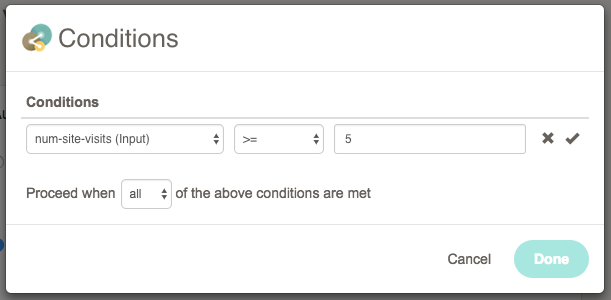
When the condition is actually encountered by the system, your passed-in values (if supplied) will be used to evaluate whether the condition matches. You can supply multiple conditions, and you can specify "and" vs "or" logic using the "Proceed when" dropdown down above.
Using Your Custom Inputs in the API Testbed
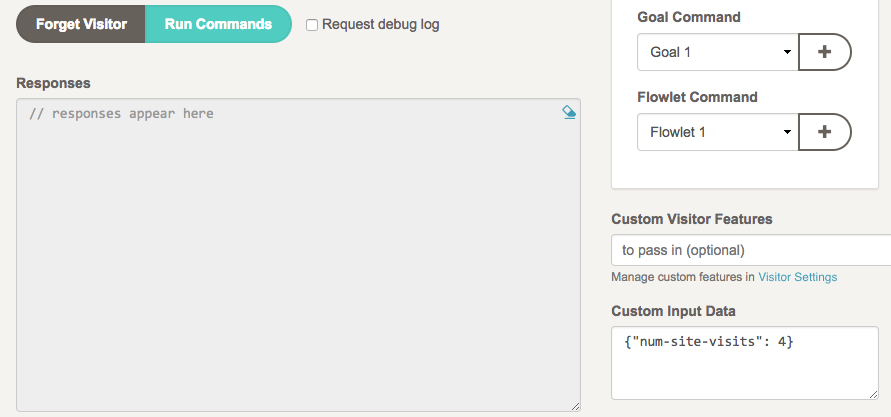
You can try out passing your custom input values with the API Testbed by providing the name/value pairs as a JSON-formatted object at bottom right, as shown below:
Updated over 1 year ago