
Google Analytics Integration (Legacy)
This page is about integrating with GA Universal, the "legacy" version of Google Analytics. For information about integrating with GA4, please see Google Analytics 4 Integration.
If you use Google Analytics, it makes sense to want to send information to GA about the selections your Conductrics Agents are making, so can do further analysis in the GA reporting to understand the downstream effects of each test experience and so on.
This is a simple client-side integrationThe integration being discussed here works on web pages only, by talking to the client-side GA tracker on the page (which is provided by the GA analytics.js library). It does not work with our mobile libraries or REST API. If you're interested in a GA integration that also works for mobile the REST API, check out our Analytics Connectors.
Also check out our "Data Layer" integrationThe "canned" Google Analytics integration discussed here is purposefully simple. If you want more control over how information is passed to Google Analytics, see also our Data Layer Support which provides more of a generalized / flexible way to integrate with Google Analytics (or other analytics / marketing system).
You can also use a Selection Callback HandlerIn addition to the GA integration discussed here and the Data Layer Support mentioned above, you can also create a Selection Callback Handler to do the calls to GA using your own custom logic. See Other Analytics Services for details.
Enabling the Google Analytics Integration
Our Google Analytics integration is enabled at the "Deploy Target" level.
To enable the Google Analytics integration:
- Go to Settings > Distribution in the Conductrics Admin, and hit Setup for the JavaScript deploy target you're using for your site.
- Look for the Google Analytics section, under JS Options.
- Enable the integration by checking the checkbox and save your changes.
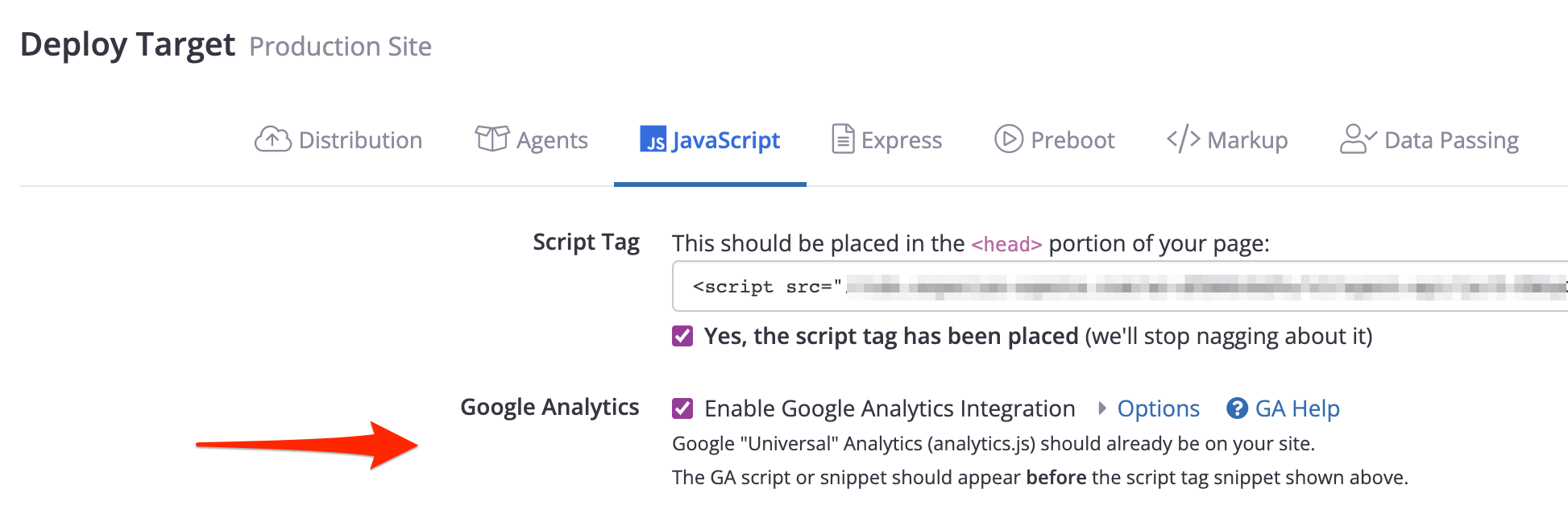
Make sure your Conductrics snippet appears after the GA snippetPlease note that the Google Analytics snippet is expected to be in the
<head>part of your pages. The Conductrics snippet should also be in the<head>part of your pages, after the Google Analytics snippet.
That's all there is to do, unless you happen to use multiple GA tracker objects on your page. If you are using multiple trackers, please see What about pages with multiple GA trackers? in the FAQ section at the bottom of this page.
What Conductrics Passes to Your Google Analytics Reports
Once you've enabled the integration, every time a Conductrics agent makes a selection (chooses the "A" or "B" experience for a visitor, etc), it sends an event to Google Analytics using Event Tracking.
The Event Fields we send to GA are as follows:
- "Conductrics" is sent as the Event Category
- The name of the agent is sent as the Event Action.
- The name of the variation is sent as the Event Label.
- Nothing is sent as the Event Value.
Triggering Conductrics Goals when GA Events Fire
If you already have your "conversions" and interesting clicks, etc., set up to send events to Google Analytics, then you may want to set up Conductrics Goals that automatically trigger based on certain GA events. When these GA events fire, the corresponding Goal events are sent to Conductrics.
To set this up:
- Make sure you've enabled the GA integration in your Conductrics Distribution (see above).
- Go to the Agent List page in the Conductrics Admin, and click the + button to start creating a new Goal type.
- Alternatively, you can click to edit an existing goal, as long as it's for Conductrics Express.
- Make sure the Trigger via Express option is selected.
- Under Trigger on Page, provide
*if you want Conductrics to listen for your GA Event no matter what page the visitor is on, you can provide something like/store/*if you only want to catch the GA Event on certain pages. - Change the When visitor option to hits GA event.
- Supply the Category, Action, and Label for the GA Event you want Conductrics to "listen" for.
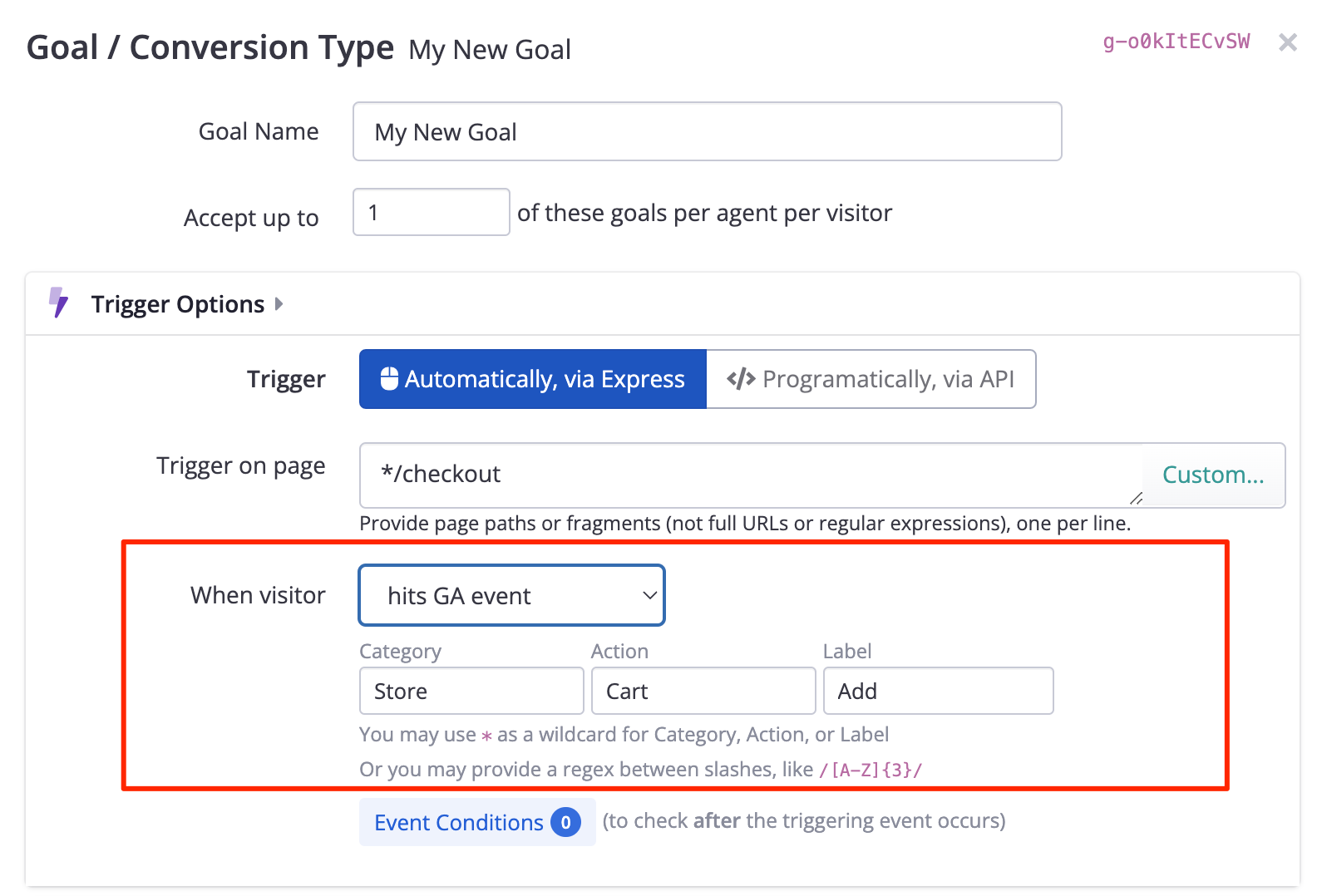
When actual GA events occur on your pages:
- Conductrics will check if the Category, Action, and Label all match what you've provided in the Goal form (above).
- You can use commas in the form for Category, Action, or Label to provide multiple values to match on. For instance, under Label you could provide
Add,Detailif you wanted to catch GA Events with a Label ofAddorDetail. - You can use a single
*for Category, Action, or Label as an "any" wildcard. You can also use a single*to do partial matching, such asClicked FAQ:*to match "Clicked FAQ: Shopping". - If the Category, Action and Label on the actual GA Event all match, the corresponding Goal should get sent to Conductrics and recorded for use in our reporting and machine learning.
Google Analytics Integration FAQ
Q: Where do we provide our GA Tracking/Property ID from our Google Analytics account, like UA-000000-2 or whatever?
A: You don't need to provide that UA-000000-2 style identifier. That's presumably already been set up in the GA tracking code that you added to your pages back when you set up Google Analytics. Conductrics sends events to GA via that already-present configuration.
Q: What about goal events that we've set up in Conductrics?
A: At this time we only send events for agent selections (when an agent chooses the "A" or "B" variation for a visitor, etc), not when goals are achieved. What we generally see is that most sites already have their success or conversion events wired into GA already, so us sending them would be redundant.
Q: What about custom dimensions?
A: At this time our Google Analytics integration doesn't support custom dimensions, mainly because it implements Event Tracking, not Page Tracking. There are a few reasons why we implemented it this way. For one thing, you don't have to have a dimension available and set it aside for our use. If you want more control, check out the Data Layer Support which would give you more flexibility via Google Tag Manager, etc.
Q: What if our pages rename the global "ga" object?
Google Analytics allows you to rename the global "ga" object to avoid naming conflicts. If your pages happen to do so, you shouldn't have to do anything special on the Conductrics side (we look for a renamed GoogleAnalyticsObject and use that if appropriate).
Q: What about pages with multiple GA trackers?
A: If you happen to have multiple tracker objects in your pages as discussed here in the GA documentation, then you need to expand the "Options" section and provide the tracker name as it appears in your call to the ga function. So, to specify that you want your Conductrics agents to send their events to a tracker named myTracker, you'd do something like this:
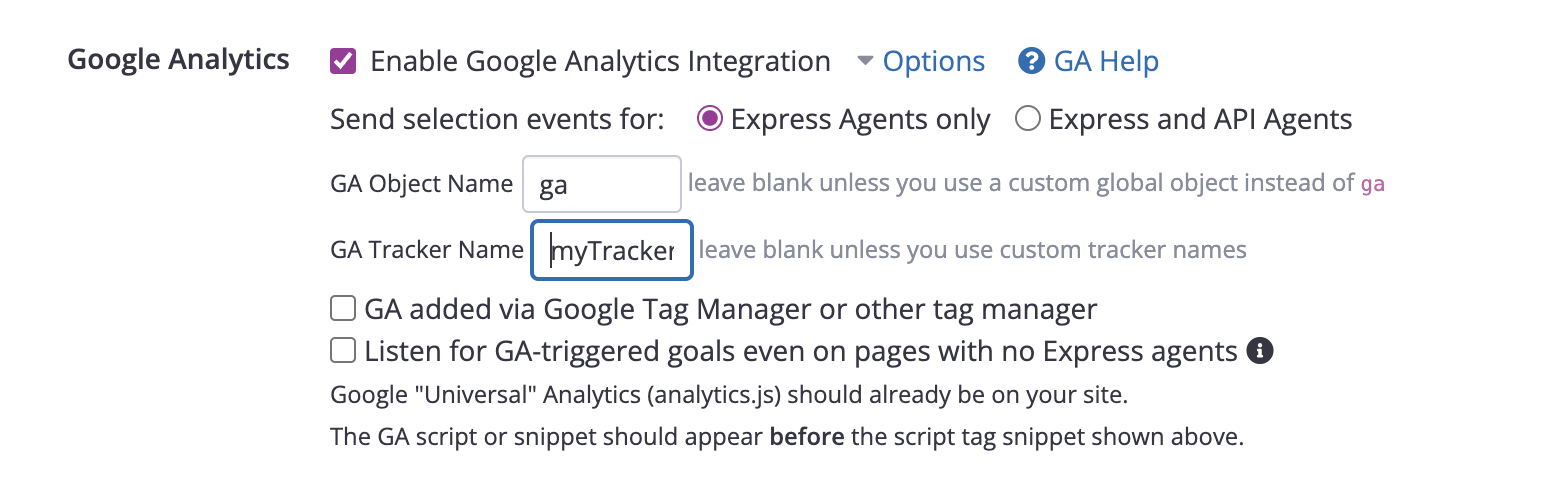
Q: What if GA is loaded after Conductrics, perhaps by a Tag Manager?
Try enabling the GA added via Google Tag Manager or other tag manager option, which is in the Google Analytics section of the options for your Deploy Target as shown in the screenshot above. This should account for GA being loaded/added asynchronously after Conductrics has loaded (for instance, if Conductrics is added in the <head> while GA is added via a tag manager or similar which remains at the end of the <body>).
Updated over 1 year ago