
Self-Storage Mode for REST API
What's This About?
When you call the Conductrics REST API to conduct an A/B test (or predictive targeting campaign, etc), Conductrics needs some way to remember a few things about the visitor, such as:
- What variation(s) has this visitor been exposed to in the past, and when?
- What Custom Visitor Traits have been set for this visitor?
- What Goals / Conversions has the visitor reached, and when?
- A few other bits of information, such as the "visit number" and date of last visit, etc.
We call this group of information the "Visitor State Record", which is also described on our Visitor Data & Privacy page in these docs.
When you use the Conductrics REST API, you can have Conductrics store this Visitor State record "on our side" or "on your side".
- If you identify the visitor by providing a unique identifier as the
sessionparameter, Conductrics will store the Visitor State record in a database "on our side", using the identifier you provide as the key. - Alternatively, you can identify the visitor by providing the "Visitor State Record" itself, instead of a traditional "unique identifier". We call this "Self-Storage" Mode. In this mode, Conductrics does not need to keep the record in the database on "our side".
Self-Storage mode is a new feature as of Conductrics 3.7.13.
Enabling "Self-Storage" Mode
First, you need to enable the Self-Storage mode, which is done at the Deploy Target level.
- Go to Settings > Deploy Targets and hit Setup for your REST API Deploy Target.
- Hit the Advanced Settings button (under the Advanced tab).
- Find the Session State: Use 'Self-Storage Mode' Format setting and set it to True as shown in the screenshot below.
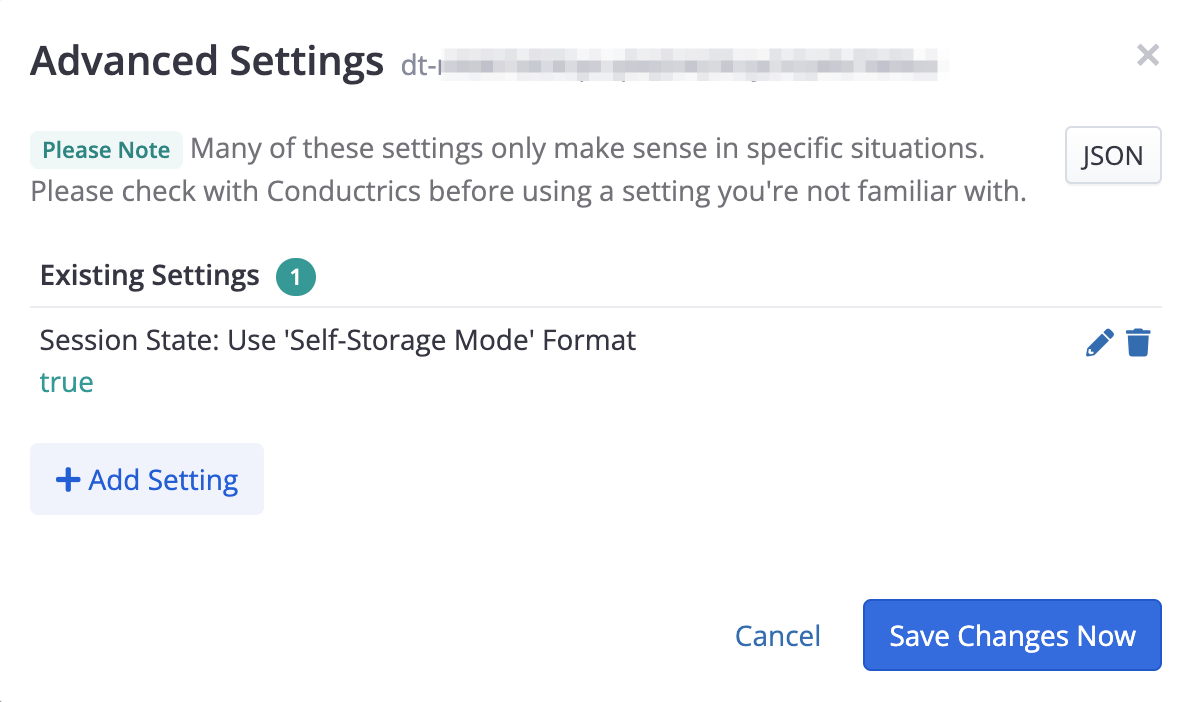
It's possible that you'll see some other "Advanced Settings" in there already. Leave those as-is. Contact Conductrics if you have any questions about Advanced Settings.
This should be a safe change to make, but If you don't want to make this change to an existing REST API Deploy Target just yet, feel free to create a duplicate of an existing REST API Deploy Target to play around with. There's a "Duplicate" available in the three-dots menu for each Deploy Target under Settings > Deploy Targets to make that easier, and you can always delete it later.
How to Use "Self-Storage" Mode
Call the REST API normally (see API Usage via REST API), except:
- Don't provide a "session identifier" (that is, omit the
sessionparameter). - Instead, provide a
sessfield within the body of the request, if you have one available. If there is no such string to provide (probably because this is a "new" visitor), provide an empty string. - Store the
sessstring that the REST API returns, perhaps as a cookie or in a database record on your side. - When calling the REST API again for the same visitor, provide the same string back to the API as the
sessfield within the body of the request.
For example, let's say you need to get a variation selection for some A/B test, using an API Agent called a-my-ab-test:
POST https://my-api.conductrics.com/ac-xxxxxxxx/v3/agent-api/dt-xxxxxxx?apikey=api-xxxxxx

{
    "commands": [
        { "a": "a-my-ab-test" }
    ],
    "sess": ""
}
When Conductrics returns its response, it will include a sess string, like so:
{
    "status": 200,
    "data": {
        "items": [
            {
                "a": "a-my-ab-test",
                "c": "A",
                "p": "r",
                "md": {},
                "s": "ok"
            }
        ],
        "sels": {
            "a-my-ab-test": "B"
        },
        "traits": [],
        "sess": "<the string to keep on your side>"
    }
}
It's now up to you to store the returned sess string and provide it back to the REST API when you next call it for the same visitor (for instance, to send a goal or get a variation for some other agent/test, etc):
POST https://my-api.conductrics.com/ac-xxxxxxxx/v3/agent-api/dt-xxxxxxx?apikey=api-xxxxxx

{
    "commands": [
        { "g": "g-my-conversion-event", "v": 19.99}
    ],
    "sess": "<the string you kept from last time>"
}
How you store the string from one request to the next is up to you. Most likely you would either:
- Store the complete
sessstring as a cookie in the visitor's browser, or - Store it in a database, keyed by some visitor identifier that you have available.
Here's a conceptual example in pseudo-code, assuming that you're using something similar to Express.js on the server:
// what cookie name will we read and write from?
const cookie_name = 'conductrics-sess-string';

const api_body = JSON.stringify({
  // provide "commands" to get a variation selection or send a goal, etc
  commands: [ { "a": "a-my-ab-test" } ],

  // provide current value of cookie from browser, or empty string if none
  // (alteratively, you could get the string from an internal database table)
  sess: (req.cookie[cookie_name] ?? '')
});

// make call to Conductrics REST API
const api_url = "https://xxxxx.conductrics.com/ac-xxxxxxxx/v3/agent-api/dt-xxxxxxx?apikey=api-xxxxxx";
const fetched = await fetch(api_url, {method: "POST", body: api_body});
const api_reply = await fetched.json()

// store the returned "sess" string as new value of the cookie
res.cookie cookie_name, api_reply.sess, {
  path: '/', // usually appropriate, adjust if needed
  domain: 'example.com', // optional, but if provided must match domain for client-side deploy target
  maxAge: 2592000000, // 30 days, just as an example
  httpOnly: true, // optional, but recommended unless sharing with client-side Conductrics
  secure: true, // optional, but recommended
  sameSite: 'Strict' // optional, but probably best if possible
};
The above is not a complete code example. It's just trying to show the conceptual steps that you would take in your own server-side logic. Feel free to reach out to Conductrics if you have questions!
What's inside that "sess" string?
The
sessstring is currently a simple JSON string that has been Base64 encoded. However, the internal serialization format is likely to change in future versions of Conductrics. Please do not attempt to create functionality that depends on the contents of the string.That said, you are welcome to deserialize the string to verify that the information stored within is in keeping with the "Session State" section on our Visitor Data & Privacy page. Please feel free to contact Conductrics if you have any questions.
Sharing a Cookie with Client-Side Conductrics
If your site also uses client-side Conductrics (Conductrics Express or the Local JS API), you can have the client-side functionality and your REST API calls use the same cookie.
In most cases, this will allow the client-side and server-side functionality to work together nicely, for instance allowing both sides to know which variations the visitor has been exposed to, or being able to send goals instrumented via Express to tests/agents that make their selections server side, and so on.
If you want to use Conductrics in this mode:
- You MUST set your client-side Deploy Target to use cookies (as opposed to Local Storage). To make this change, go to Settings > Deploy Targets in the Conductrics Admin, hit Setup for your deploy target, then switch the Visitor Storage Mode to Cookies (under the JavaScript tab). This will cause the Conductrics script on the page to read and write from a cookie called
cp-sess. - BOTH Deploy Targets must have the Use 'Self-Storage Mode' Format option turned on under Advanced Settings, as discussed above in the "Enabling Self-Storage Mode" section.
- When calling the REST API, pass the value of the
cp-sesscookie (if provided by the browser) as thesessstring in the body of the API request (see example above). If the browser doesn't provide acp-sesscookie, assume that this is a "new" visitor for Conductrics purposes, and provide an empty string instead. - After calling the REST API, your server-side code should re-store the value of the
sessstring (returned by the API) using the samecp-sesscookie name.
In order for the cookie to be successfully shared, all the attributes of the cookie must match:
- This means that you MUST NOT set the
HttpOnlyflag for the cookie. - You MUST provide the same
Domainattribute for the cookie that your client-side Deploy Target is set to use. - You should also not set the
SameSiteorSecureflags for the cookie (these may be supported in the future).
Adapting the example from the section above slightly, you might be left with something like this (again, if you were using something Express.js-like on your side):
// what cookie name will we read and write from?
const cookie_name = 'cp-sess'; // same as client-side Conductrics

const api_body = JSON.stringify({
  // provide "commands" to get a variation selection or send a goal, etc
  commands: [ { "a": "a-my-ab-test" } ],

  // provide current value of cookie from browser, or empty string if none
  // (alteratively, you could get the string from an internal database table)
  sess: (req.cookie[cookie_name] ?? '')
});

// make call to Conductrics REST API
const api_url = "https://xxxxx.conductrics.com/ac-xxxxxxxx/v3/agent-api/dt-xxxxxxx?apikey=api-xxxxxx";
const fetched = await fetch(api_url, {method: "POST", body: api_body});
const api_reply = await fetched.json()

// store the returned "sess" string as new value of the cookie
res.cookie cookie_name, api_reply.sess, {
  path: '/', // usually appropriate, adjust if needed
  maxAge: 2592000000, // 30 days, just as an example
  domain: 'example.com', // optional, but if provided must match domain for client-side deploy target
  httpOnly: false // must be readable by client-side Conductrics
};
Again, the above is not a complete code example. It's just trying to show the conceptual steps that you would take in your own server-side logic. Feel free to reach out to Conductrics if you have questions!
Updated over 1 year ago