
Custom Visitor Traits
Often times, you will want to be able to inform Conductrics about certain aspects of your visitors that you know about on your side. These can represent nearly anything, but consider the following as some examples of what we mean:
- Whether or not a visitor is a known customer of yours
- What type of products the visitor has purchased from your company
- If the visitor is a registered user, some kind of preferences etc from their profile
You can pass this type of information to Conductrics as custom visitor traits to Conductrics.
Once you have your custom traits defined in Conductrics, you can:
- Enable the traits for reporting purposes, via the checkboxes at the bottom of each agent's main setup page. Once enabled for a given agent, that agent's reporting will include breakdowns by trait, so you can see the conversion rate or other stats on a trait-by-trait basis.
- Use the traits in targeting conditions, to include/exclude visitors or "force" them to get certain variation assignments based on the traits (for example, to show "B" to people with the "Silver Tier" trait).
- Turn on the "predictive" selection mode for an agent, in which case it will consider each visitor's traits when making predictive variation assignments. See Predictive Agent Guidelines and How Adaptive Selection Works in Conductrics.
Defining Your Custom Visitor Traits
The first step is to define the custom visitor traits you'd like to use.
- In the Conductrics admin, go to Settings > Visitor Data.
- Under Custom Visitor Traits, hit the New Trait Group button.
- Provide a Group Name and Group API Code to uniquely identify this group of traits.
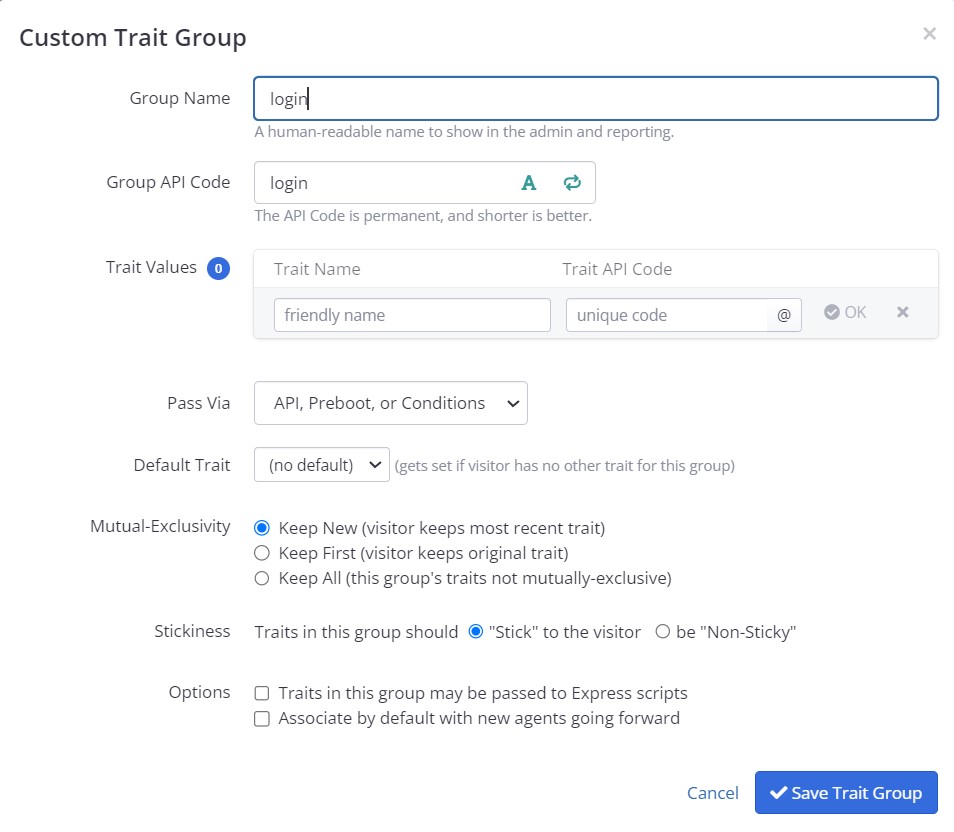
Creating a new group of traits
Next, use the Trait Values table to define the actual visitor traits in your new group. For instance, let's say you want to let Conductrics know whether the visitor is currently "logged in" into your site or app. You might enter something like the following:
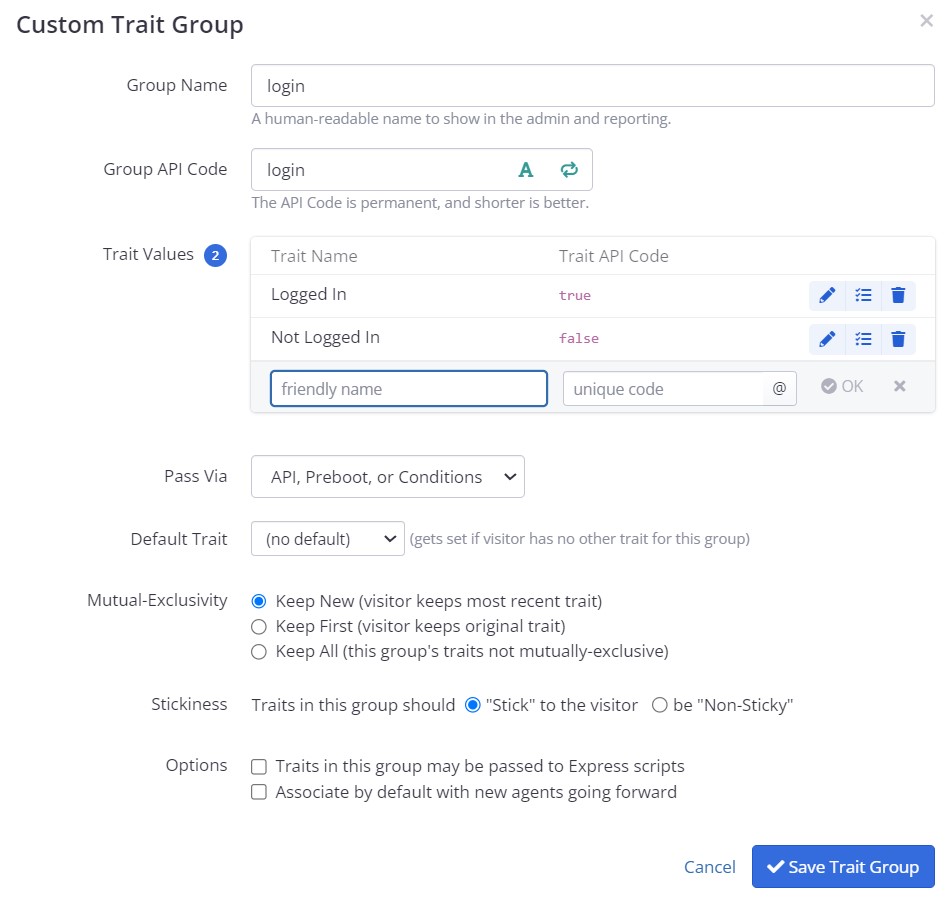
The screenshot above defines two custom visitor traits:
- The traits will show up in the Conductrics Admin, reports, etc., with the friendly names Logged-In and Not Logged-In.
- The traits have api codes of
login:trueandlogin:false, respectively. The API codes matter if you're going to pass the traits to Conductrics programmatically, as we'll discuss below.
Allowed CharactersLike other "API codes" in Conductrics, the codes for your traits and types may contain letters, numbers, underscores, and slashes, up to 100 characters. The friendly names may contain up to 50 characters.
Go ahead and click Done, and then save your changes. At this point, the traits are "defined" in Conductrics, and you'll notice that they are now show up when defining custom filtering rules or targeted selection rules for your agents.
Deciding How the Traits Will Get Passed to Conductrics
Now that the custom visitor traits have been defined, we need to somehow "pass" them from your site or app to Conductrics.
- Simple Passing: If the actual trait values are already available in a Cookie or Local Storage item, Data Layer value, URL or input parameter, you can probably use the "Pass Via" option to have Conductrics "read" the value automatically. See "Reading Traits from Cookies, Data Layer or Other Params" below.
- Via Conditions: If the trait values need some "massaging" because you need to use some kind of and/or logic to look at multiple cookies or other pieces of information, or because you need to "bin" numeric values into low / medium / high type buckets, you can often use Conditions at the trait-value level. See "Reading Traits from Cookies, Data Layer or Other Params" below.
- Preboot Code: If you're using Conductrics client-side, you can can add a bit of JS Code in the Conductrics Admin to pass the trait values using our "Preboot" feature (see "Passing Custom Visitor Traits via the JavaScript Preboot" below).
- Programmatically: If you're using the Conductrics API, you'll pass them as the
traitsparameter, as discussed in the Runtime API Reference. Another programatic option for client-side use is to add them to your Data Layer using the special nameconductrics_traits(see Data Layer Support for details).
You can also define your traits programmaticallyThe steps shown above are about defining custom visitor traits in our admin. You can use our Custom Visitor Traits API to "push" new trait definitions in programatically. That might be easier over time if you are integrating with a CMS or other system.
Reading Traits from Cookies, Data Layer or Other Params
Depending on your situation, the values of the traits can often be read directly from a cookie, URL param, or other already-available information.
Via URL Parameters
For instance, let's say you have a campaign identifier which may appear in the URL of your landing pages, and you want the campaign to be retained as a trait as far as Conductrics is concerned.
- In the Conductrics Admin, go to Settings > Visitor Data and hit Edit for the trait group.
- Set the Pass Via option to URL Parameter and provide the name of the URL parameter, exactly as it appears in your URLs (such as
campaignor similar).

- Make sure that the actual values that the URL Parameter might have are listed as "Trait API Codes" (see screenshots above).
For instance, if the URL parameter might have &campaign=spring25 or &campaign=summer30 in the URL when your pages are actually viewed, then the Trait API Codes should be spring25 and summer30 (case-sensitive). The "friendly" Trait Names don't matter for passing purposes, they are for display in the Conductrics Admin only.
Via Cookies or Local Storage Values
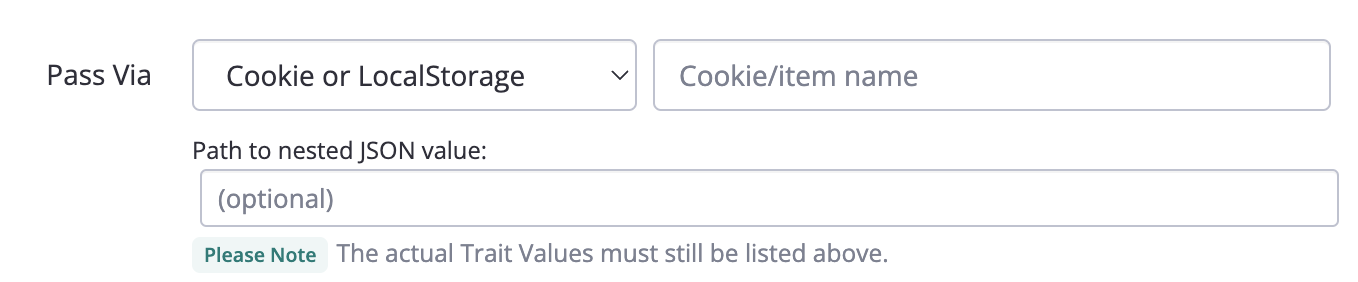
Similarly, if the trait values you want are already available in a Cookie or Local Storage value client-side, then you can likely have Conductrics read the value straight from there. Set the Pass Via option to Cookie or LocalStorage and provide the name of the cookie or Local Storage item:
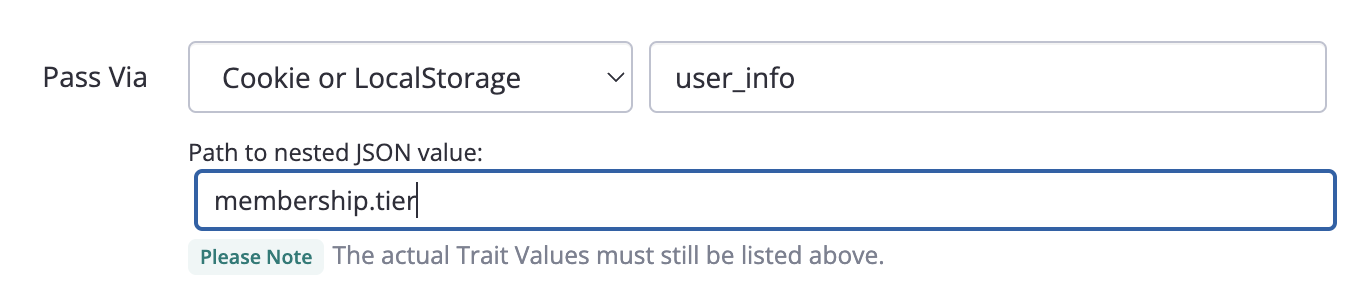
If the cookie or Local Storage item happens to be a JSON object, you can use the "Path to nested JSON value" option to "grab" the appropriate value. For instance, if you have a little user_info record in Local Storage which contains JSON like {"membership": {"tier": "gold", since: "2021"}} then you could use something like the following to parse the tier out as a trait value:
Via Data Layer Value
Similarly, if the trait values you want are already available in a Data Layer value client-side, you can probably have Conductrics read the traits from there. Set the Pass Via option to Data Layer and provide the name (aka "key") to use to read the actual value from the Data Layer. You can use dot notation as needed if the value you need is "nested" within the data layer.

Please note that you'll also need to enable the Enable Analytics Data Layer Support option for your Deploy Target if it's not enabled already.
Via a Custom Input Param
If you are using the Conductrics REST API or Local JS API, you can provide Custom Input Params when calling the API. If one of those Input Params will hold trait values, you can set Pass Via to Custom Input Param and simply provide the name of the input param:

Note that if you're using the REST API, you could use the Input Params as a way to set traits from the values of certain cookies that might be provided to your servers, but that Conductrics wouldn't be able to read on its own server-side.
Setting Custom Visitor Traits via Conditions
You might have a situation where the trait values you need aren't available "verbatim" in a cookie, URL parameter, or one of the other simple "Pass Via" scenarios discussed in the "Reading Traits from Cookies, Data Layer or Other Params" section above, because you need to do a bit of "massaging" or extra checks first.
For instance:
- Perhaps the "raw" values you have need to be "binned" conceptually on their way to becoming traits. An example might be a numeric "purchase amount" value that you want to transform into "binned" trait values like $1-10 vs $10-50 vs $100+ or similar.
- Or perhaps you need to look at multiple cookies or URL / Data Layer / Input parameters in order to determine which trait value to set, using some kind of and/or conditional "logic".
For instance, consider a fictitious "Song Style" trait that could have values like Sad, Powerful, or Upbeat:
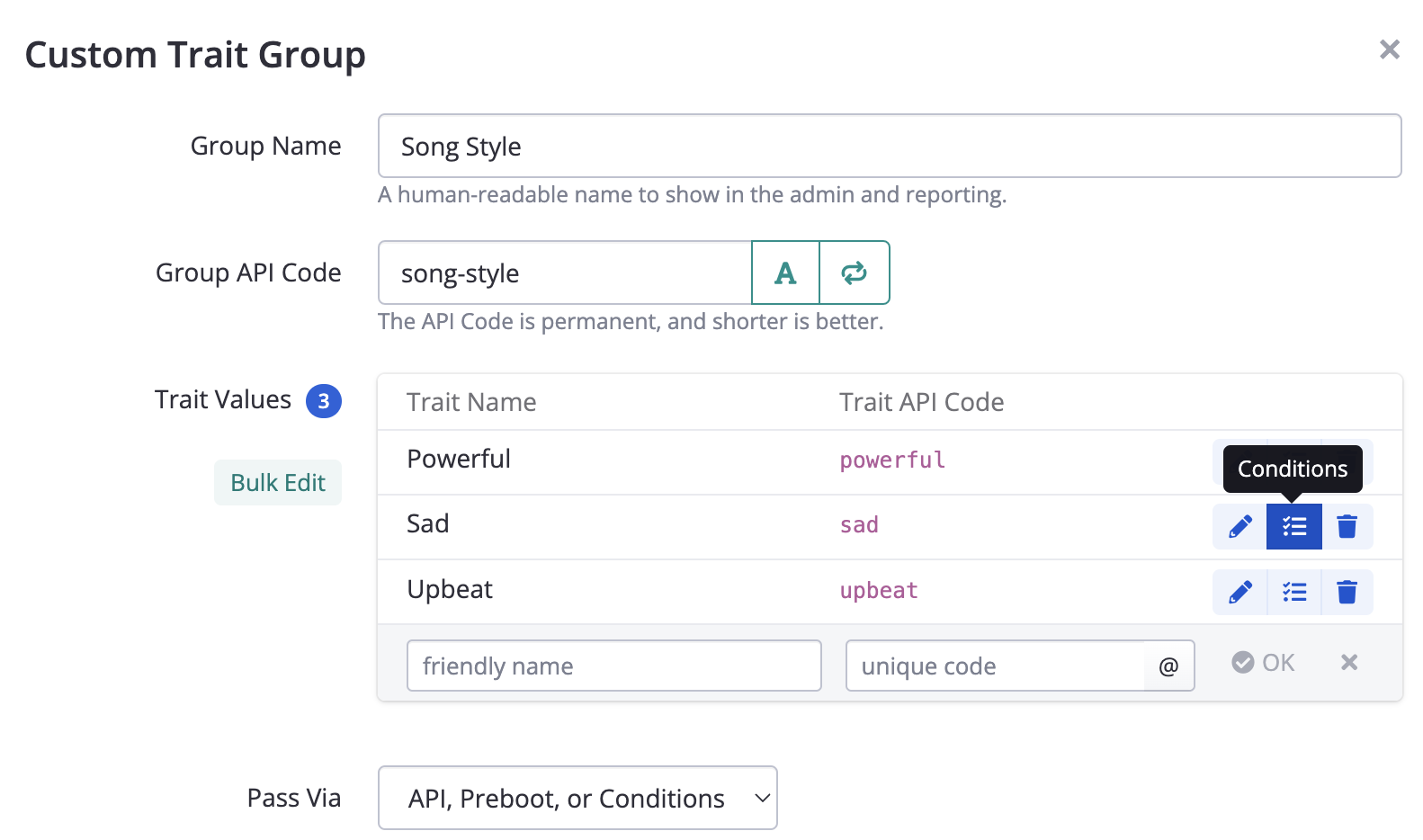
For each of the values (such as Sad in this case), you can click the Conditions button to provide custom conditions. If the conditions are actually met at runtime, the trait will be considered set to that trait value.
For instance, you might click Conditions for the "Sad" trait, and provide a custom condition like the following:
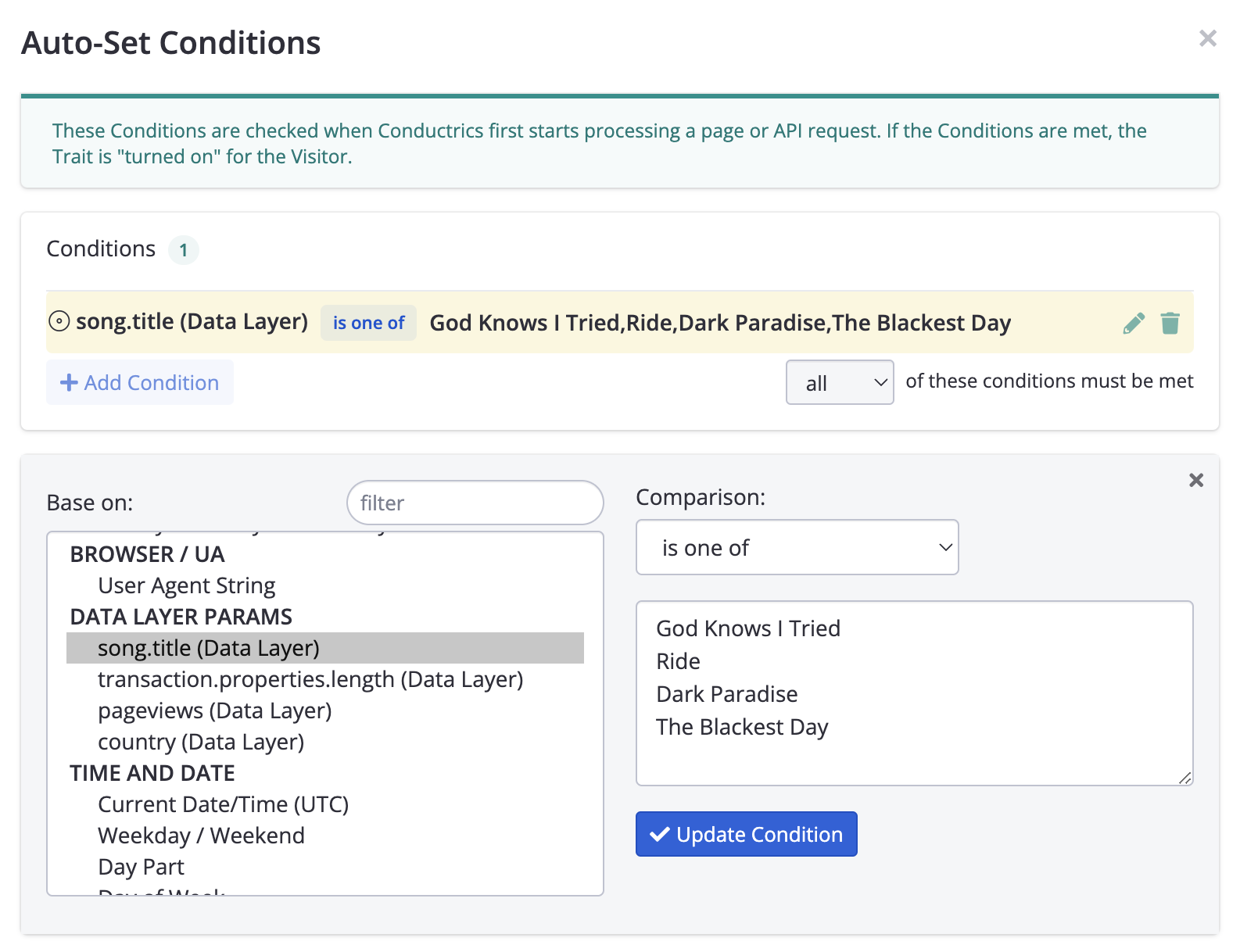
In this fictitious example. you'd probably repeat the process for the other Song Styles such as "Upbeat", etc. If needed, you could add additional conditions based on user agent, country, URL params, or whatever is needed. You can use and/or groupings, regular expressions, numeric comparisons and so on as well.
Passing Custom Visitor Traits via the JavaScript Preboot
If you are using Conductrics Express or the Local JavaScript API, you can "pass" your Custom Visitor Traits by adding a bit of JavaScript code (typically a line or two) in the "JavaScript Preboot" field in the Conductrics admin. The code you provide can do whatever is needed to "grab" or "look up" the traits that should apply to the current visitor.
To get started:
- In the Conductrics Admin, go to Settings > Distribution, then click Edit for the Default Deploy Target.
- Under Express, take a look at the JavaScript Preboot field.
- Assuming there is nothing in the JavaScript Preboot field already, click *Start with example code. This just fills in a couple of lines of "sample code" to make it easier to get started. Here's what it looks like after you click to add the example code:
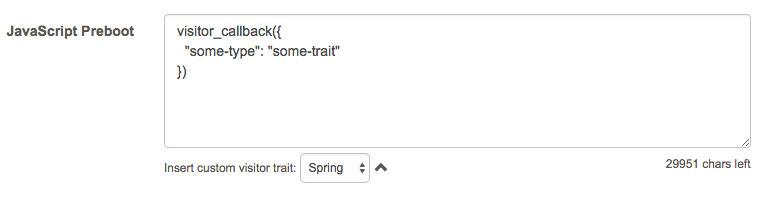
Now it's up to you to edit the preboot field as appropriate to pass Conductrics the visitor traits that actually apply to each visitor.
- At runtime (that is, when your pages are actually viewed), the code you provide here will be run in the visitor's browser.
- The
visitor_callbackwill be provided to the preboot. It's a function that accepts one parameter, which is an object that contains the custom visitor traits that apply to the current visitor. - If you need to do some kind of external lookup to get the custom traits, you are free to do so using normal JavaScript. Just call the callback when you've gotten the data from your external sources.
Tip: Use the "Insert custom trait" dropdownYou specify your custom traits by their API code, which are case-sensitive. The Insert custom trait dropdown makes it easier to get the API codes exactly right.
For instance, let's consider a simple example. Let's say the answer to the question "Is the current visitor logged in" is answerable by simply calling sessionStorage.getItem('logged_in').
In this fictitious example, the idea is that if the user is logged in, there will be a value of "true" in sessionStorage. If there is no value, or if it's set to "false", the visitor is not logged in. Of course, you will need to substitute your own logic for this part.
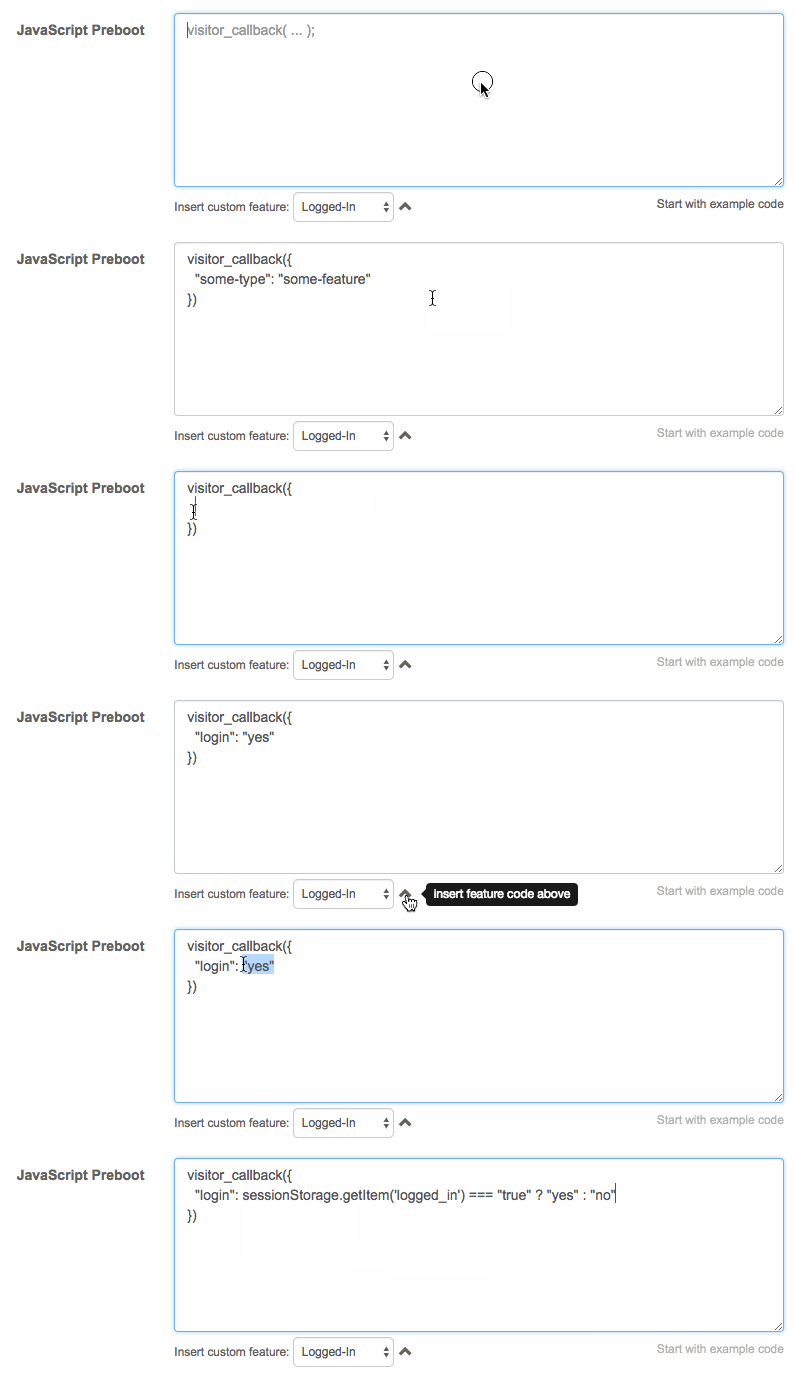
So, to implement, you would do something like this:
- Remove the
"some-type":"some-trait"line from the example code. - Select Logged-In from the "Insert custom trait" dropdown, then click the little arrow to insert it into your code.
- Adjust the code so that it looks at the value returned by
sessionStorage.getItem(), something like this:
visitor_callback({
  "login": sessionStorage.getItem('logged_in') === "true" ? "yes" : "no"
})
So, if the visitor is logged in, this ends up sending {"login": "yes"} to the callback. If not, it sends {"login": "no"} to the callback. That's just what we needed here. We're done!
A Note About the JavaScriptThe "preboot" field must contain valid JavaScript. It will be validated for you as you type. Please contact Conductrics if you need help with this step. We are more than happy to send you custom code for your situation if you explain what you are trying to achieve.
Asynchronous Lookups
Your actual scenario may be more nuanced, in that you may need to call some external API to get the information you need. Let's say you need to call a function called isLoggedIn(), provided by some other part of your page/system, and that function returns its answer asynchronously.
Your "preboot" code will still be pretty simple. Just wait until you get the answer from the function, and then call visitor_callback.
For instance, you might end up with something like the following:
getLoginStatus(function(login_status) {
	visitor_callback({
	  "login": login_status ? "yes" : "no"
	});
});
Keep it Quick!The preboot code will run (in the visitor's browser) on every page that you include Conductrics on, whether or not there are any active agents currently on that page. So, don't use the preboot to do anything that will take a lot of time.
Your Code Must Eventually Call the Callback!Your code must call the
visitor_callbackfunction, even if it encounters an error or has no custom traits to provide. Conductrics is conceptually "waiting" for you to call the function. If you don't call it, further Conductrics processing will never begin.
Using the Preboot to Halt ProcessingYou can also use the Preboot as a way to check whether Conductrics should "run" at all for a given visitor. For instance, you could check for the presence of a cookie which indicates whether Conductrics should be allowed to run (perhaps certain people have opted out per GDPR or similar policies), and simply decline to call the
visitor_callbackfunction for any visitors that should be completely excluded.This will cause Conductrics to "halt early", before anything has been looked up or recorded, and before any changes have been applied to your pages. Such a policy would take precedence over any and all include/exclude rules in your agents. Feel free to discuss with Conductrics if you have any questions.
Your Preboot code also runs on "view-state" changesIf you are using our support for Single Page Apps, please note that your preboot code will re-run each time the view-state changes. If you're not using the SPA support, your preboot code runs only during the initial page load.
Passing Custom Visitor Traits via Runtime API
If you're using our Runtime API to get variation selections from your agents, you can "pass" the relevant visitor traits when getting the selections.
- If you're using our Local JavaScript API in the browser, pass the traits as an array called
traitsin the options object you provide to theConductrics.ClientApiconstructor. See theLocal JS API page for an example. See also the Runtime API Reference page. - If you're using our REST-style API, can also pass the traits as an array called
traitsalongside yourcommandsin the body of your POST request. See theREST-Style API page for an example. See also the Runtime API Reference page. - If you're using our support for native mobile apps, please see the pages for iOS Native, Android Native, and React Native.
When using Conductrics in the browser (via Express or the Local JS API), it's often easiest to use one of the other methods of passing traits discussed above. Feel free to contact Conductrics if you have questions about which way to go.
Accessing Visitor Traits in your JS Code for Express Variations
If you're using Conductrics Express and providing your own JavaScript code for a variation, you can access the values of your visitor traits within your code. This might be helpful if the variation needs to be customized/personalized per trait in some way.
- At the Trait Group level (under Settings > Visitor Data), make sure the Traits in this group may be passed to Express scripts option is checked.
- Check the Pass custom visitor traits to script option, available when providing your custom JavaScript code at the Variation level.
- Within your JavaScript code, use the
cdx.trait()function to access the value of a custom trait. This function accepts the API code of a trait group, and returns the trait value (if any) for the current visitor. If there is no such trait, the function returns an empty string.
Just as an example, if you have a trait group for "membership tier" with API code tier and trait value codes gold, silver, platinum, then cdx.trait('tier') might return gold if the visitor is known to be in the "gold" membership tier, etc.
Updated over 1 year ago