
Using List Agents
List Agents are for special cases where you want to show several variations from a longer list of possible variations, with the "best" variations tending to show up first.
One scenario where you might use list agents would be to implement a "featured products" or "top offers" type feature for your app or or site. You might have 20 possible offers, or 50 possible products, or something of that nature. You might want to display the top 5 offers or products, etc, and have the Conductrics agent keep track of success rates, keeping the better-performing items closer to the top of the list overall.
List Agents are API onlyYou can access list agents using either the Local JS or Web Service forms of the API, but they are not available for setup with the visual authoring ("Express") part of Conductrics.
Creating a List Agent
The first step is to create a list agent:
- Hit Create at the top of any page in the Conductrics Admin.
- When you get to Step 2, add as many variations as appropriate.
- On Step 3, choose Developer APIs (as opposed to Conductrics Express) since this agent will be used via our APIs.
- Check the Create as List Agent option as shown below, then finish creating the agent normally.
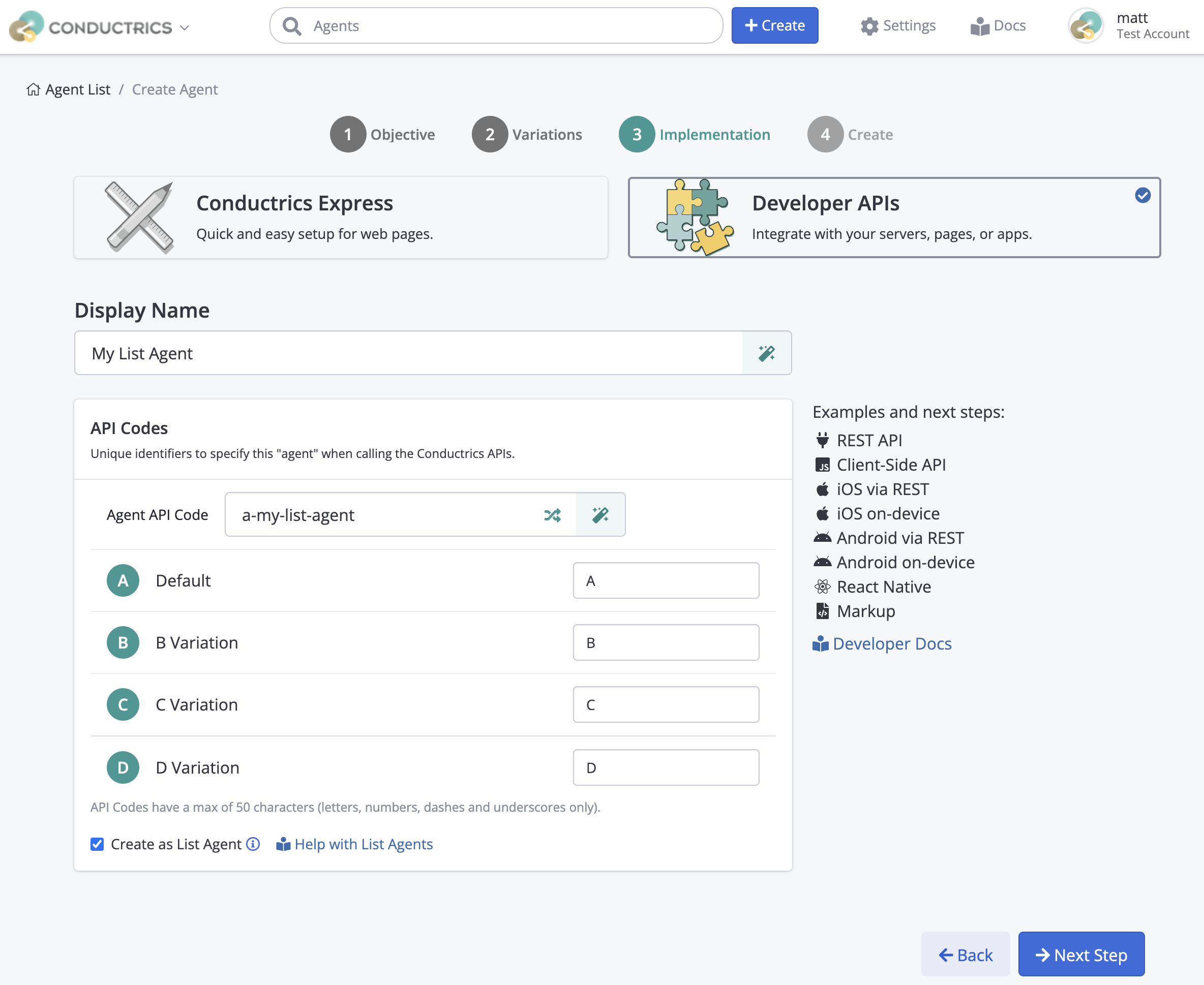
The Create As List Agent option only appears for API Agents, and only if there are more than two variations.
A maximum number of 128 variations are allowed by default. Contact Conductrics to discuss a higher number if your needs require.
Using the List Agent
Once your List Agent has been created, you can use it via the Local JavaScript API or Web Service API, much as you would use a "normal" Conductrics agent. See the Runtime API Overview for a general discussion about interacting with agents via these APIs.
The only real difference is that instead of asking the agent to select a single variation, you'll be asking it to select multiple variations:
- In your selection "commands", specify the number of variations to be selected as a parameter called
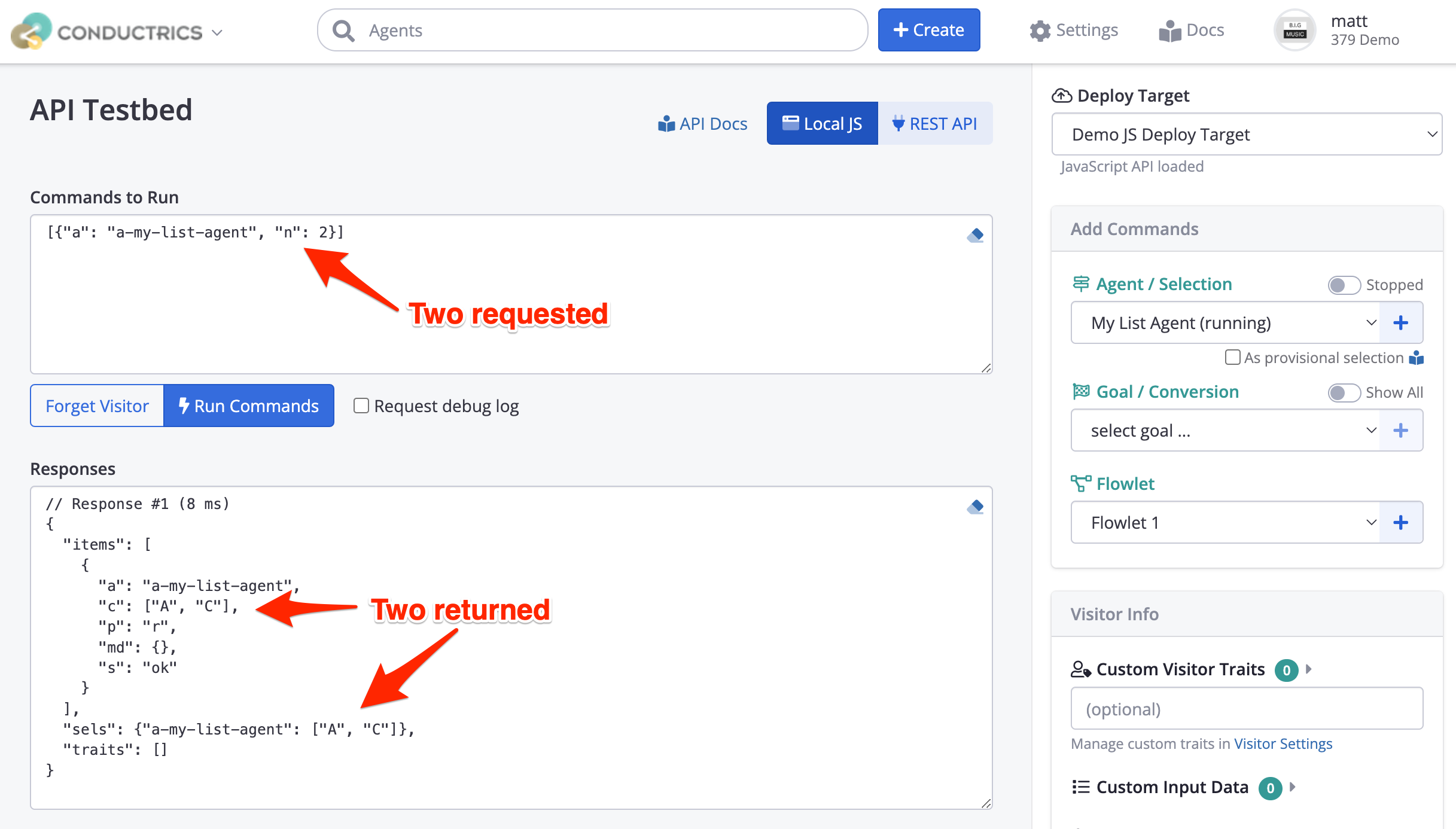
n. So, rather than{"a": "a-123456789"}, your command might look like{"a": "a-123456789", "n":5}if you wanted 5 variations to be selected. - Whereas a normal agent would respond with a single variation code, a list agent will respond with an array that contains however many variations you asked for in
n.
As an example, here's how a selection looks in The API Testbed.
Now What?
Once the agent has selected some variations, it's up to you to display or otherwise present them to your visitors. It is assumed that you are going to present them in the order returned by the API.
Number of variationsThe number of variations you request in
nis expected to be at least 1 for normal operation.
nis silently capped at the number of variations defined in the agent. For instance, if the agent has ten variations and you pass in11forn, the agent will use10internally.- If
nis zero (or a negative number), the agent will return an empty array of choices incto indicate that nothing was selected. Thepfield will be set top(same as the "stopped Selection Policy) as an indication that the selection won't be reflected in reporting, etc.
Meta-Data with List AgentsIf you are using Variation Meta-Data, the
mdobject will contain a "nested" object for each selected variation. For instance, let's say the agent selects variationsBandD. In that case, you might get something like:"md": { "B": {"ctaColor": "blue"}, "D": {"ctaColor": "green"} }
Allowlist / Blocklist Variations at Runtime
Sometimes you might have a situation where you need to keep your list agent from selecting certain variations, and you might not know which variations are okay to select until runtime. For instance, in an e-commerce scenario, perhaps only certain items may be in stock at a given time.
In such a case, you can indicate which variations may be selected via a "allowlist" or "blocklist":
-
To "alllowlist" variations, provide a
carray in your selection command. -
To "blocklist" items, provide an
xarray in your selection command.
For instance, consider these two ways to deal with a scenario where variation "B" should be excluded when the selection is actually made:
-
Allowlist style - To get 3 selections from a set of 5 specific variations, you might use something like:
{"a": "a-123456789", "n":3, "c": ["A","C","D","E","F"]} -
Blocklist style - To get 5 variations, where
Bis NOT allowed, you might use something like:
{"a": "a-123456789", "n":5, "x": ["B"]}
Whether you use the allowlist or blacklist style is up to you. It will depend on the use case, and which set of variation codes is at hand to provide on your side.
Blocklist takes precedenceIf you provide both a
c"allowlist" and ax"blacklist", the blacklist will take precedence. In other words, the agent will select from the set of variations that appear in the allowlist AND do NOT appear in the blocklist.
Updated over 1 year ago