
V2 / V3 API Compatibility
If you are already using the "legacy" V2 Runtime API provided by previous versions of Conductrics to make decisions and send rewards to your agents, you can continue to use that API with some caveats.
The idea is to make it easier for you to transition to the V3 system. We hope you prefer it enough to eventually convert "your side" over to the V3 API, which has been designed to be faster, simpler, more flexible, and to grow with you better.
What's Supported?
Here's a quick summary of what's supported and what's not.
Supported:
- Getting decisions from agents
- Sending goals to agents
Not supported:
- Auto-creation of agents, goals, or features (they must exist already; see note below)
- List agents
- Explicit "expire" calls
- Custom @-style input parameters
No more auto-creationThe V1/V2 system used to create agents, goals, and features "on the fly" for you. If you made a
decisioncall to an agent that didn't exist yet, the agent would be "auto-created" and added to your account automatically. The same went for choices - a new choice could be added to an agent on the fly the first time it was used via the API. The same went for other items like decision codes, choice codes, segment codes, and point codes.While handy as a developer convenience for getting started quickly, we found that in nearly all cases, the auto-creation behaviors caused more harm than good at the end of the day, and so the "auto-creating" behavior is not supported in the V3 system. Please talk to us if this is a major blocker for you.
Getting started
You'll be hitting different servers, so make a note of a few things:
- Use
api-v3.conductrics.cominstead ofapi.conductrics.com(unless you have been given a different URL because you're using a special Conductrics environment, see note below). - You probably have a different account code in the new system. It will start with
acc-, whereas your old account code probably started withowner_. - You probably have a different API key in the new system, see note below.
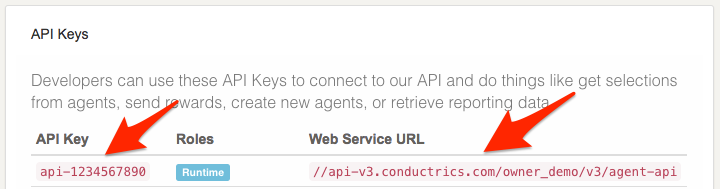
Verifying Your API Key and Web Service URL / Endpoint
You can check your API Key and the correct URL to use as the endpoint for your API calls in our admin, under Developers > API Info & Keys, like so:
Decision Calls
You can make basic decision calls, using your account and agent codes, like so:
https://api-v3.conductrics.com/acc-xyzzy/a-123456/decision
You can specify the choices that the agent may select from, like so:
https://api-v3.conductrics.com/acc-xyzzy/a-123456/decision/blue,red
You can also make decisions calls, which return a bit more information as noted under multiple decisions:
https://api-v3.conductrics.com/acc-xyzzy/a-123456/decisions
Multivariate (MVT) decisionsIf you have Multivariate (MVT) Agents in the V3 system, you can access them using the older V2-style API if needed as a way to ease your transition. Let's say you've created an MVT agent with two member agents that have
a-coloranda-sizeas their individual API codes. Just make adecisionscall using the "parent" MVT agent's API code. You will get back a V2-style "decisions" object, with a "decision" for each member agent, so you can access the individual selections asresponse.decisions['a-color'].codeandresponse.decisions['a-color'].size, respectively.
Provisional SelectionsIf you would like to use Using Provisional Selections when making decision calls via V2 API, you can do so by adding a
statusparameter to the query string, for example&status=pto get a "provisional" decision/selection. Then, to confirm the selection, make the same decision call again with&status=okin the query string. You can also use a HTTP header calledx-mpath-statuswithporokas the header value.
Goal Calls
You can make basic 'goal` calls, using your account and goal codes, like so:
https://api-v3.conductrics.com/acc-xyzzy/a-123456/goal
You can add an optional reward parameter, if your goal accepts numeric rewards:
https://api-v3.conductrics.com/acc-xyzzy/a-123456/goal?reward=19.99
You can specify a particular goal code:
https://api-v3.conductrics.com/acc-xyzzy/a-123456/goal/checkout?reward=19.99
Goal AssociationsIn the V3 system, goals are conceptually separate from agents. Goals must be associated with agents before the agents will accept them. You can make this association in the agent's main page in the admin.
- If you send a
goalcall for an agent that isn't associated with a goal, the goal will not be accepted. No harm will be done, but you will receive a status code of 202 as an indication that it was not accepted.- If you send a
goalcall, and the goal in question is associated with multiple agents, the goal will be sent to all of the associated agents. This may allow you to cut down on the number ofgoalcalls that you send.
Other Parameters
Required parameters:
apikey- your Conductrics API key (required for all calls discussed on this page)
Optional parameters:
ip- can be used to provide the visitor's ip address (optional)ua- can be used to provide the visitor's user agent string (optional)features- can be used to provide a comma-separated list of feature codes (optional)session- can be used to provide a session identifier (optional). If not provided, a session identifier will be generated randomly and returned as thesessionpart of the response structure. Our server will also attempt to set a cookie that retains the auto-generated session identifier, so that the same session id is used for subsequent requests if the API is being called from a browser.
Silently-ignored parameters:
segment- this parameter has no real meaning in the V3 system, but if provided to adecisionscall, we send the same value back in case it is depended on.point- similarly, this parameter has no meaning in the V3 system, but if provided to adecisionscall, we send the same value back in case it is depended on.
About the automatic "mpid" cookieAs noted above, the V2-compatible calls may attempt to set a cookie whenever you don't provide a
sessionparameter explicitly. We do this by adding an ordinary Set-Cookie header to the API call response.If you are using our API server-side, the Set-Cookie header is expected to be ignored on your side. If you need to explicitly turn off the cookie-setting behavior, please go to Settings > Company > Advanced in our admin and add an
"v2:cook-enabled": falseentry.If you are using our API client-side, the browser should retain the session identifier as a client-side cookie, and send back the same identifier in subsequent requests. This means you can omit the
sessionparameter from API calls if you wish.
- The cookie is called
mpid, and is set to persist in the browser for one year.- The cookie's path is set to be shared by all agents in your account.
- By definition it is a "third-party" cookie, and some browsers have options to"block" third-party cookies from being sent back to the server (us).
- Notably, Safari on iPhone/iPad and the Mac now block third-party cookies by default.
- As a workaround, you may be able to create a DNS CNAME record within your domain that creates a "subdomain" (such as
agents.your-company.comorconductrics.your-company.com) which points to the Conductrics server you are using (api-v3.conductrics.comor similar).- Then go to Settings > Company > Advanced in our admin and add a
v2:cook-domentry that specifies your top-level domain, preceded with a dot (such as.your-company.com).- Alternatively, you can avoid the third-party issue by setting your own (and thus "first-party") cookie using JavaScript and supply the value as the
sessionparameter to your calls to Conductrics.- Please feel free to contact Conductrics for help with the above.
Updated over 1 year ago