
Triggering View-States
Activating your Express agents after the initial page load
When you're working with normal web pages, any Express agents that apply to a page make their changes when that page first loads.
You may have some pages that change considerably in response to things that your visitors do, without reloading the page. Some examples include:
- Viewing a pull-down version of a shopping cart
- Viewing product details or fancy charts in some kind of overlay
- Being able to log in to reveal extra features for registered users
...and anything similar, where the page is responding to things the visitor does without reloading the page, typically fetching additional data via AJAX and powered by a JavaScript framework such as Angular, React, Next, Vue, or the like.
For our purposes here, let's call any such page a single page app, or SPA for short.
There are three basic steps for working with SPA-style pages with Conductrics Express:
-
Set up your Express agent normally.
-
Define a View State that you want your agent to react to (or re-use an existing View State if one already exists).
-
Specify that your agent should apply only to the relevant view states.
Coding Usually Not RequiredIn most cases you can set up the View States in the Conductrics admin without any coding. In some special cases, however, you may need to notify Conductrics programmatically when a view-state is reached; if so, you may need a developer's help. See "Notifying Conductrics of View-States Programmatically" later on this page.
Defining Your View States
If you want to use Conductrics Express agents on your SPA-style pages, you will likely need Conductrics to wait until your visitor does something or other before applying the agent's visual changes to the page. Conceptually, you want Conductrics to wait until the visitor encounters the relevant "view state" of the page.
The first thing to do is to define the view states that Conductrics should know about. In the Conductrics admin, go to Settings > View States, then hit New View State and give your new View State a name.
You can also create the View State while working on an Express agent. Just open the View-State "sidebar" (shown in the next section) and hit the New View State button there.
For instance, if you want to make changes to a shopping cart "overlay" of some kind, you might use View Cart as the name:
Creating a new View State
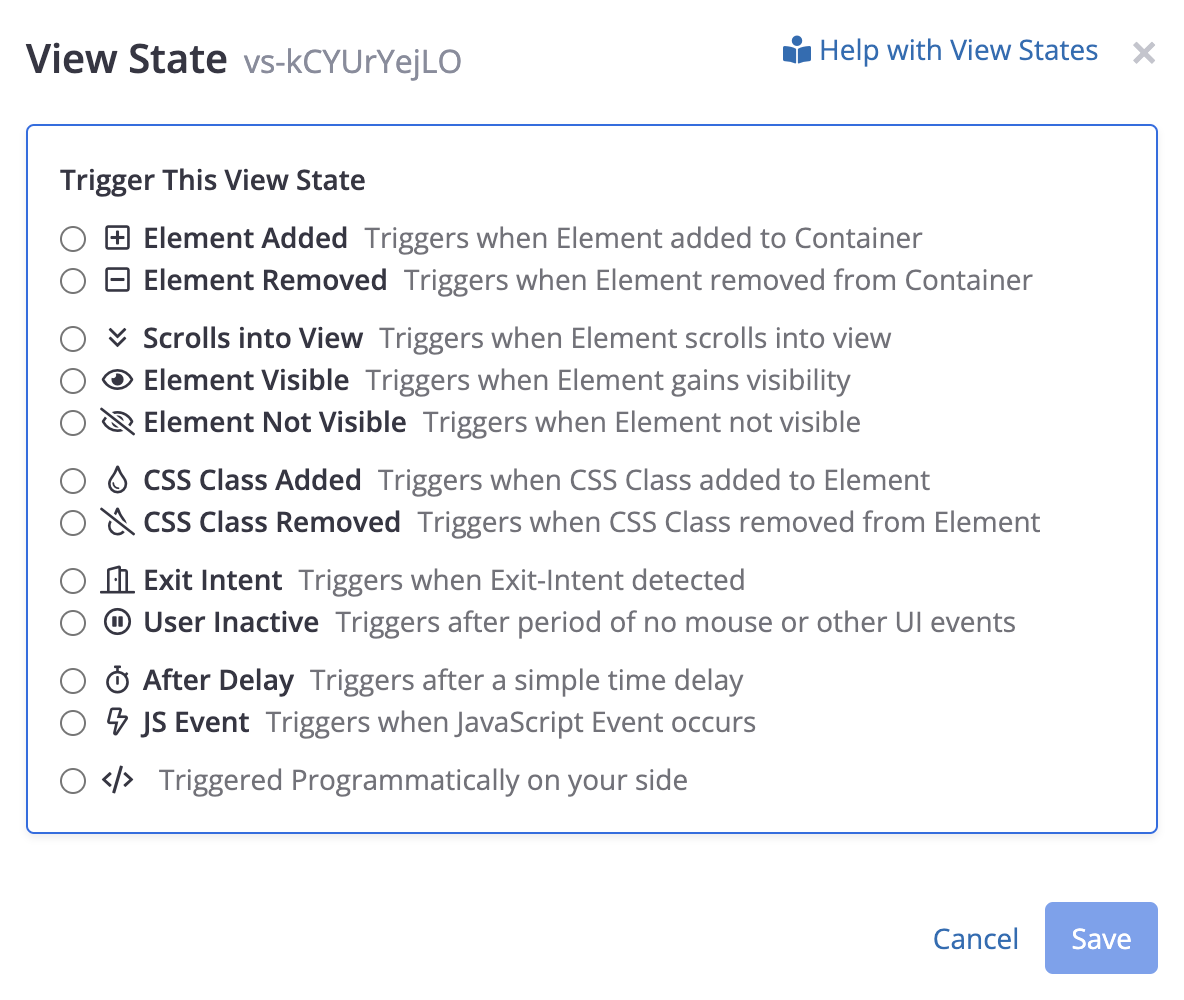
Next, choose how you want the View-State to be "triggered". In other words, how should Conductrics tell that the user has "arrived" conceptually at the view-state?
- You can choose one of the built-in triggers, such as "When Element added to Container" or "When element scrolls into view". See the Using Built-In View-State Triggers section below.
- Or you can choose "Programmatically", where you notify Conductrics (in your own JavaScript code) when the View-State should be triggered. See the Notifying Conductrics of View-States Programmatically section below.
Activating an Express Agent at a View State
Now, when setting up an Express Agent, you can specify that the agent should only select a variation and apply its changes when your visitors reach your new View-State:
- Go to the agent's main page in the admin.
- Click on When the page loads at top right.
- Choose your View State, then click Select and save your changes.
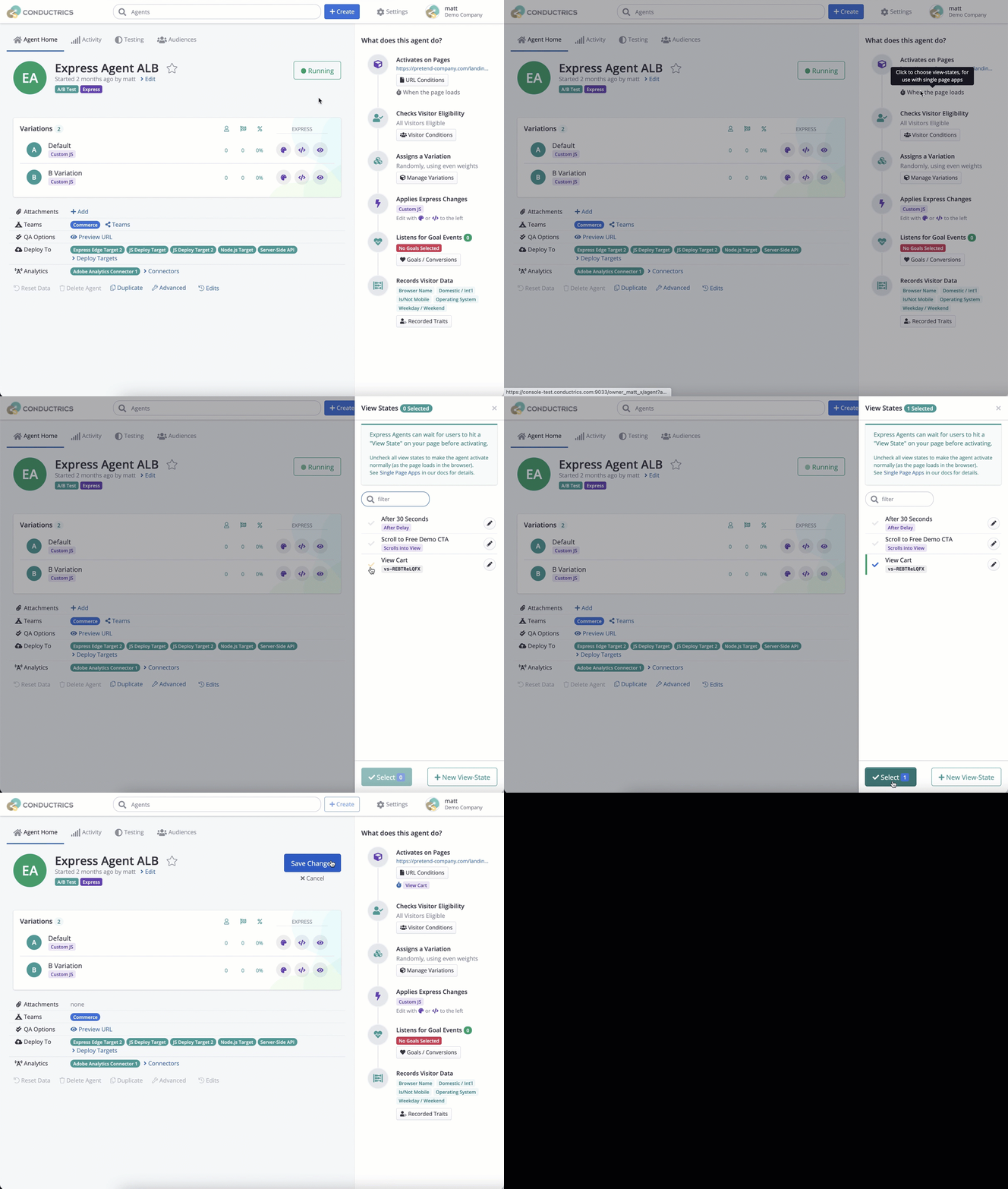
Associating a view-state with an agent
Now, when the visitor gets to the page, the agent will wait until the view-state is reached. If and when the visitor actually does whatever it is that causes the view-state to start or appear, the agent should be activated, select a variation, and apply the corresponding visual or other page changes you already set up for the selected variation.
Want to go back to normal behavior?If you want the agent to make its changes when the page first loads, just repeat the above steps, unchecking any selected view states. That will cause the agent to work its normal mode, meaning that it makes its changes right away rather than waiting for a given view state to be reached.
Using the Built-In View-State Triggers
In many situations, you can tell Conductrics to "trigger" the view-state (and thus any agents that should activate in response) via one of the built-in Triggers available in the admin.
Currently, Conductrics includes these built-in triggers:
- When Element added to Container - Helpful for something like a shopping cart overlay, or similar interaction such as a login or registration "modal" which isn't present on the page initially, but gets added in response to the user clicking on something. There's also "When Element removed from Container" which is the conceptual opposite.
- When Element scrolls into view - Helpful if you have a Conductrics agent which is meant to change some portion of the page that is "below the fold". Rather than entering the visitor into the test right away, you can wait until the user scrolls down to where the area in question would be visible.
- When element gains visibility - Helpful if you have an area of the page which is already part of the DOM when the page first loads, but which is hidden initially (perhaps via
visibility:hiddenordisplay:none). There's also "When Element not visible" which is the conceptual opposite. - After a time delay - Useful in scenarios where you want Conductrics to do or show something after a certain amount of time, such as present a third-party survey after the visitor has been on the page for 30 seconds.
Need something different?If none of the built-in triggers will work for your use-case, you can still have your page trigger the view-state "programmatically" via a line or two of JavaScript, as discussed in the section below. Feel free to reach out to Conductrics for help as well.
For instance, in the case of a shopping cart "overlay", you might be able to use the "When Element added to Container" trigger, something like the following. In this example scenario, the assumption is that the shopping cart overlay gets added to the page dynamically when the user clicks a cart icon or similar. Let's say that the overlay can be identified by CSS class name .cart, and will be added (when the user clicks) within a containing element with ID cart-container (which is already on the page):
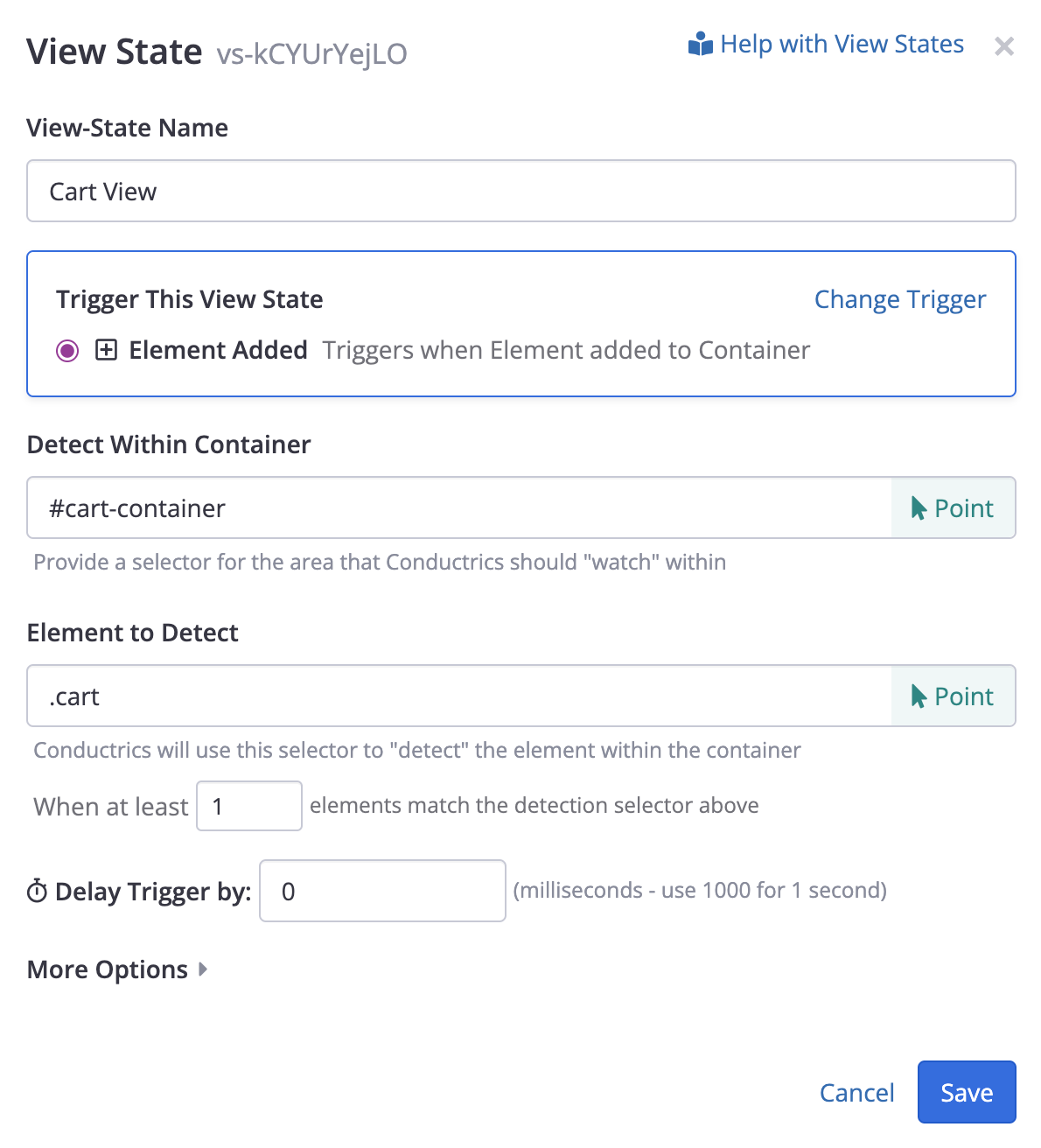
Setting up a view-state to be triggered automatically when a shopping cart overlay gets added to the page
About that "Container" SelectorSome of the built-in triggers ask for a selector for the element's "Container". Behind the scenes, Conductrics will add a MutationObserver to the container, watching for the addition of the element you want to detect. This means that the container must exist already when Conductrics first executes (during the initial page load). Generally speaking, it's best to use a container that is as "nearby" as possible (that is, a relatively close ancestor to wherever the element you want to detect will appear in the DOM) so that there is less "surface area" for Conductrics to "watch". That said, you can try using the selector
bodyfor the container if there is nothing more appropriate to use.
Notifying Conductrics of View-States Programmatically
If you can't or don't want to use one of the built-in triggers, you can notify Conductrics "programmatically" when the view state changes.
You may need a developer's help for this stepIf you're not a developer, you may want to talk to one about this step. That said, in many cases, it's possible that this is something that will only need to be done once, to get Conductrics conceptually wired up to listen for view-state changes in your page. It may only be a couple of lines of code to get things sorted once for your present and future needs.
Or use a Data LayerYou can also notify Conductrics about your view-state changes via a data layer. You may already have a data layer in place if you use Google Tag Manager (GTM) or similar tools. See the Passing a View State to Conductrics section in our Data Layer Support page.
When defining the View State, choose "Programmatically" and make a note of the unique code (ID) provided. You can also make up your own identifier if you prefer. An example snippet is also provided, which you can adapt for use in your own JavaScript:
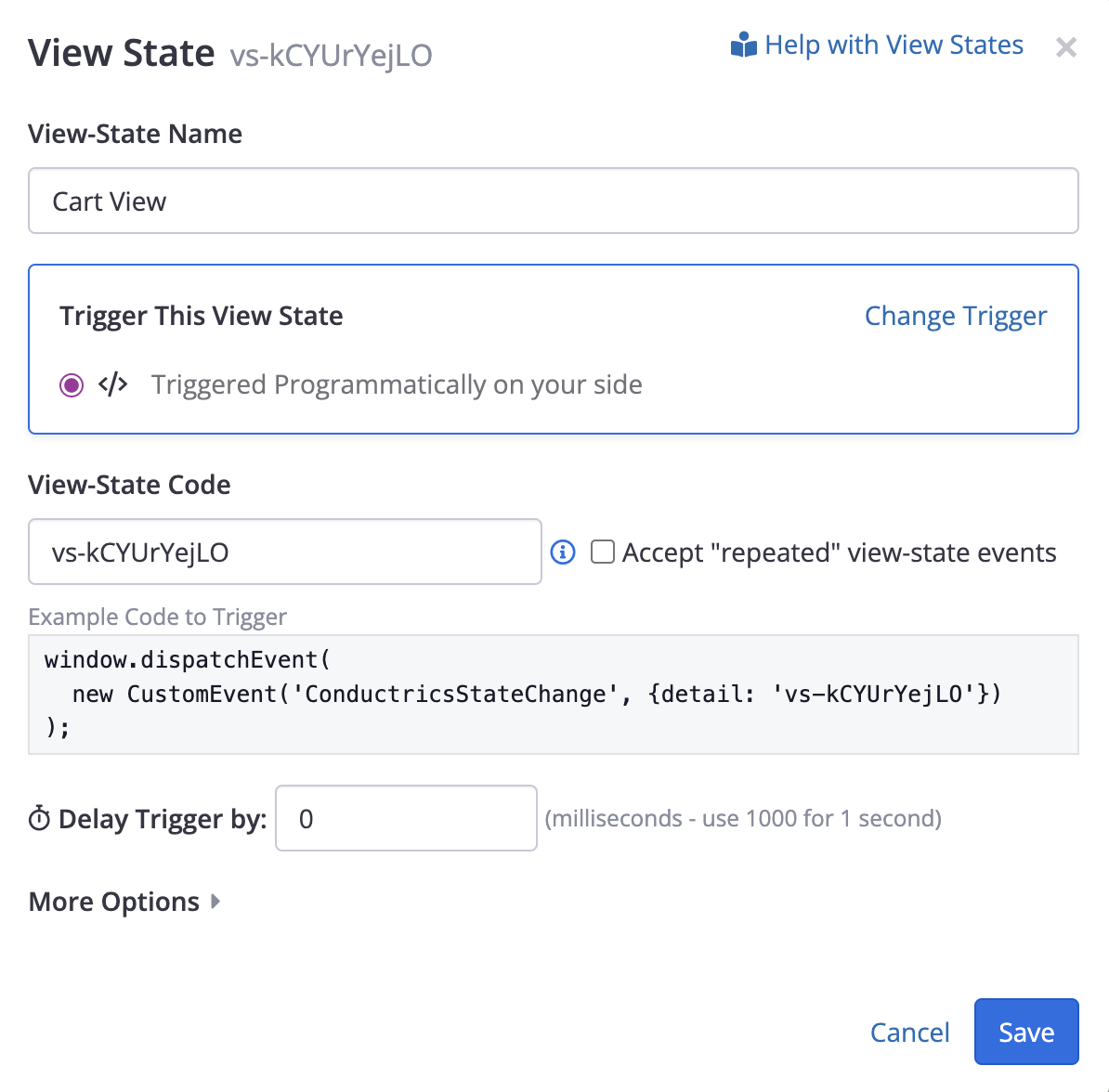
Obtaining the unique identifier and example code to trigger a view-state
You can make up your own unique code for the view-state if you want it to be more human-readable. The maximum length of any view-state code is 200. Spaces are allowed, but newlines, tabs, and other other whitespace characters are not.
To notify Conductrics about view-state changes, just have your page trigger a DOM event called ConductricsStateChange, providing the view-state code that the visitor just reached. The code should be one of the ones that you've registered in Conductrics at the account level (see above on this page).
The event can be sent like so, using vanilla JavaScript to fire a CustomEvent:
window.dispatchEvent(
  new CustomEvent('ConductricsStateChange', {detail: 'view-cart'})
);
Of course, where you see view-cart above, you will use whatever view-state names/codes are appropriate for your page or app, and it's up to you to determine when to send these events (in response to clicks, or after some other internal event occurs within the framework that your pages are built with, etc).
If it's not convenient to put the event-triggering code in your page right now, you can add it to the JavaScript Preboot in our admin. Go to Settings > Distribution, hit Edit for your Deploy Target, and take a look at the JavaScript Preboot field (under Express). Whatever code you provide there will be included in the JavaScript that Conductrics assembles for your Express agents (the preboot code is included for all pages). There's more about the Preboot field in the Passing Custom Visitor Traits section of these docs.
Suppression of duplicate view-state changesNormally, if you notify Conductrics about a view-state change, it will be ignored if that's the view-state that the visitor is already in. So, if your code sends view-state
checkout, and then sendscheckoutagain without some other view-state in between, the second notification is ignored (treated as a no op).In some cases, you may have a situation where you need agents to re-evaluate when you send a view-state notification, even if it's the same view-state code that the visitor is already at. Use the Accept repeated view-state events option at the View-State level in such a scenario (see above screenshot).
Re-Executing Your JS "Preboot" when the View State Changes
If you have provided a JavaScript "Preboot" for your Deploy Target, perhaps to "pass" some Custom Visitor Traits to your Conductrics Agents on the page, you may want your Preboot logic to fire again when the visitor hits a view-state.
For instance, perhaps you have a view-state that "detects" when a user has recently logged in (without necessarily re-loading the page). Now that the visitor is logged in, there might be some additional visitor information available (such as a membership tier) which you'd like Conductrics to know about (for instance maybe you want to run an A/B test that excludes Silver Tier members). If those traits are passed to Conductrics via some Preboot code, you probably want that code to re-execute.
In such a situation, check the **Re-execute Preboot when this View State is Triggered" option. Just keep in mind that your Preboot logic could thus run multiple times per page lifetime, so it shouldn't do anything very "expensive" or long-running. Feel free to contact Conductrics if you have questions.
Firing Goals Based on View State Changes
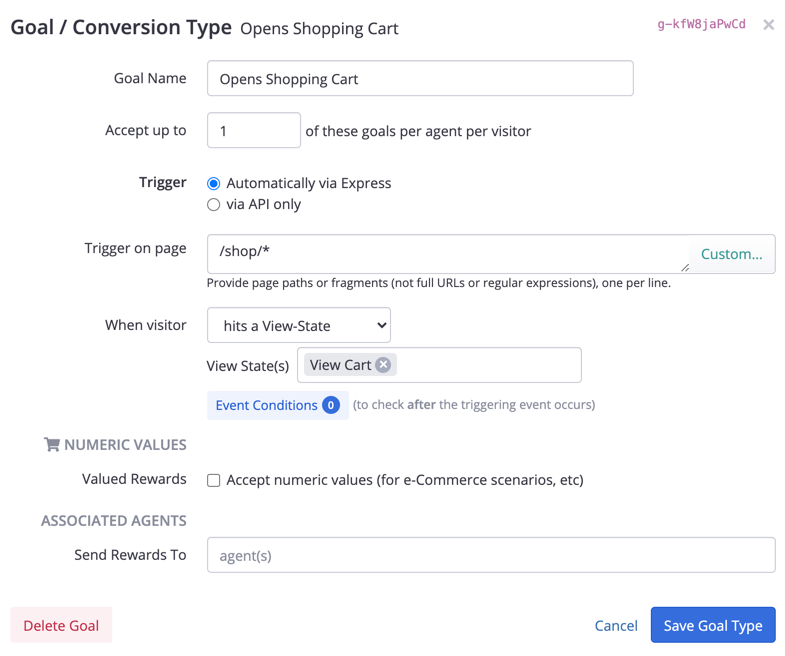
You can also trigger a Goal / Conversion event when a View-State is entered. This can be helpful in situations where a simpler way of firing Goals (such as a basic click event) isn't sufficient for some reason.
Set up the View State first as discussed above. Then, when setting up a Goal Type, just choose When visitor > hits a View-State as shown below:
Caveats and Limitations
At this time, there are some important limitations to understand:
- If the visitor hits a view state that activates an agent, then leaves that view state, your Express agent does not currently undo the changes that it may have made to the DOM (the page's visual display). In many cases this will not be a problem, because the page will have changed in such a way that the agent's changes are no longer visible anyway.
- The built-in triggers for "scrolls into view", "gains visibility", and "not visible" rely internally on the IntersectionObserver API, which is not implemented in any version of Internet Explorer. Visitors using IE will never trigger the view state, so will be effectively excluded from any agent/test that fires at the view state. There is a "No IE" marker in the admin for these items. Microsoft Edge should work fine.
Updated over 1 year ago