
The API Testbed
The Conductrics admin includes a simple "testbed" page where you can assemble the "commands" to get selections from your agents or send rewards back to them.
The commands can then be passed into the API via either the Local JavaScript or Web Service. You can also try the commands out in the testbed for general experimentation with the Conductrics Runtime API.
If you're not familiar with the API, we'd recommend checking out the Runtime API Overview first.
Using the Testbed
To use the testbed:
- Get to the Testbed page via the API section of the admin, pictured below.
- At first, the "Commands to Run" portion at top left will be empty. Add commands by:
- choosing an agent from the Selection Command dropdown, or
- choosing a goal from the Goal Command dropdown.
- Now you can send the commands into the API via the Run Commands button.
- The response from the API will be shown at bottom left. See the Runtime API Reference for an explanation of the
itemsandselsfields shown here.
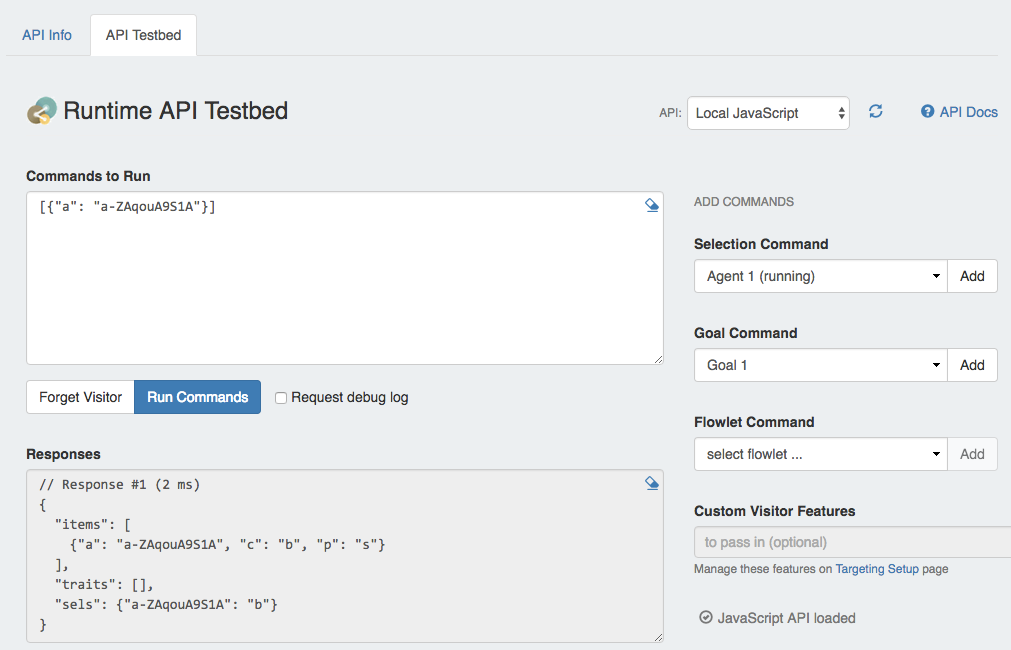
The API Testbed can make it easy to experiment with the API, or assemble commands for agent selections/goals, ready to paste into your own code.
Local JavaScript vs Web Service Execution
You can switch between the Local JS and HTTP Web Service flavors of the API via the dropdown at top right. See the Runtime API Overview for an explanation of the two flavors.
- If you're using the Local JavaScript mode, you can use the "Forget Visitor" button to tell the API to discard its local memory of the current visitor (that is, you). This will cause fresh agent selections next time you run an agent selection command, etc.
- If you switch to the HTTP Web Service mode, you'll need to provide a session identifier in the testbed UI, and the "Forget Visitor" button is disabled.
Other Testbed functionality
- You can clear the commands or responses using the little eraser icons.
- If you are Using Custom Flowets, you can assemble a flowlet command using the corresponding dropdown at right.
- If you have defined any Custom Visitor Features, you can pass them into the API using the UI field at bottom right.
Updated over 1 year ago