
Sending Goals via REST API for Express/JS Agents
For special cases where conversions can't be tracked via our client-side script
This is Conductrics feature #976, available in Conductrics 3.7.14 and later. Please reach out to Conductrics if you don't yet have the options available in your account.
See also Sending REST API Goals via Express, which covers sending Goal/Conversion Events in the other direction.
Example Scenario
Generally speaking, most experiments conducted "client-side" (via Conductrics Express or the Local JS API) can have their Goal / Conversion Events also tracked client-side, such as in response to a click or data layer event, etc.
However, you may sometimes have a situation where you want to conduct an experiment "client-side", but the goal/conversion events can really only be sent "server-side". For instance, perhaps there is a checkout/purchase type of event event that happens "offline" or "downstream" of your pages that you have the Conductrics script installed on.
In such a case, you may be able to send the goal/conversion events from your servers via the Conductrics REST API, provided you can supply a unique identifier that can be used to match the goal events back to the variation that the visitor was exposed to on the page. Please see below for details.
See also Sending REST API Goals via Express which is about sending goals in the opposite direction (when the variation assignments are being made server-side, but the goal/conversion events happen on the client-side).
Visitor Identifier
The main conceptual requirement is that you must be in a position to provide Conductrics with a stable/consistent "External Visitor Identifier" in both places (client-side and server-side). This is how the server-side goal events are matched back to the variation selections being made on the client-side.
You may have a "first-party" identifier already available that can be used for this purpose, or you may be able to use a "stitched" identifier provided by your analytics package or other third-party system.
On the client side, you'll supply the first-party identifier to Conductrics via the "Preboot". On the server side, you'll pass it as the vid parameter when calling the Conductrics REST API. Both are discussed below.
Feel free to reach out to Conductrics if you have questions about the identifiers.
Setup / Prerequisites
In addition to the Visitor Identifier, you'll need to configure a few other things, which you can do via the Conductrics Admin.
For your Express / JS Deploy Target:
- The External Visitor ID must be provided to Conductrics by providing the
vidparameter to thevisitor_callbackin the Preboot. See "Via Express or Local JS API in the Browser" under Passing an External Visitor Identifier for details. - The Allow Passing of External Visitor ID option must be enabled (under the "Data Passing" tab).
When calling the REST API:
- The External Visitor ID must be provided via the
vidparameter when calling the REST API. See "Via the Conductrics REST API" under Passing an External Visitor Identifier for details. - The Allow Passing of External Visitor ID option must also be enabled for the REST API Deploy Target (under the "Data Passing" tab).
At the Goal Type Level:
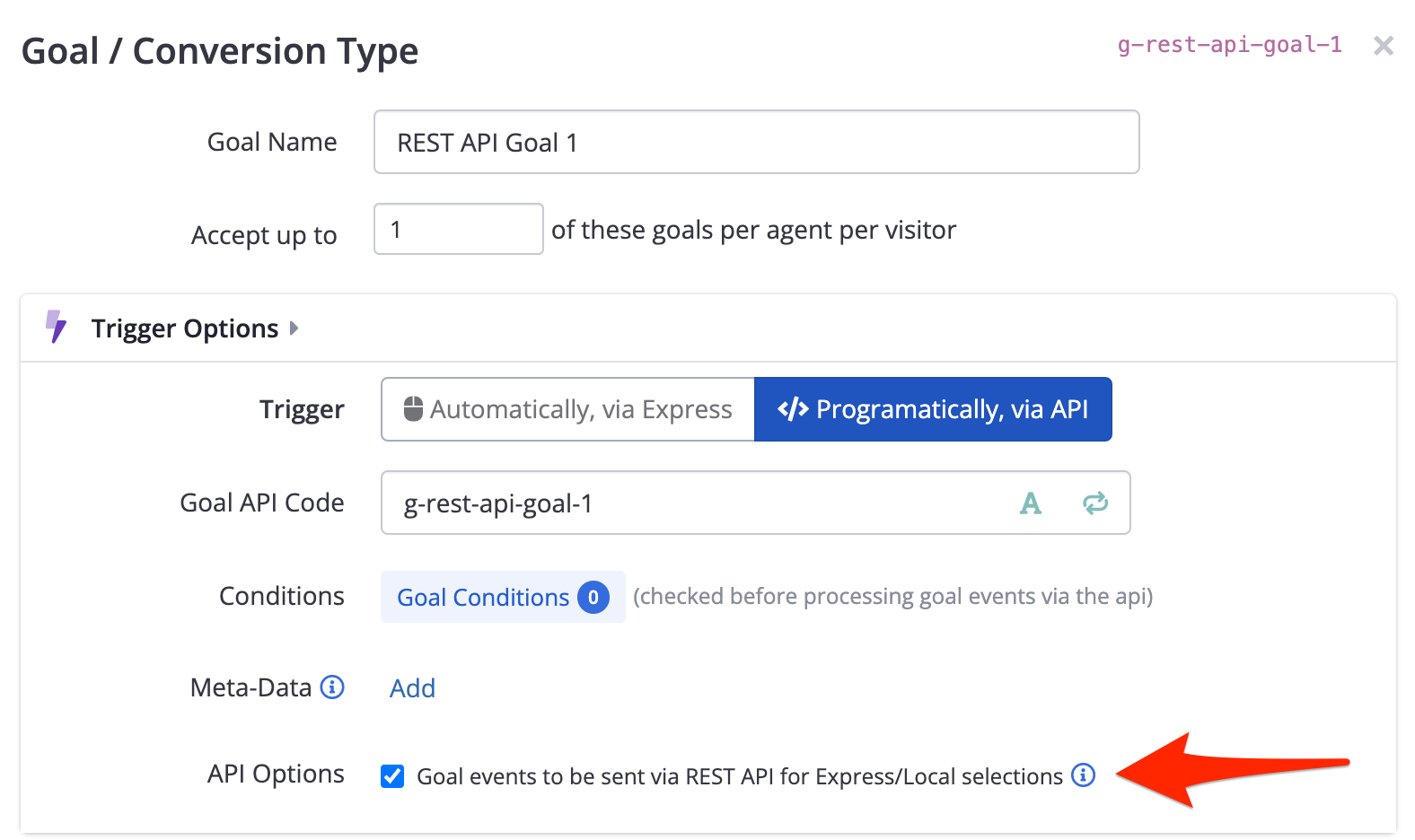
- The Goal in question should be an "API Goal", meaning that its Trigger should be set to Programatically, via API (as opposed to an Express-style trigger based on page events).
- The Goal events to be sent via REST API option should be checked. Contact Conductrics if you don't see this option for API Goals in your Conductrics Admin.
Usage and Caveats
For example, let's say you have an identifier available in a cookie called our_visitor_id, which is accessible to both client-side and server-side code (that is, the cookie is not an HTTP-Only cookie).
On the client-side, you might "pass" the identifier value using code like the following in the Conductrics "Preboot" script:
var vid;
try {
  // CAUTION: this simplistic example doesn't handle proper escaping of special characters, etc
	vid = document.cookie.match( /our_visitor_id=([\w]+)/ )[1];
} finally {
	visitor_callback({}, {vid: vid}); // continue Conductrics processing
}
And let's say you have a Goal Type with API Code g-purchase, which has just occurred somewhere in your server-side stack for a visitor whose our_visitor_id is lana-123. Your server-side code would read the value of the cookie (not shown here) and then could call the REST API using an HTTPS call something like this:
POST https://api-xxx.conductrics.com/ac-xxx/v3/agent-api?vid=lana-123&session=lana-123&apikey=api-1234567890

{
  "commands": [
    {"g":"g-purchase", "v": 19.99}
  ]
}
Please note that while the vid parameter is what is used to match the goal events back to the client-side variation selections, the REST API still requires a session identifier as well. You may provide the same value for both, as shown above.
See API Usage via REST API more about the REST API itself, and the Runtime API Reference page for information about additional parameters that can be provided if needed.
There are some caveats, mostly due to the fact that the server-side goal events are not synchronized back to the client-side Conductrics script (in keeping with our privacy-first design).
- Client-side Conductrics doesn't know whether or when the server-side goal events have occurred. For instance, you won't be able to use "Visitor Has Reached Goal" or "Seconds Since Goal Reached" type conditions to determine eligibility for other client-side agents.
- Conversely, the REST API doesn't know everything that's happened for the visitor on the client-side. For instance, you won't be able to use conditions that depend on what other agents/variations the visitor has been exposed to (client-side) in the Goal-level conditions for your REST API goals.
- By default, the goal events must be sent to the REST API within 72 hours of when the original variation selection was made for the visitor on the client-side. Please contact Conductrics if you expect to send the goal events after a longer period of time.
Updated over 1 year ago