
Setting up a Snowplow Connector (Beta)
For passing Variation-Selection events to your Snowplow pipeline
If you use Snowplow, you can set up a Connector that sends information about agent variation "selection" events from Conductrics to your Snowplow pipeline. From there, Snowplow can get the variations into your database or data lake as desired, so you have a record of which visitors were exposed to each variation and so on.
Snowplow is just one of our available Connectors. See our Analytics Connectors page for an overview, to learn about the other connector types, and about the options they have in common.
Getting Started
To get started with your first Snowplow Connector:
- Go to Settings > Connectors in the Conductrics Admin.
- Click Add Connector and then Snowplow in the dropdown menu.
- Fill out the form as discussed below.
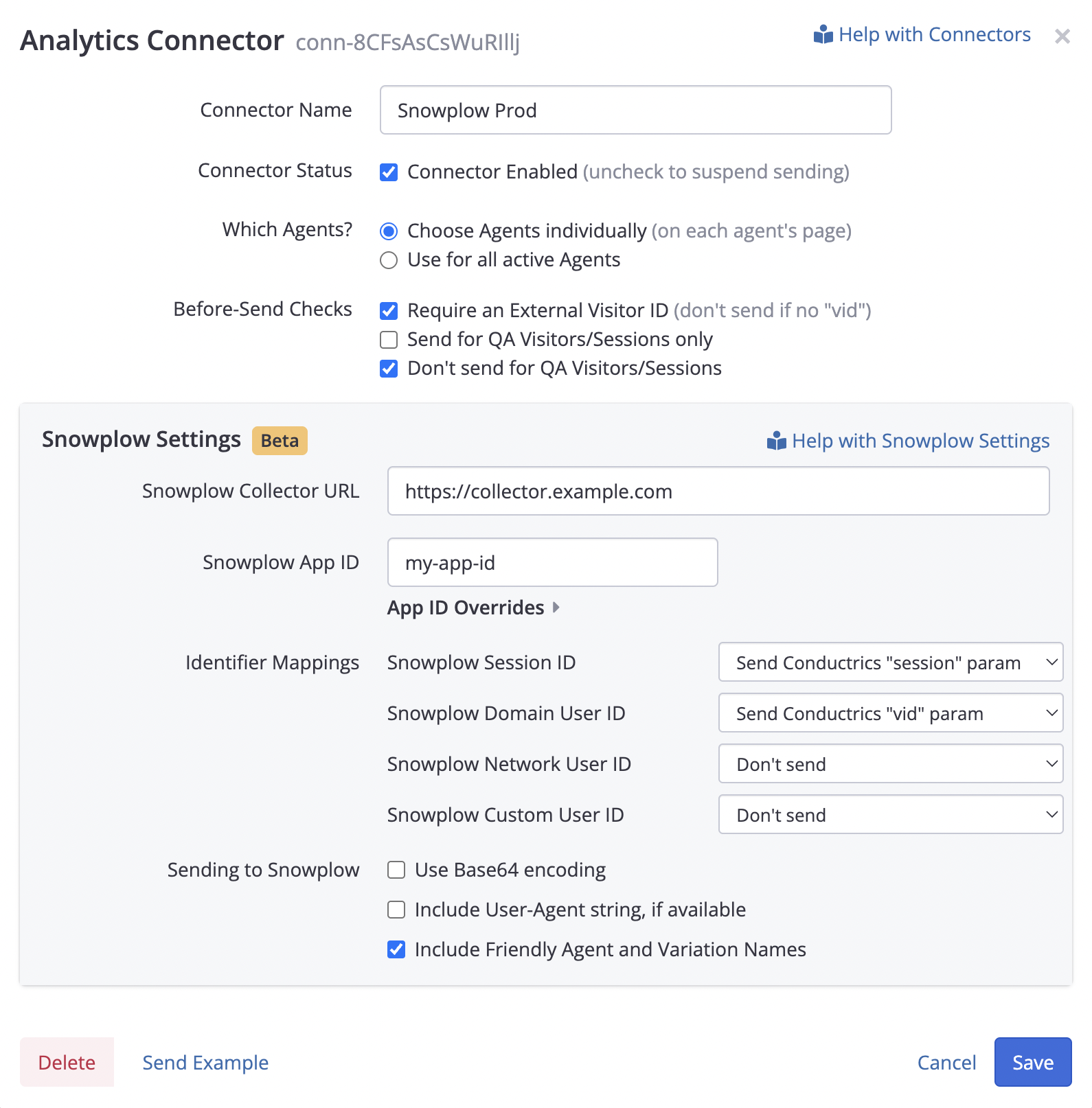
The collector setup form shown requires:
- The Snowplow Collector URL for your Snowplow pipeline. This might be something like
https://example.collector.snowplow.ioorhttps://collector.snowplow.example.comdepending on whether you are self-hosting. Please do not provide the/com.snowplowanalytics.snowplow/tp2portion (we will add that automatically). - The Snowplow App ID that Conductrics should provide when sending events to Snowplow. This is a custom identifier that you would presumably also be using when sending events from your own application.
- If you need the App ID to be somewhat "dynamic", you can expand the App ID Overrides to map Custom Visitor Traits to custom App IDs. Instructions are provided alongside that part of the form.
In the Identifier Mappings section, you can choose how Conductrics should provide various tracking identifiers to Snowplow (Snowplow doc page). Each of the dropdowns in this section has these options:
- Send Conductrics "vid" param - This means that Conductrics will pass along whatever value you have provided to Conductrics as the
vidparameter. So, if you choose this for the Custom User ID dropdown, thevidgets passed as the Snowplow userID. See Passing an External Visitor Identifier for details on how to provide this identifier to Conductrics. - Send Conductrics "session" param - This means that Conductrics will pass along whatever identifier you provide as the
sessionparameter when calling the Conductrics REST API. Please note that this identifier is not available when using client-side Conductrics (Express). - Send sp Input - This means that Conductrics will pass along whatever identifier you provide as the correspondingly-named parameter when calling the Conductrics REST API. For instance, for the Snowplow Network User ID dropdown, you can choose the Send "sp_network_userid" input option. Then when calling the REST API, you can provide
sp_network_useridin theinputsportion of the request body, such as{inputs: {"sp_network_userid": "C73C7E22-6B01-xxxxx"}}.
If you select Send Conductrics "vid" param for any of the Identifier Mappings, you may want to also check Require an External Visitor ID in the top part of the setup form.
Under Sending to Snowplow, you can choose:
- Use Base64 Encoding - When checked, data is transmitted to Snowplow as Base64-encoded strings. The default is on, but it may be convenient to have this switched off for debugging purposes. See the Snowplow documentation for details.
- Include User-Agent string - If checked, Conductrics will pass along the User-Agent string, if available. For client-side Conductrics, the User-Agent string will already be known, but for the REST API it should be provided explicitly as the
uaparameter (see the Runtime API Reference). Note that you will also need to check the Allow Passing of User Agent string option under the Data Passing tab at the Deploy Target level. - Include Friendly Agent and Variation Names - Check this option if you want the
agentNameandvariationNameproperties in the Snowplow event message to be populated with the "friendly" Agent and Variation names as shown in the Conductrics Admin. If unchecked, the agent code (such asa-xxxxxxxx) and variation code (such asB) will be provided instead.
Using Your Snowplow Connector
After you've created your Snowplow Connector, you can associate it with whichever agents you want to send their selection events to Snowplow. See the Enabling Connectors on a Per-Agent Basis section in the Analytics Connectors overview page for details.
You can have multiple Snowplow Connectors in your Conductrics account. This may be helpful if you use different Snowplow endpoints for "dev" vs "staging" vs "production" or similar.
Please note that only the first selection event (for a given agent, for a given visitor) is sent to Snowplow. Repeat selections (that is, those with the "Sticky" selection policy are not sent.
Example Snowplow Event
Here's an example to illustrate how selection events get sent to Snowplow:
{
  "schema": "iglu:com.conductrics/selection-event/jsonschema/1-0-0",
  "data": {
    "eventDateTime": "2025-11-06T16:04:23Z",
    "deployTargetCode": "#d4"
  },
  "contexts": [
    {
      "schema": "iglu:com.conductrics/agent-entity/jsonschema/1-0-0",
      "data": {
        "agentCode": "a-agent-123",
        "agentName": "My A/B Experiment #123"
      }
    },
    {
      "schema": "iglu:com.conductrics/variation-entity/jsonschema/1-0-0",
      "data": {
        "variationCode": "B",
        "variationName": "B Variation",
        "metaData": {
          "cta-color": "blue",
          "cta-text": "Buy Now"
        }
      }
    },
    {
      "schema": "iglu:com.conductrics/selection-entity/jsonschema/1-0-0",
      "data": {
        "selectionDateTime": "2025-11-06T16:04:23Z",
        "selectionPolicy": "r",
        "selectionTraits": ["tier:gold", "level:vip"],
        "reportingDataSet": "p"
      }
    }
  ]
}
The event references the selection-event schema at the top level, plus these entity schemas as context:
agent-entity- The identifier and name of your Conductrics Agent.variation-entity- The identifier and name of the selected variation, plus any associated meta-data.selection-entity- Additional information about the selection event, including the Selection Policy, any Custom Visitor Traits that were present at selection time, and whether the selection will be reported in Conductrics in the Production or QA Data Set.
Please see the Snowplow Schema Information page for the schemas themselves.
We have not yet registered the schemas in the central Iglu repository. Please register the schemas in your self-hosted Iglu during this Beta period. Please reach out to Conductrics if you need help.
Updated 6 months ago