
Edge-Side JavaScript
Writing code to alter a page's HTML before it's returned to the browser
When creating an Agent for Conductrics Express Edge, you can "bring your own" Custom JavaScript to display your page variations. You can provide your Custom JS in two ways:
-
As "normal" JavaScript, which runs in the browser during the page load process. In this mode, Conductrics Edge simply adds your JS code to the page, which should then execute just like any other JavaScript on the page. Your code will have full access to the Document Object Model (DOM) provided by the visitor's browser.
-
As "Edge-Side" JavaScript, which executes "at the edge", before the page is returned to the browser. You don't have access to the full DOM that you get in a browser context, but you gain the opportunity to make meaningful changes to the page without relying on client-side logic.
Please note that the Allow Conductrics Edge to make page changes set up via WYSIWYG and Custom JS option must be enabled for your Edge Deploy Target in order for your Custom JS to take effect. See Conductrics Edge Setup for details.
Creating an Agent with Edge-Side JavaScript
You can specify that you want to use Edge-Side JavaScript while creating an agent:
- In the Conductrics Admin, hit Create in the top nav.
- When you get to the "Implementation" Step, choose Custom JS.
- Make sure the Create for Express Edge switch is on, then hit Custom JS for B (or other variation).
- In the Custom JS window, select the Execute > At Edge option.
- Provide your JavaScript, using
$to add or manipulate page elements, as discussed below.
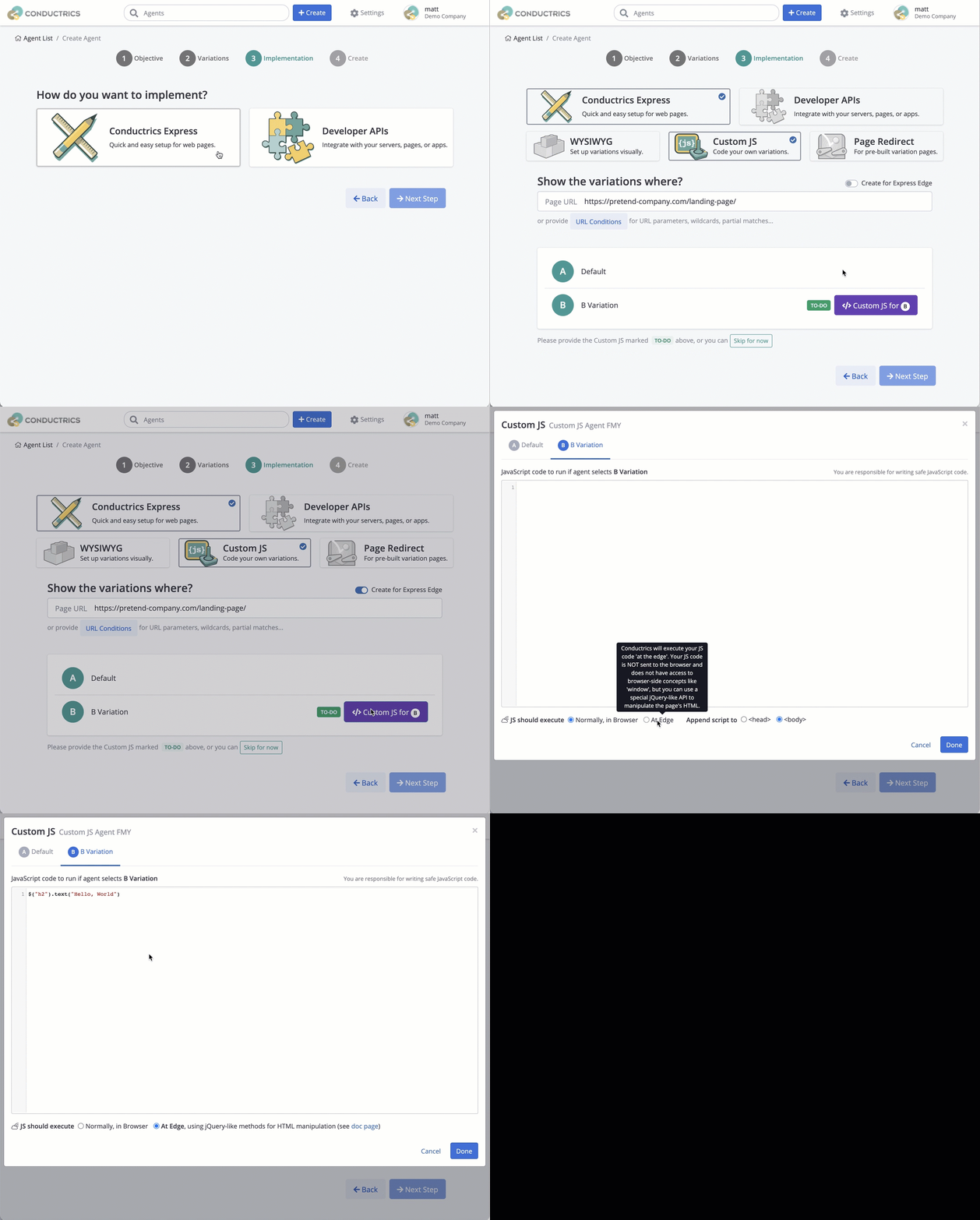
Providing Edge-Side JavaScript for a new Conductrics Agent
Of course, you can always review or edit the JavaScript later for an existing Agent. Just go to the Agent's page in the Conductrics Admin, then hit the </> icon next to your variation.
What Can You Do with Edge-Side JavaScript?
When you're using the "Execute at Edge" option, your JavaScript can manipulate your page's HTML, before it gets returned to the browser. This gives you a good amount of freedom to add, remove, or change elements on the page as needed to display the variations for your Conductrics agent/test.
This functionality is powered by the excellent Cheerio.js library, which is an implementation of the core jQuery API, designed specifically for use in server environments. This implementation does not use jQuery under the hood; it just re-creates much of its API for use in a server-side environment. Therefore, you can use a convenient jQuery style of coding, with all of its flexible methods for manipulating a page, but without using client-side code running in your visitor's browsers.
When Conductrics needs to "render" one of your page variations, it creates a Cheerio instance, pre-populates it with the "normal" HTML for the page in question (from your origin), and passes it to your code as $. You can therefore use $(selector).text(), $(selector).attr(), $(selector).append() and so on to make whatever changes are required.
Reference
The Cheerio reference docs provide details about all the methods and functions available via $:
- Structural Manipulation, such as inserting, removing, or replacing content areas.
- Attribute Manipulation, such as changing links, CSS classes, or "data" attributes.
- Traversal Methods for finding/selecting or looping over elements that you want to check for or change.
- See also the jQuery API Documentation for more details and context around the methods supported here. Most jQuery examples can be used directly as Edge-Side JavaScript.
Here are some practical examples for common testing-related scenarios:
// Change the text content of an element
$("#my-primary-cta").text("Start Free Trial")

// Replace the HTML content of an element
$(".my-element")
  .html('<a href="https://www.google.com/search?q=hello+world">Hello, World</a>')

// Add a CSS class to all links on the page
$("a").addClass("big-bold-style")

// Change all the "/shop" links on the page to go to "/store" instead
$("a[href='https://example.com/shop'")
  .attr("href", "https://example.com/store")

// Add a new CTA to a "Hero" area
$(".my-hero-area")
  .append("<a href='/learn' class='btn'>Learn More</a>");
This isn't jQuery, and you're not in the browser yet!While the code looks like jQuery, please keep in mind that you are not actually using jQuery, and you are not interacting with a live page's DOM. Instead, you are manipulating the HTML that will be sent to the browser, which will eventually expressed via the DOM. So, you can make changes to the page' structure and content, but you can't expect that the page will yet contain content or variables that get added via other JavaScript.
Edge-Side JavaScript FAQ
Q: Can we usewindow, navigator, document, and so on in our Edge-Side JS?
A: No. When your code executes, it has not yet been loaded by a browser, and browser concepts like window do not exist. If you need access to those, you probably want to use the "Execute Normally in Browser" option, rather than "Execute at Edge".
Q: What aboutquerySelectorAll, innerText, outerHTML, and so on?
A: Same answer as the above - you don't have access to the full DOM API provided by modern browsers, because the page has not yet been loaded by a browser. But you can accomplish most of the same things using the jQuery-inspired API discussed above. Please feel free to reach out to Conductrics if you have any questions on this!
Q: Does our edge-side code run for every visitor?
A: No. Conductrics caches the resulting HTML code at the "Page URL + Variation" level. This is achieved by adding the selected Conductrics variation (or variations) to the CDN's "cache key". This means that the same altered content will likely be returned to many, many visitors (until the underlying page expires or changes on your side, or until you make changes to the Conductrics agent/s running on the page). As such, Conductrics Edge is not currently appropriate for situations where your origin server would be returning "personalized "HTML per visitor - but it can be appropriate for the more likely scenario where visitor-specific info is displayed via "lookups" after the page loads.
Q: Can we load HTML from multiple URLs and combine it into the final response?
A: Not currently, no. You only have access to one chunk of HTML, which is the HTML for the page in question, as returned by your origin servers. Let us know if you have a use-case for combining assets in such a fashion (aka "content orchestration").
Q: What about altering other types of content, like JSON or CSS files?
A: Only HTML is supported at this time, but let us know if you have a use-case where such a thing would be handy.
Q: What if we use a "partial hydration" strategy via Next.js or similar?
A: Conductrics Edge only changes the content of HTML pages. It won't currently try to also alter any corresponding client-side JavaScript or JSON endpoints that may be being used to "hydrate" the page after its initial load. Please feel free to reach out to us if you'd like to discuss ideas about how we could be helpful in this regard.
Q: What happens if an error occurs while executing my edge-side JavaScript?
A: If your code can't be run (for instance, if you refer to a variable that doesn't exist), Conductrics stops executing the remainder of your code, and appends the error message to your page as a console.log line (so it should display in the JS console when the page is shown to the visitor). You don't get a stacktrace, but at least you should be able to see what the basic problem was.
Q: Is there any logging or debugging available?
A: No, not currently. We do attempt to display the edge-side error message in the browser's JavaScript console (see above Q), but that's the only debugging option you have at the moment.
Q: What if, in addition to my edge-side changes, I also need some client-side JS added to the page?
A: We don't currently provide a way to provide edge-side and client-side code for the same variation. However, your edge-side code could add client-side JS code (as a string) to the page programmatically. For example, something like this would add code to display an alert when the page loads: $('<script>').text("alert('Hello World')").appendTo('body')
Updated over 1 year ago