
Android On-Device API
SDK vs REST APIThese instructions are for our Android "SDK", which makes selections for your Conductrics agents locally (on the device). Due to the local processing, response times are fast and work offline.
That said, if you prefer to work without an additional SDK dependency, you are free to use our REST-style API from your Android app. Check out our Java/Android via REST Helper library, and Options for Mobile for an overview.
Overview
To use our Android SDK Library in your project, you must:
- Create a "Deploy Target" for Android using our admin console.
- Download the SDK Library into your Android Studio project.
- Invoke the SDK to make selections and send rewards from within your Android Application.
Installation
Here you will learn how to install our SDK in your project, after creating the appropriate Deploy Target.
Using the Conductrics Android Library requires minSdkVersion >= 17.
Creating a Deploy Target
A Deploy Target is a bundle of all the relevant agents for one platform, with all their associated rules and data. It will be consumed later by our Android Library, once you install it in your project.
To create one, go to Settings > Distribution > Add Deploy Target > Android Native as shown below:
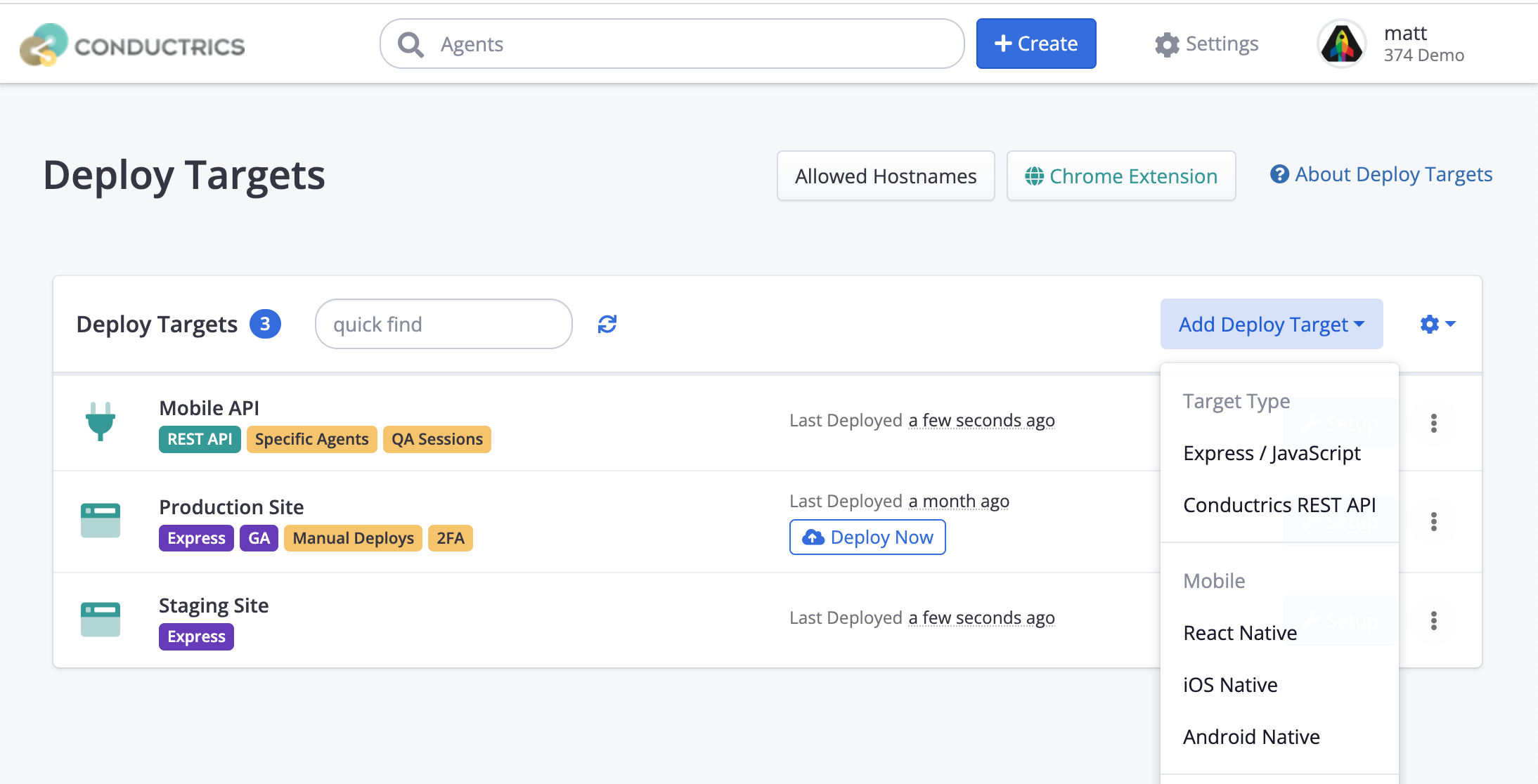
The default options should be fine for your first Deploy Target.
On the Android Native tab, use the Download Android Archive link to download the AAR file you will use in your Android Studio project.

This will download a file named Conductrics-1.0.7-<date>.aar or similar (the version number may vary).
Adding an Android Archive to your Android Studio Project
Copy the downloaded .aar file in your app/lib folder (create the lib folder if it doesn't exist).
As of version 1.0.7 the duktape dependency has been replaced by a dependency on quickjs-android. To successfully import the latest version of this dependency, you must include a reference to the maven repository at https://jitpack.io.
To add this reference, open the settings.gradle (or settings.gradle.kts) file in your app folder, and add a reference like this:
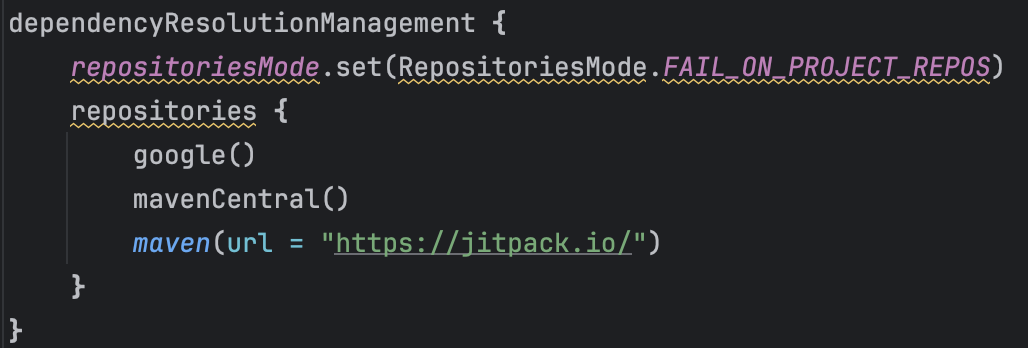
Shown above is the settings.gradle.kts version, if using settings.gradle then use the alternative syntax:
repositories {
  // ...
  maven {
    url "https://jitpack.io"
  }
}
Open build.gradle (Module: app), and add two implementation entries to the dependencies block as shown below (one for quickjs-android dependency and one for the Conductrics module itself):
dependencies {
    // ...

    // add these two lines:
    implementation("com.github.netless-io:quickjs-android:0.1.3")
    implementation(files("lib/Conductrics-1.0.7-202509180039.aar"))
}
If you are replacing an older version of our SDK in an existing app, make sure to remove references to duktape here in dependencies, as well as any older Conductrics SDK versions (there should be exactly one reference to our .aar file in the dependencies section).
Since the SDK needs to send information over the internet, we also need to ask for the INTERNET permission.
Edit your AndroidManifest.xml, and add (outside the <application> tag):
<uses-permission android:name="android.permission.INTERNET" />Using the SDK
You create an instance of the Conductrics class, giving a URL that refers to your new Deploy Target, then invoke our Runtime API methods from that interface.
import com.conductrics.sdk.Conductrics;

public class MainActivity extends AppCompatActivity {

  Conductrics api;

  protected void onCreate(Bundle saved) {

  	api = new Conductrics(this);

    TextView myHeadline = findViewById(R.id.myHeadline);
    switch( api.Select("agent-code").getCode() ) {
      case "A": myHeadline.setText("The default headline. (A)"); break;
      case "B": myHeadline.setText("The improved headline! (B)"); break;
    }

    /* When My Button is clicked, send a reward. */
    Button myButton = findViewById(R.id.myButton);
    myButton.setOnClickListener(new View.OnClickListener() {
      @Override
      public void onClick(View v) {
        api.Reward("goal-code");
      }
    });
  }
}
A few notes:
- Instances of the Conductrics class are safe to be stored and re-used throughout your app's lifecycle.
- All instances of Conductrics within one application share the same "session" (history of selections, traits, etc).
API Interface
public interface Conductrics {

  SelectResponse Select( String agentCode );
  /* deprecated */ String select( String agentCode ); // returns an option code

  GoalResponse Reward( String goalCode, double value = 1.0);
  /* deprecated */ void reward( String goalCode, double value = 1.0);

  ExecResponse Exec( JSONArray commands );
  /* deprecated */ JSONObject exec( JSONArray commands );

  void setSessionTraits(String... traits);
  void setSessionIP(String ip);
  void clearSessionTraits();
  void clearSessionIP();
  void clearSession();
}
The Exec(JSONArray) function supports all the message types documented in the Runtime API Reference: https://support.conductrics.com/docs/runtime-api-commands
All the other methods in the interface either make or modify calls to Exec(JSONArray).
Select(agentCode)is shorthand forExec([{a: agentCode}])Reward(goalCode)is shorthand forExec([{g:goalCode}], null)
A user's session data is stored in Android's SharedPreferences, scoped to your application.
Refreshing the "Profile" from Conductrics Servers
There is Profile Loading option at the Deploy Target level which controls whether the on-device Android library should periodically check whether there have been any changes in the agents, goals, visitor traits, or other settings used when you make calls to the library from your code.
To check or change this option, go to Settings > Deploy Targets and hit Edit for your Android Native deploy target. Under Android Native > Profile Loading you will find two options:

By "profile" we mean the "content" associated with the Deploy Target, so any included Agents, Goals, Visitor Traits, or other settings. The "profile" is baked into the .aar file when you download it initially from the Conductrics admin, and is also re-fetched when you create an instance of the Conductrics class via new Conductrics as discussed above.
-
If you choose the Refresh automatically from Conductrics option, the library will periodically check whether there is a new version of the Deploy Target's "profile". This means, for instance, that if you start or stop a test/agent, that status change will propagate to the library after a handful of minutes, so new calls to an existing
Conductricsinstance will reflect the status change. -
If you choose Don't refresh automatically, the library will not automatically reload/refresh the "profile" on your behalf. This means that you must ask the library to refresh itself programmatically (by creating a new instance of the Conductrics class via its constructor) in order for it to know about any changes or additions to your Agents, Goals, Traits, and other changes made in the Conductrics Admin. Otherwise, it will only know about the items that existed at the time that you downloaded the AAR file.
If you choose Don't refresh automatically, and don't ask for the profile to be refreshed programmatically, the library won't know about new agents/tests, goals, or other additions/changes. In particular, this means that if you stop an agent/test in the Conductrics admin, the library won't know about the change in status unless you update your app with a fresh download of the AAR file from the admin.
If you feel it's important for changes in test/agent status to be reflected right away (the very second that an agent is started/stopped or other similar change), consider using our Java/Android via REST Helper instead of the on-device API. See also Options for Mobile for an overview of the options available.
Specifying Traits for a User
First, you need some Custom Visitor Traits that are known to the system. For instance, imagine a group of Custom Visitor Traits called Membership Tier, with values of Gold, Silver, and Platinum. You can set this up under Settings > Visitor Data > New Trait Group. See Custom Visitor Traits for more detail about the options available when creating a group of traits.
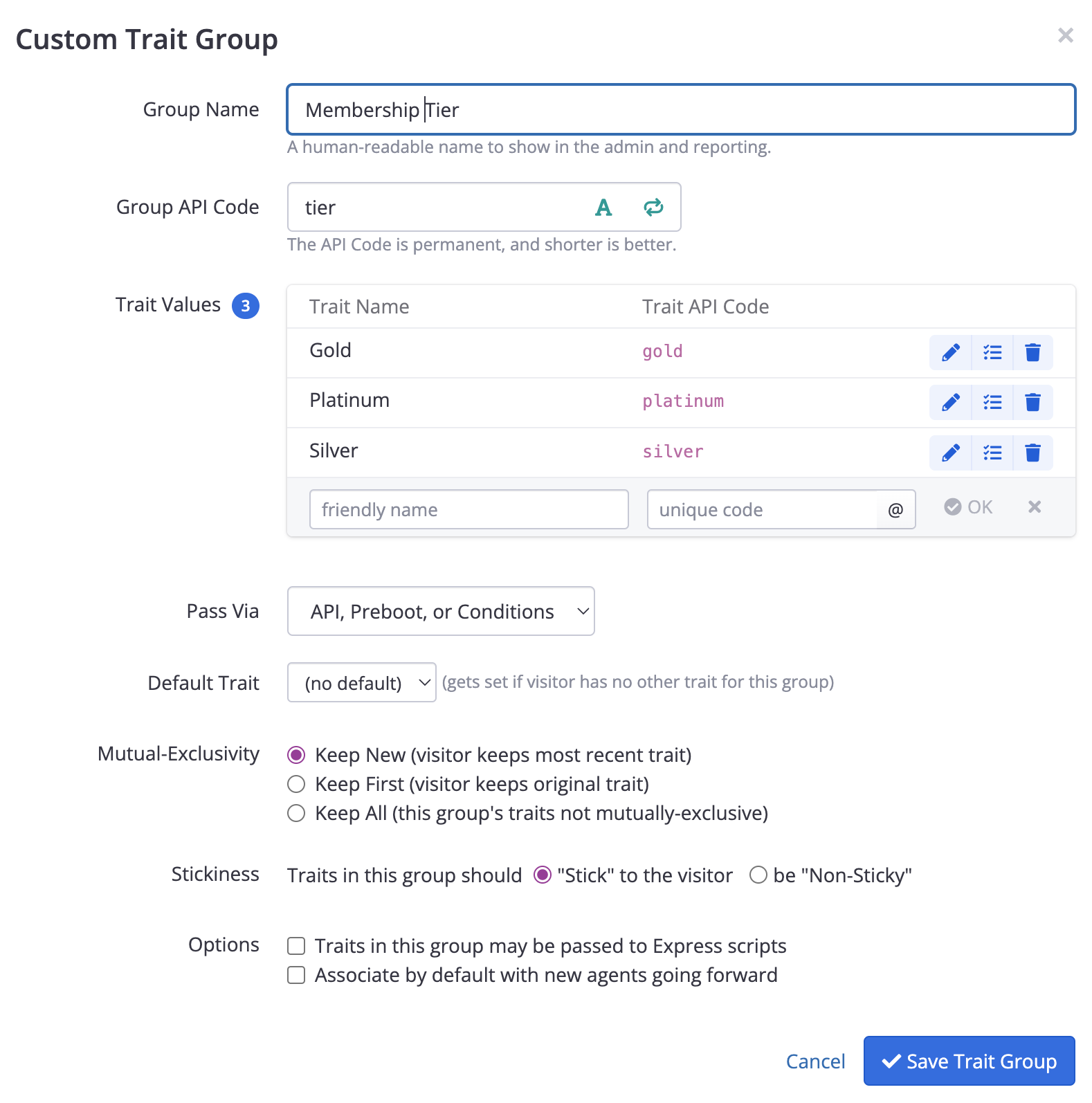
The next step is to enable this new Trait Group for the Agents we want to test with. You do this on the agent's page in the admin, via the Recorded Traits button in the right sidebar:
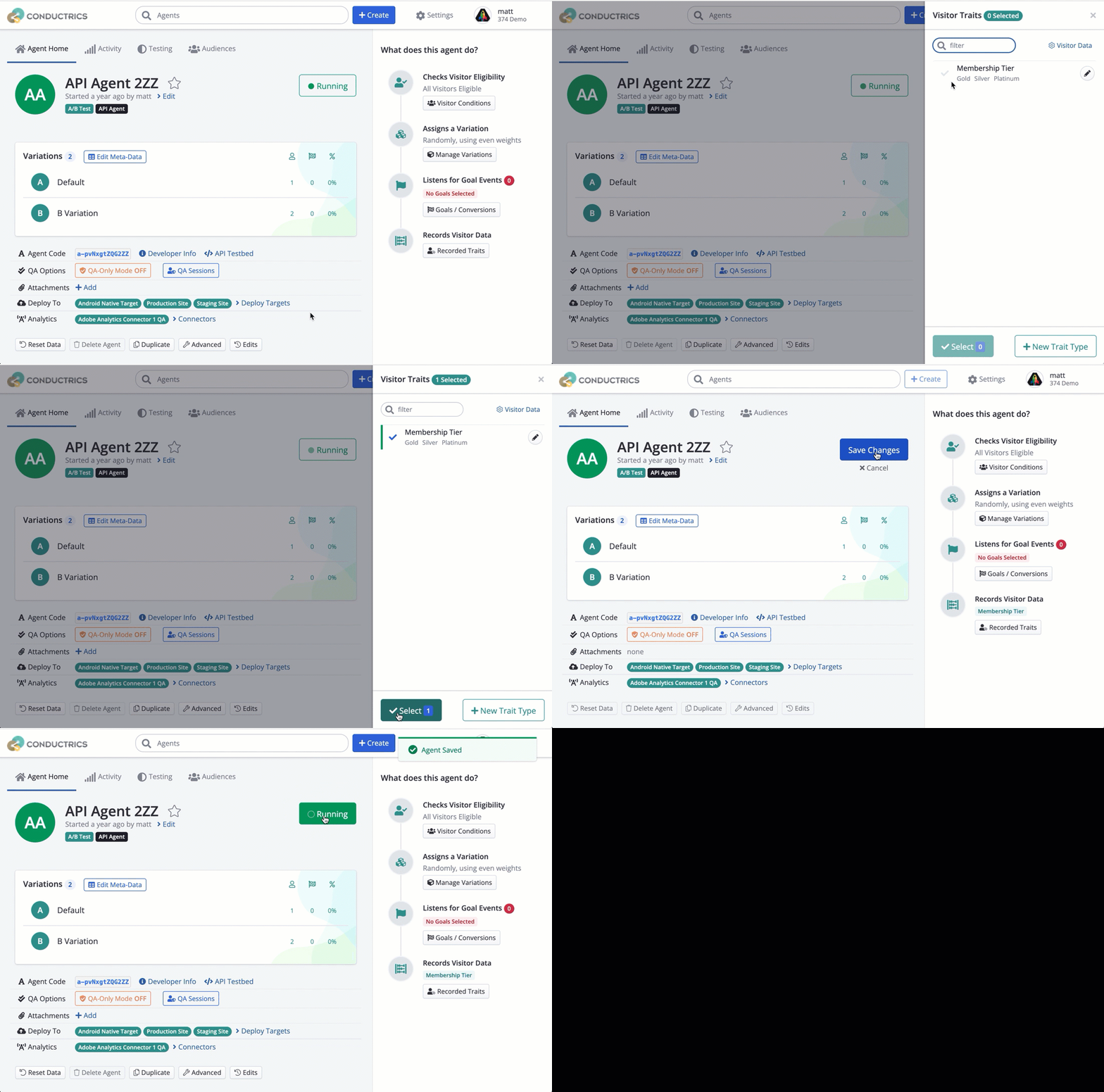
Now that the system knows about these traits, and they are enabled for your Agents, you can pass them in using the SDK Library.
api.setSessionTraits("tier:gold");

/* Now api.select() (and exec) will take these traits into account */
switch( api.Select("agent-code").getCode() ) {
  case "A": break;
  case "B": break;
}
Changelog
1.0.7
- Replaced
duktapewithquickjs-androidfor 16kb page support. - Changed SDK target to SDK 36, and compiled with 16kb page support.
1.0.6
- Added:
api.getDistroVersion()which returns information about when currently the running deploy target was last deployed from the console. - Added:
api.listAgents()which returns a list of all agent codes included in this deploy. - Changed:
ExecResponse.getSelection(agentCode)- when the specified agent did not make a selection, return aSelectResponsewheregetCode() == "A"andgetPolicy() == "none", instead of returning null. - Changed:
ExecResponse.getReward(goalCode)- when the specified goal did not accept any value, return aGoalResponsewhereacceptedValue(agentCode) == 0for all agent codes, instead of returning null.
1.0.5
- Changed:
api.Selectnow returns aSelectResponseobject instead of only the option code as a string.- SelectResponse supports:
- getAgent() - the agent code from the request
- getCode() - the selection option code, eg "A" (previously, the return value)
- getPolicy() - the policy used to make the selection.
- one of: "paused", "random", "adaptive", "fixed", "control", "sticky", "bot", or "none"
- getMeta(key) - returns a string value specified in this option's meta-data in the console.
- SelectResponse supports:
- Changed:
api.Rewardnow returns aGoalResponseinstead ofvoid.- GoalResponse supports:
- goalCode() - the goal code from the request
- acceptedValue(agentCode) - float - how much value did
agentCodeaccept (1.0if accepted)
- GoalResponse supports:
- Changed:
api.Execnow returns anExecResponseobject instead of aJSONObject.- ExecResponse supports:
- getSelection(agentCode) - return a
SelectResponseobject for this agent code (if theExecrequested a selection). - getReward(goalCode) - return a
GoalResponseobject for this goal code (if theExecsubmitted a reward). - getTraits() - return a
List<String>of all the traits that were used in consideration of the submitted commands.
- getSelection(agentCode) - return a
- ExecResponse supports:
- Changed: These main API functions have been slightly renamed to be consistent between the Android and iOS SDK. This means that, in this Android SDK,
api.selectis nowapi.Select,api.rewardis nowapi.Reward, andapi.execis notapi.Exec. The lower-case names are deprecated but still supported for now.
Updated 12 months ago