
Conductrics Edge Setup
This page explains the steps you'll need to take initially to enable Conductrics Edge to be used with your site. Once set up, you probably won't need to revisit these options going forward.
If you haven't already, we recommend checking out the Conductrics Edge Overview page first to get an idea of the overall functionality.
Creating a Deploy Target for Conductrics Edge
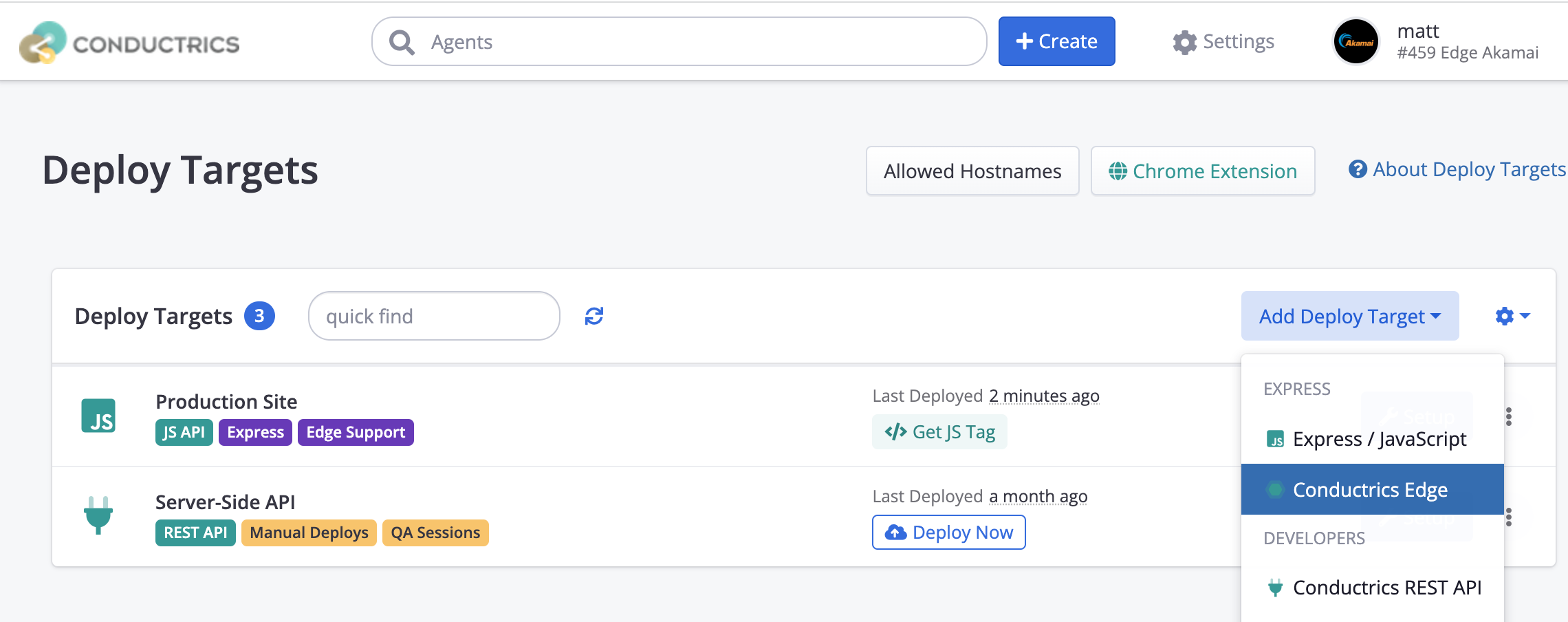
The first step is to create an "Edge" Deploy Target in your Conductrics account. In the Conductrics admin, go to Settings > Deploy Targets, then hit Add Deploy Target and choose "Express Edge" as shown below:
Most of the options on the Distribution and Agents tabs are the same as for other Deploy Targets, but there are a few things you need to provide under the Edge tab:
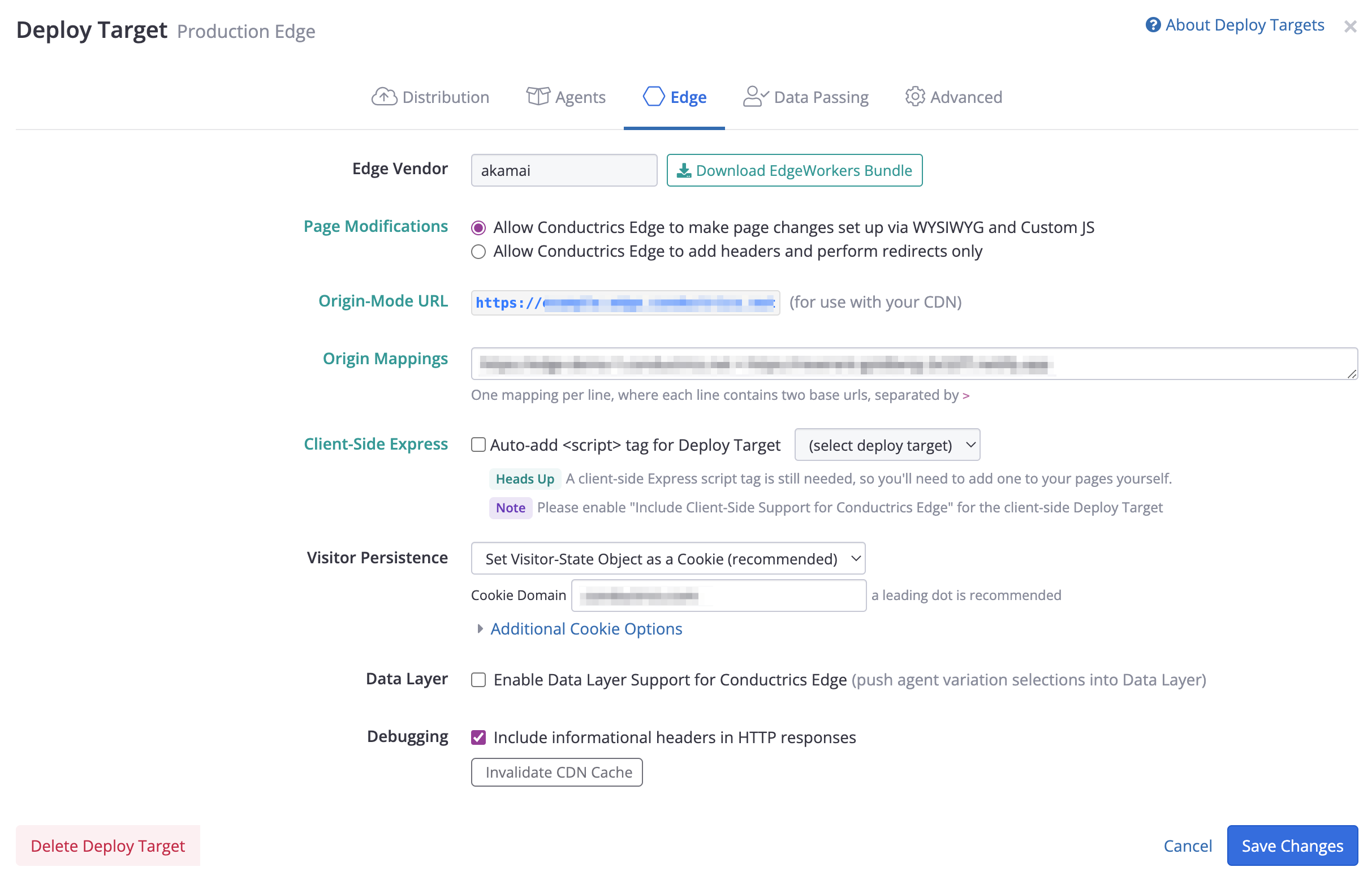
Here's an overview of the options:
-
Under Edge Vendor, note that the correct vendor (such as akamai) is selected. Contact Conductrics if the vendor option is incorrect.
-
Under Page Modifications:
- Choose the Allow Conductrics Edge to make page changes set up via WYSIWYG and Custom JS option if you want to be able to create Edge-enabled tests/agents where the actual page changes are set up in the Conductrics Admin.
- If you don't need that ability, you can choose the Allow Conductrics Edge to add headers and perform redirects only option instead. Note that if you choose the first option, you will need to add a "Conditional Origin" if using Akamai (see Akamai Setup for details).
The next few options apply only if the Allow Conductrics Edge to make page changes set up via WYSIWYG and Custom JS option is selected:
-
The Origin-Mode URL isn't editable, but may be required for completing the initial setup for your CDN. For instance, you use it to establish a "Conditional Origin" if you are using Akamai (details here).
-
Under Origin Mappings, provide at least one mapping so that Conductrics knows where to fetch the canonical/normal version of your pages from your origin servers.
- For instance, if you intend to use Conductrics Edge for pages under
https://www.your-company.com, and the pages are served by an "origin" server on your side athttps://www-origin.your-company.com, you would use a mapping something likehttps://www.your-company.com > https://www-origin.your-company.com. - You can provide multiple mappings as needed; Conductrics will use the first line that matches the incoming request.
- For instance, if you intend to use Conductrics Edge for pages under
-
Under Client-Side Express, you can have a client-side Conductrics Express script tag added to your pages automatically. If you prefer, you can uncheck this option and do the Script Tag Installation normally.
The last few options apply for all Edge Deploy Targets:
-
Under Visitor Persistence, choose Set Visitor-State Object as a Cookie as shown below. For the Cookie Domain, provide your top-level domain with a leading dot as shown below. You can also adjust the cookie name, expiration, and same-site option under "Additional Cookie Options".
-
Under Data Layer, you may optionally enable data layer support, in which case Conductrics will populate a data layer array that contains any agent variation selections for the current visitor. See Simple Data Layer for the structure of the items in the array.
-
Under Debugging, enable the Include informational headers option if you would like some meta-data to be returned to the browser for informational/debugging purposes, in the form of several additional headers. The headers will have the prefix
X-Conductrics-and can help you understand what variation(s) you were assigned to, when the variation was last rendered and cached by Conductrics, and so on. We recommend that this option remains turned off for production environments.
You can create multiple Edge Deploy Targets, perhaps for your staging vs production environments, or for different sites. See this page for general information about Deploy Targets, and feel free to discuss with Conductrics.
Configure Your CDN
Now that the Deploy Target has been created, the next step is to configure your CDN for Conductrics Edge.
Our roadmap for Conductrics Edge includes "native" support for several CDN / Cloud vendors, such as:
- Akamai (via Edge Workers)
- AWS CloudFront (via Lambda@Edge)
- Cloudflare (via Cloud Workers)
- Netlify (via Netlify Functions)
- Fastly (via Compute@Edge)
Akamai is the only CDN vendor option available at this time. Let us know if you are interested in using Conductrics Edge with one of the other vendors.
Enable Edge Support Option in your Client-Side Express Deploy Target
Conductrics Edge works together with Conductrics Express on the client side. This allows for coordination between tests/agents that you might be running "at the edge" versus running locally in the browser.
Currently, a client-side Express
<script>tag must be present on your pages in order for Conductrics Edge to work correctly, and the Include Client-Side Support for Conductrics Edge must be enabled for that client-side Express Deploy Target (see screenshot above). Otherwise, you may find that your Edge-side experiments don't show up in the Conductrics reporting. Feel free to contact Conductrics if you have any questions.
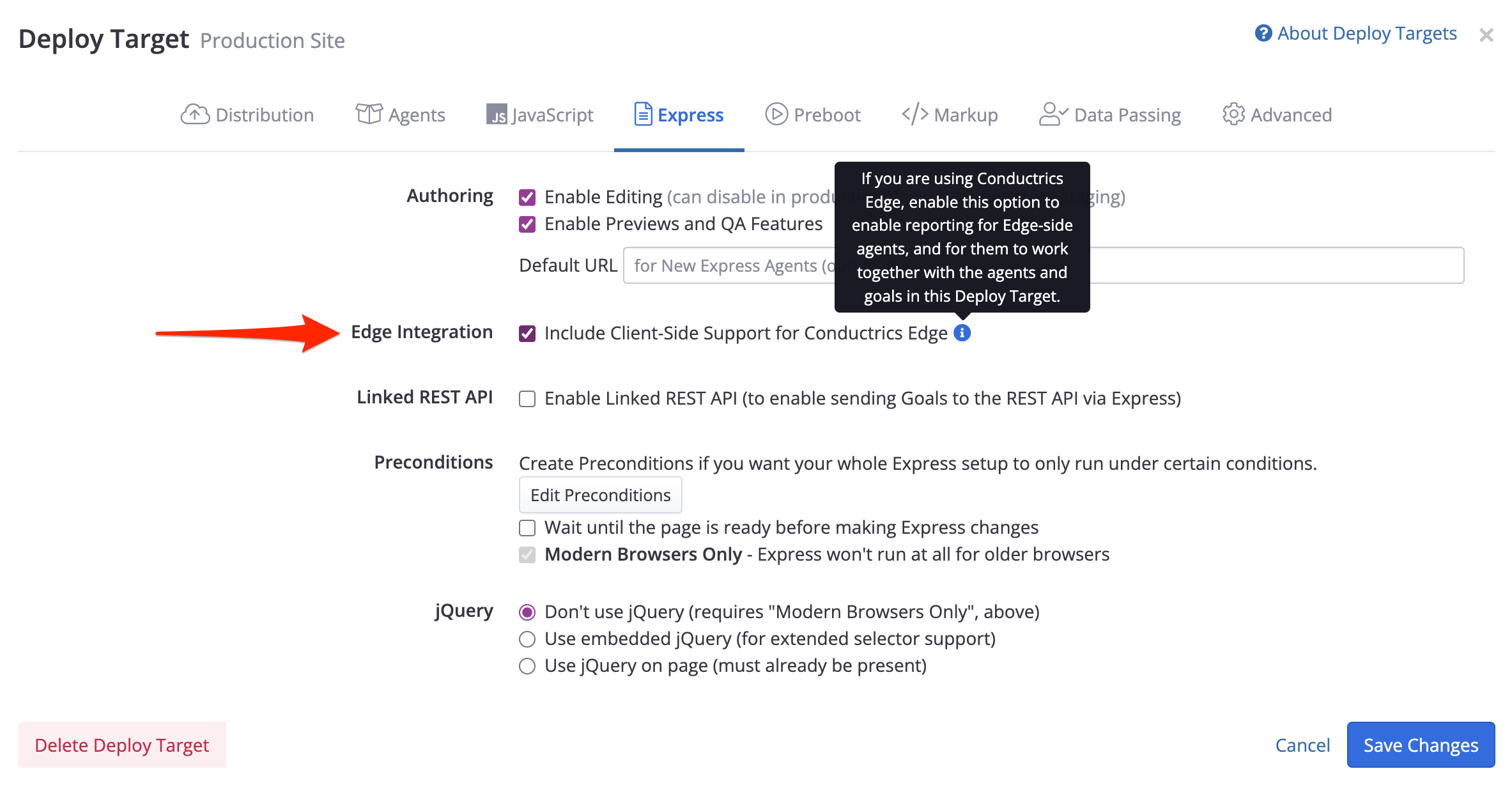
Cookies are RequiredPlease note that you must use the Cookies option under Data Storage in order to turn the Include Client-Side Support for Conductrics Edge option on. This is because cookies are conceptually "visible" at the edge, whereas values in LocalStorage never leave the browser.
Updated over 1 year ago