
FAQ and Troubleshooting
FAQ
There's a discrepancy between the amount of visitors to an agent that Conductrics report vs what my analytics tool reports
A difference in "visitor" counts between tools is to be expected given that every tool has different definitions of what a visitor is and how its identification and persistence is handled. The most common case reported happen when using the client-side version of Conductrics (either Express or JS API).
The first thing to acknowledge is that client-side Conductrics identifies a visitor by storing a session-state record on the browser local storage (or as a cookie if desired). This is similar to Google Analytics that stores the "user" identifier (known as "clientId" or "cid") on a separate cookie. And Adobe Analytics operates in a similar fashion with the "aid" parameter taken from the "s_vi" cookie. This is important to understand because not all cookies or storage have the same setup or behavior. Some last longer, some less, some are erased or overridden by privacy or consent measures or ad blockers. And so this results can result in discrepancies since a same person could be recorded as just one visitor on one tool but as multiple on another, and sometimes they are not counted at all. You can find more information on how Conductrics handles visitor's data at https://support.conductrics.com/docs/visitor-data-tracking-and-privacy
From this it also stems a second issue which has to do with the metrics used. In order to compare "apples to apples" its important that when comparing Conductrics Visitors to other analytics tools, you need to pick the "Unique Users" or "Unique visitors" metrics (or whatever comes closest depending on the tool). Comparing Conductrics Visitors to for example GA sessions will most of the times result in a much higher number seen in GA.
And lastly, another source of the discrepancy may arise from the integration between tools. If you are using our Google Analytics Integration (which only works client-side for webs), then most of the time the reporting counts should be quite similar since it uses the GA analytics.js library thats loaded from your GA script on site. That means it leverages on the normal functionality that GA has on your website. Unless of course some consent or privacy mechanics are in place that could affect that.
But if instead you are using either of our Analytics Connectors (https://support.conductrics.com/docs/connectors), its important to make sure that every call made for Conductrics includes the "vid" parameter which is what's used for populating the corresponding "Visitor / User" identifier on either of those analytics tools. This can be done by either populating the corresponding parameter on the REST API call or via browser storage (https://support.conductrics.com/docs/providing-an-external-visitor-identifier-to-conductrics). Whenever that is missing, Conductrics will count its unique visitor, but the event wont be properly sent to the analytics tool, which will result in an under counting in either GA or Adobe. Or for example if the value passed on the "vid" parameter is not consistent for a same "unique visitor", then you can end up with over counting on your analytics tool vs Conductrics.
The bottom-line is that each tool is different, and some small discrepancy is to be expected between them. But when the discrepancy is big enough to generate some concern, either because of under or over counting on one of the tools, then we need to traceback which of the possible sources of the difference could be at play here.
My Google Analytics Goals aren't being recorded
This usually happens when the goal in question happens / is triggered on a different page than the one of the agent variation. To solve this please make sure that the item under Settings > Deploy Targets > Setup (on desired Deploy Target > Javascript > On Google Analytics line click Options > Listen for GA-triggered goals even on pages with no Express agents is checked
Conductrics is reporting less goals than my analytics platform
By default, Goals are only counted once per visitor, per variation (per goal type). Use the “Accept up to” setting at the Goal Type level if you want to count repeated goal/conversion events from a given visitor.
Also please keep in mind that in Conductrics, Goals are counted in the reporting for the day that the original variation selection was made for that visitor. In other words, the reporting is designed to show you the number of goal/conversion events that happened as a consequence of showing the variation to visitors on that day. So, if a visitor first gets exposed to a variation on Monday, then converts on Tuesday, the goal count will increment for Monday (not Tuesday as you would probably expect in your analytics package). This doesn’t make any difference if you are looking over the whole date range - only if you are looking at individual days.
I created some Custom Visitor Traits but don't see them on the Agent Reporting
Although Custom Visitor Traits are created at the customer level, they are collected and reported at the agent level. So once you set up the Custom Visitor Trait in the Conductrics UI under Settings > Visitor Data and made sure the code is passing the trait in question, you need to make sure that the Trait is marked as checked on the Agent Home page > Right Side-bar under Visitor Traits.
My API Goals do not show on my agent
When working with multiple Deploy Targets (DT), its important to keep in mind that each DT has its own endpoint (aka url), and thus the goals / rewards sent to that endpoint will only reflect in the agents that the DT knows about. If this is the case, please make sure that on Settings > Deploy Targets > Click Setup on the DT used for firing the goals > Agents on the top navbar : the option for Include all Agents is selected or that the specific agent in question is added when selecting Specific Agents
I dont see the changes from my Express Agent getting applied or the goals are not getting tracked
When this happens it's possible you are getting a cached version of the JS on your site. You can look at our debugging messages on the console, one of the first lines is the date/time that the JS was generated, which can help you know if that’s the case. If it is, just waiting a couple of minutes for the CDN to see the new version should work out. We are also working on a feature that will be invalidating/purging the CDN cache automatically whenever you make a change.While using the Pre-Selection feature from QA Sessions I'm not getting the selected variation.
If this is happening, make sure the agent you are QAing is not Paused At a certain variation. If it is, you will always get the Paused At variation becaused Paused agents will always select said variation and it has precedence over whatever you select on the Pre-Selection from the QA Sessions.WYSIWYG Troubleshoot
Conductrics Visual Editor is not loading
This could be happening for many reasons which we will cover ahead:1. Domain missing on Deploy Target
The WYSIWYG editor only works on previously defined domains on your Deploy Target. Please head to Settings > Deploy Targets > Allowed Hostnames and make sure the domain you are trying to load the editor on is whitelisted in there.
-
Using a Browser other than Chrome
Right now the WYSIWYG editor is only supported on Chrome browser -
The script not present on the page at all
Make sure that the script is present on the pages you want Conductrics to work on. For details on how to install the script please see Script Tag Installation. -
Script Blocker Extension
Some browser extensions block certain scripts and network calls or only allow for whitelisted domains to load scripts on your site. Please make sure that any browser extension installed is not blocking the WYSIWYG editor from loading. -
“Enable Editing” option turned off at Deploy Target level
It just might be that the Enable Editing option is disabled. To change this go to Settings > Deploy Targets > Click Setup on the deploy target you want to edit > Select Express on the top navbar > check the Enable Editing box at the right of Authoring. -
CSP (Content Security Policy) blocking the editors requests
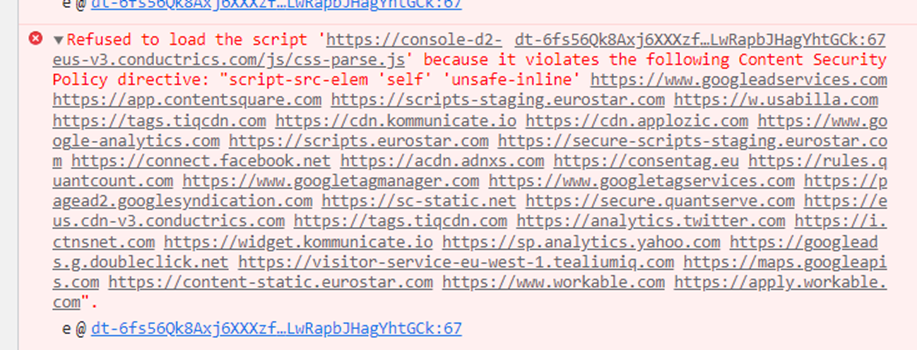
If this is the case, which you might find out because of seeing an error like the one above on the console when trying to load the visual editor on your site please head to Content Security Policies (CSPs) which includes a step by step guide to fix it.
I'm having trouble pointing to and selecting something
Sometimes depending on how the HTML is structure or built, it will be harder for the editor to pick the right child or parent element that we want to make changes to.
If thats the case we encourage you to look at Variation Setup > WYSIWYG which details some keyboard shortcuts that helps navigate through different HTML elements.
Another thing you can look into is pressing the s key which will rotate across 5 different selector methods. So once you changed the selector method, try and click the element in question to see if the desired one gets selected.
Updated over 1 year ago