
Sending REST API Goals via Express
Conductrics provides a "Send Goal via Linked REST API" capability that can be used in certain "hybrid" scenarios, when Conductrics Express is being used together with the REST API.
For example, consider this scenario:
- You have a server-side test running on your website, where your web servers are calling our REST API to assign visitors to variation A or B;
- And you want to be able to easily set up Express-style Goals (that the visitor might encounter later in their visit / journey) which should count against the server-side test.
Or, another scenario:
- You have a mobile app that uses the REST API (perhaps using our helper libraries for Swift/iOS or Java/Android) to get variation selections from an API Agent for a A/B Test or other optimization/targeting scenario;
- And the mobile app also contains a WebView that displays pages from your website, and those pages have the Conductrics script tag present;
- And you want to be able to easily set up Express-style Goals that trigger within the WebView, such as when the user clicks on a button in the WebView or other similar web UI event, and where the Goals should be sent to the API Agent.
See also Sending Goals via REST API for Express/JS Agents which covers sending Goal/Conversion Events in the other direction.
Enabling Linked REST API Mode
To enable the "Linked REST API Goals" functionality, you first need to tell Express which REST API endpoint to use when visitors trigger a goal event.
- Under Settings > Deploy Targets, make sure that you have at least one Express Deploy Target in addition to at least one REST API Deploy Target. See Deployment Options for more info about Deploy Targets in general.
- Hit Setup for the Express Deploy Target, and go to its Express tab.
- Under Linked REST API, check the Enable Linked REST API option, and choose the REST API Deploy Target that you want the goal calls to be sent to.
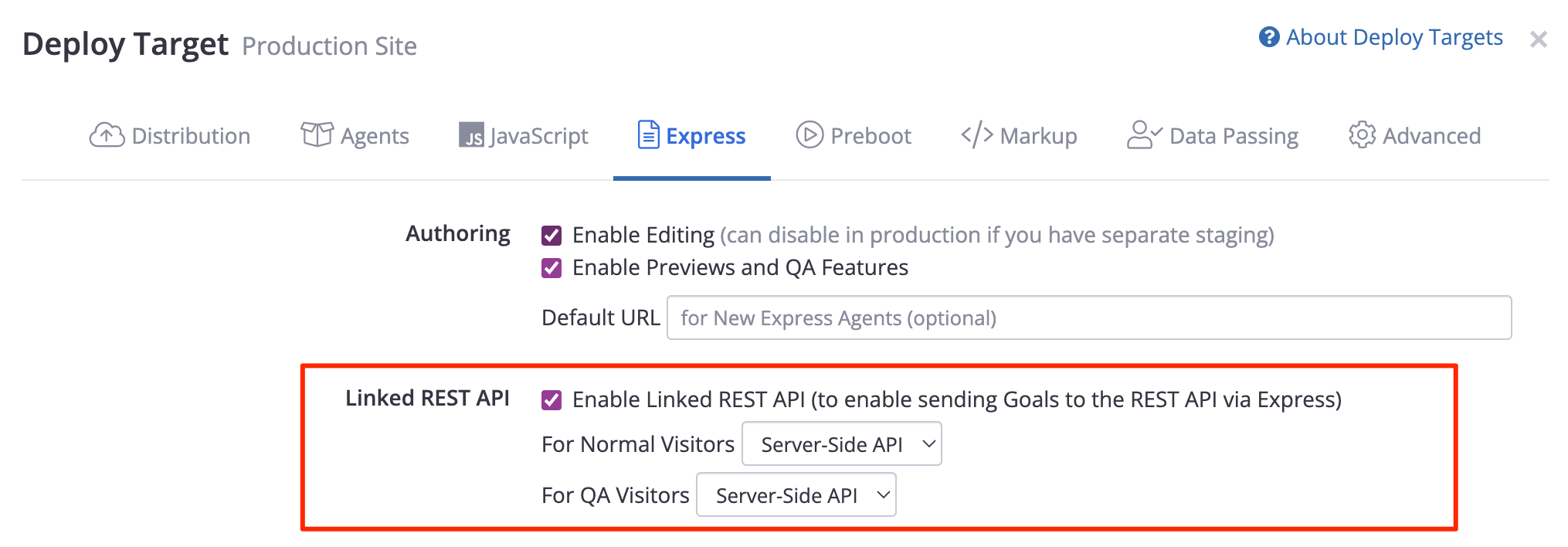
Note that you can specify separate REST API Deploy Targets for normal vs QA visitors.
Specifying the Session Identifier to use with the REST API
The REST API requires a session parameter to be provided for all calls to it, including calls that send Goals. This identifier is used to look up the information needed to record the goal event properly (mainly any agent variations that the visitor was previously exposed to).
Therefore, the client-side Conductrics script will need to know the session identifier that is being used for calling the REST API for the current visitor. To do so, provide a "Preboot" script that gets the value and passes it to the client-side Conductrics environment as the sid parameter.
For instance, if you know that the session identifier will be placed in sessionStorage with the name visitor-id, you could use something like this in your "Preboot" script:
visitor_callback({}, {
  // session identifier for use when sending REST API goals from Express
  sid: sessionStorage.getItem('visitor-id')
});
The above is just a simple example. You'll need to do whatever is needed to make the appropriate Session ID for the given visitor available to your Preboot code. See the Custom Visitor Traits doc page for some more details about creating Preboot scripts.
- For instance, if your server-side code has made the identifier available to client-side JavaScript as a cookie, you could read the cookie value and provide it as the
sidparameter. - Or, if your pages are being displayed in a WebView in a mobile app, you could pass the value into the WebView's JavaScript context as a string, perhaps via
stringByEvaluatingJavaScripton iOS orevaluateJavascripton Android, or perhaps by including it as a URL parameter when initializing the WebView.
If the
sidis not provided via the Preboot (or if its value isnullorundefinedfor a given visitor, or isn't a valid session identifier string), the goal event will not be sent to the REST API. A message to that effect will be displayed if you have our Debug Messages enabled.
The value you provide to
sidis NOT persisted on the client-side by Conductrics. It is up to you to store it, if needed, so that you can provide it again each time the visitor navigates to a new page (which will in turn re-run your Preboot code).
Enabling REST API Mode for your Express Goal
- Go to the main page of your API Agent (or create one if you haven't already).
- From the API Agent's main page, hit Goals / Conversions, then hit New Goal Type.
- Set the Goal up as an Express Goal, triggered by whatever page event you need (page load, click, etc). See Goals / Conversions for more details about the basics of setting up an Express Goal.
- While setting up the Goal, enable the Send Goal to Linked REST API option as shown below.
- Finally, make sure that your API Agent is associated with your Express Deploy Target, as well as your REST API Deploy Target.
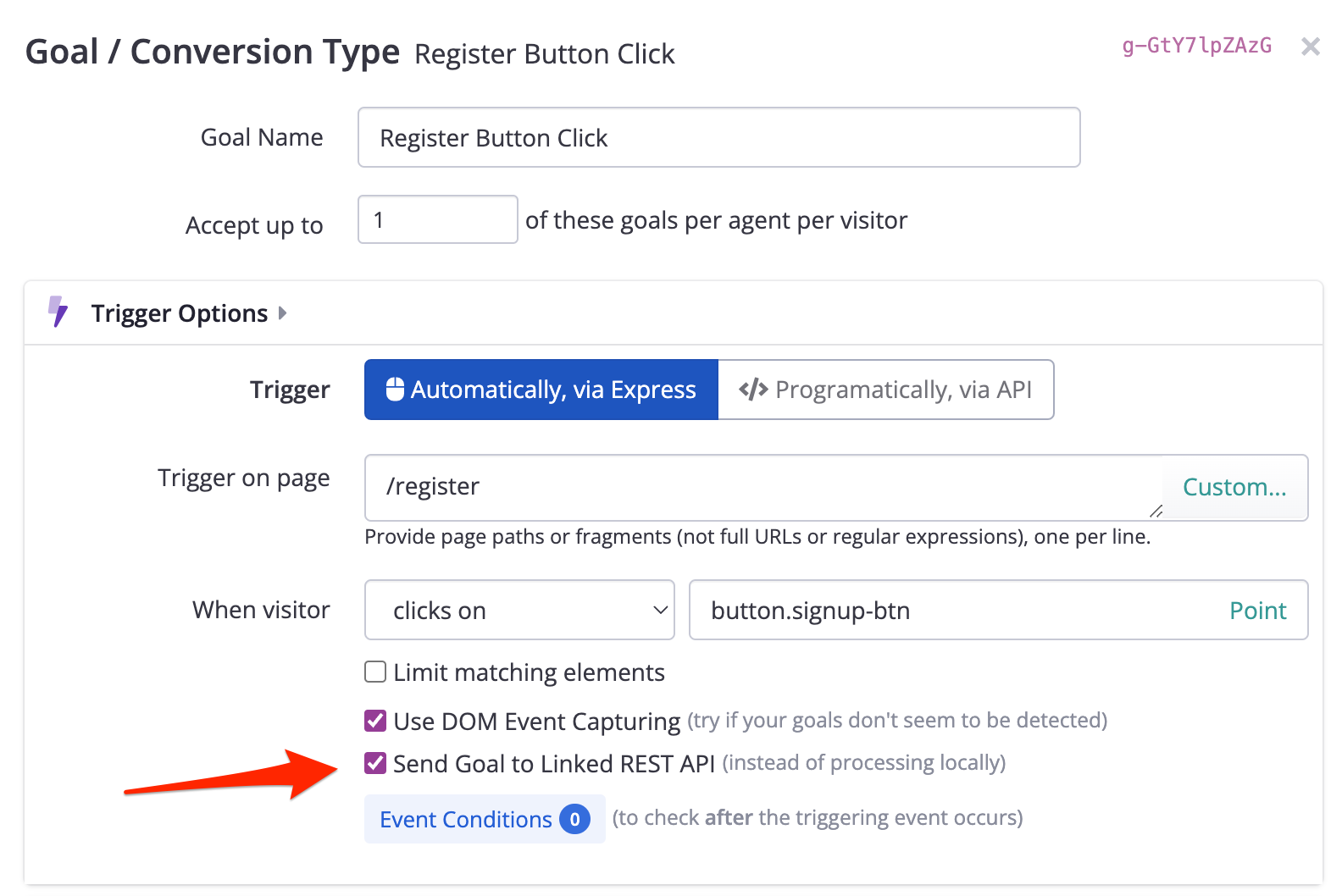
Don't see the option?The "Send Goal to Linked REST API" option only appears if you choose "Automatically, via Express" for the Goal, and if you've enabled the "Linked REST API" option for at least one of your Express Deploy Targets (as discussed in the first part of this doc page).
Remember to associate both Deploy TargetsRemember that your API Agent needs to be associated with both of your Deploy Targets (the Express target and the "Linked" REST API target). If either of the Deploy Targets require manual deployment, you'll need to complete the deployment for your changes to take effect.
Updated over 1 year ago