
Runtime API Reference
The Conductrics Runtime API supports three types of commands:
- A command for Getting Selections, discussed next.
- A command for Sending Rewards, also discussed here.
- A command for Running Flowlets, which is an optional, advanced topic.
Also check out the API TestbedYou may find it handy to use the API Testbed to assemble the commands shown in this document, with the appropriate agent and goal codes, etc.
Getting Selections
To get a selection from one of your agents, you provide the code for the agent you want a selection from a property called a, like so:
{a: 'a-bYFPtzHxbL'}
To get selections from multiple agents, you can use more than one object at the same time:
{"a":"my-agent-1"}, {"a":"my-agent-2"}
Required:
a- The API code of the agent you want a selection from.
Optional:
c- The variations that the agent should be allowed to choose from, as an array of variation codes. Useful in situations if you need the agent to only consider a subset of its variations for this particular selection. Otherwise, just omit, which will allow the agent to select from all of its variations (as shown in our admin).x- The variations that the agent should not be allowed to choose from, as an array of variation codes. Like thecoption above, useful in scenarios where you want the agent to only be able to select from a certain subset of variations at runtime.n- The number of selections the agent should return (applies to list agents only).
Response fields:
The response item for each selection will contain:
c- the selected variation's API code. Please note that the selected variation code is also available in theselsobject which is also returned when you call the API. It may be more convenient to access it there.a- the agent code that made the selection.p- the policy that the selected agent was made with. The possible policies are:pfor paused selections (if the agent does not currently have status "running")rfor random selections (random agents always make random selections)ffor fixed selections (the result of a targeted selection rule that you've set up)afor adaptive selections (when an agent selects the "best" selection using predictive analytics)sfor sticky selections (if a session has already been assigned a selection previously)
md- any associated "meta-data" that goes along with the selected variation - you can define
meta-data at the variation level in the Conductrics admin, and that meta-data will be returned to you here (see the "Using Variation Meta-Data" section later on this page).
Notes:
- The selection made by the agent will be returned in the
itemsarray in the response you get back from the API, with the response fields noted above. - The selection made by the agent will also be returned in the
selsobject, which will often be a more convenient way to get at the selections. - Selections are "sticky", meaning that repeat selection commands (when you ask an agent for a selection for a user/visitor for which the agent has already made a selection) will return the same selection over time.
Sending Goal/Conversion Events (Rewards)
To send a Goal/Conversion event, you provide the code for the goal that has been reached (generally because of some kind of user interaction) as a property called g, like so:
{g: "g-xxxxxxxx"}
The API will "reward" any agents that are associated with the goal and which previously made selections for the given user/visitor.
Required:
g- The API code of the goal you want to send a reward for.
Optional:
v- The numeric value of the goal/conversion event. Useful in e-commerce and other similar scenarios, when there might be a specific dollar or other value for the goal as achieved by your end user. This value is ignored unless the the Accept numeric values option is enabled at the Goal Type level (see Goals / Conversions for details about "valued rewards").vc- If you are providing a numeric value viav, and the Currency Conversion option is enabled at the Goal Type level, provide the currency code for whatever currency is relevant. For instance, if the visitor has just made a purchase in Canadian Dollars, you could provide{g:"g-xxxxxxxx", v:19.99, vc:"CAD"}which would allow Conductrics to convert the value into your desired currency (using the current exchange rates).to- An optional list of specific agents to reward, as an array of agent codes. Useful in certain scenarios where you want only certain agents to receive the goal/reward. For instance, if bothagent-xandagent-yare associated withmy-goalas shown in the Conductrics admin, you could use{"g":"my-goal", "to":["agent-x"]}to send the goal toagent-xonly. Otherwise, you can simply omit, which will cause the goal to be sent to both agents.
Response fields:
The response item for each goal command will contain:
g- the API code of the goal that was invokedrs- an array of feedback about which agents the reward was applied to. There will be an item in the array for each agent that the goal is associated with. Each of these items will contain:a- the api code for the agentv- the reward value that was accepted by the agent. This will generally be1if the reward was accepted, or0if the reward was ignored due to it being a duplicate or other reason as discussed in the notes below. The value could also have a different numeric value if you provided one via thevparameter in the input command (see above).
Notes:
- The goal will apply to any agents that are associated with the goal you specify (via the
gparameter). You can view or change which goals an agent is associated with in the admin. - The goal only applied to agents that previously made selections for the given user/visitor. Conceptually, the idea is that the agent "credits" the selection it made with the reward you're sending via the goal command. If there is no prior selection, there is nothing to credit.
- The goal will be ignored if a value is provided (via the
vparameter) that is outside the min/max value specified at the goal level (you can view/change the min/max value in the admin). - Repeat goals are ignored on a per-agent basis, unless the "accept up to" setting has been raised at the goal level (you can view/change this setting in the admin).
Running Flowlets
You can send in a command to run a "flowlet", which is similar conceptually to a "macro" or "function" or "stored procedure". The flowlet can call for multiple selections and/or rewards to be made, along with other custom conditions or "ad-hoc" logic flow instructions.
What to include
t- The API code of the flowlet you want to execute. See API: Using Custom Flowets for more information. Any agent selections that are made during the course of the flowlet's execution will be available in theselsobject that you get back in the API response.
Details about the response object
When you call exec, you will get back a response object, which includes the agent selection(s) you requested, plus some additional information. Here's what the response object contains:
items- an array of response items, one for each command that you provided toexec. In practice, you probably only care about looking at the response items for your selection commands.sels- a simple object that contains a selection for each agent you requested a selection from, keyed by agent code. This same information is also available in theitemsarray, but it is likely to be more convenient to get it out of theselsobject.traits- an array of strings that indicates any Custom Visitor Traits that have been assigned to the visitor, either because you passed them in or due to rules you have set up in the Conductrics admin.
Additional Parameters
When calling the API, you can also provide some additional options along with your commands. Some of these apply only to Local JS or Web Service usage of the API, as noted in the following table.
- For the Local JS API, supply any parameter(s) as the first argument when calling the
ClientApiconstructor. - For the Web Service API, supply them as URL parameters.
| Parameter | Explanation | Local JS API | REST API |
|---|---|---|---|
traits | Use to pass Custom Visitor Traits to the API for the user/visitor in question. For the Local JS API, pass the traits as an array of strings, where each string is a name/value pair in the form For the Web Service, pass your traits as a URL parameter called Note that you need to create the visitor features in the admin first (any unknown features will be silently ignored by the API). | optional (provide as an array of strings) | optional (provide as a comma-separated list as a query param, or as an array of strings in the POST body) |
dataLayer | Use to specify a "data layer" as discussed under Data Layer Support. If provided, your ClientApi instance will "listen" for relevant items being pushed into your data layer. You can supply either the name of a data data layer (as a string), or an actual data layer (as an array).
| optional | n/a |
session | Use to provide a session identifier to the web service. See example in the API Usage via Web Service page). | n/a | required |
vid | Use to provide an external visitor identifier. Generally provided only when using Analytics Connectors and you want to "pass" a dedicated identifier on to your analytics platform. | optional | optional |
ip | Use this parameter to supply the web service with the visitor's IP address, if known/applicable. The address provided will be used for applying built-in Conductrics geo features or any relevant rules you have set up in the admin (for instance, filtering rules based on country, etc). | n/a | optional |
ua | Use this parameter to supply the web service with the visitor's User-Agent string, if known/applicable. The string provided will be used for applying built-in Conductrics features or any relevant rules you have set up in the admin (for instance, filtering rules based on mobile vs desktop status, etc). This User-Agent string is also used to identify bots and search crawlers. See Bots and Crawlers for details. | n/a (no need to provide, as | optional (note that if calling the REST API from your servers, Conductrics will only have the server's User-Agent string if you don't pass one along here) |
inputs | Use this parameter to supply values for any Custom Input Params that you've defined for use in agent conditions, etc. Supply an object with name/value pairs, where the names correspond to your defined Custom Input Params, and the values are the actual values that you want to supply. Please note that the values must be of JSON type | optional | optional |
loc | If you are using the Web Service API, you can use this parameter to provide the URL of the page that the visitor is currently at (assuming you're using Conductrics in a web page context in the first place). Providing it will allow you to create rules that depend on the URL of the current page, etc. - If not provided, Conductrics can generally get the URL of the current page if you are calling the Web Service API from the browser via AJAX (we get it from the Referer [sic] header, unless it has been stripped off by a proxy along the way, etc).
| n/a | optional |
DNT | Use this parameter to indicate that the visitor should be treated with a "do not track" policy. When set to The API will return the default (first) variation for each agent, but the selection is made without recording anything in Conductrics. So, the visitor is excluded from all agents, but you get back the default variation so that you can render/deliver a working user experience. When using the Local JS API, we set this option automatically if the navigator.doNotTrack property is "1". When using the Web Service, we set this option automatically if the When calling the Web Service from a server or other program, you can either provide a | respects navigator.doNotTrack | respects DNT header |
debug | If set to Please note that this debug flag is not meant for regular production use. The actual string content of the messages is subject to change and should not be relied on programmatically. | optional | optional |
qa | If provided as QA Visitors qualify for agents that have been marked as "QA Visitors Only", or any custom conditions you may have set that use "QA Visitor?" in the conditions. QA Visitors may also be included/excluded from Analytics Connectors via options at the Connector level. | optional | optional Note: For the REST API, you must have the "Accept QA Sessions for inspection via Monitor tab" option checked for your Deploy Target (via Settings > Deploy Targets). |
Using Variation Meta-Data
Optionally, you can add "meta-data" to an agent's variations. While the meta-data doesn't mean anything to Conductrics, the meta-data will be passed through to you when a selection is made.
For instance, it might be handy to get something like a particular product ID returned to you when an agent selects a particular variation. So you could add product IDs as meta-data on the agent's variations, so they get passed through to your app when you get selections from the agent. If appropriate, non-technical users could adjust the meta-data from the Conductrics admin, without you needing to change the code in your app.
To define variation meta-data:
- Go to the agent's page in the Conductrics Admin, and hit the Edit button.
- Use the Meta-Data link (above the agent's variations).
- Add meta-data codes and values, as shown below.
So, just as an example, you might enter something like this for the meta-data, which shows using a ctaColor of red for the agent's "A" variation, yellow for the "B" variation, and blue for the "C" variation. Here we are also establishing a second name/value pair called ctaText which some different call-to-action type labels:
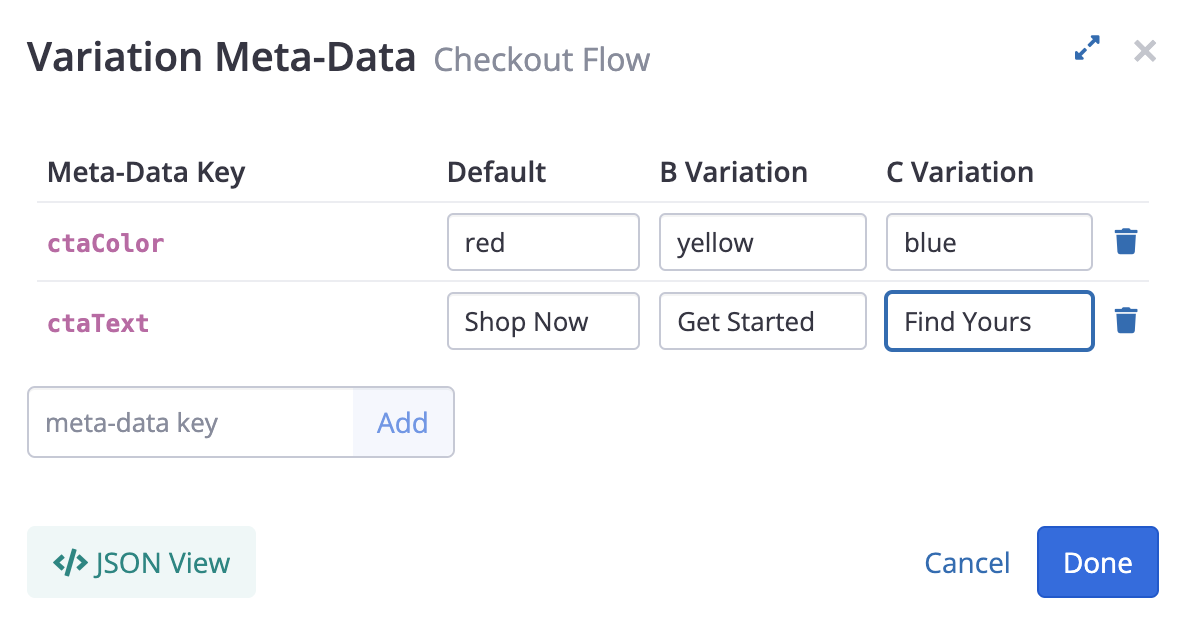
Once you've added the meta-data and saved your agent, you can call the agent using either the Local JS API or the Web Service API, and the meta-data will be returned along with the selected variation in the md object provided in the response from Conductrics.
So, in this case, you can refer to md.ctaColor and md.ctaText to get the CTA color and text that "goes along" with the selected variation ("A"), and so on. You can use this information in whatever manner makes sense for your app. Here's an example of how that looks when returned by our API:
{
  "items": [
    {
      "a": "a-fdTA8Utw9n",
      "c": "C",
      "p": "s",
      "md": {
        "ctaColor": "blue",
        "ctaText": "Find Yours"
      },
      "s": "ok"
    }
  ],
  "sels": {"a-fdTA8Utw9n": "C"},
  "traits": []
}
Meta-Data Size LimitsThere are some limits to what you can add as meta-data, mainly to keep file sizes and response times low. Contact Conductrics if you have any questions about these limits:
- You can have up to 100 key/value pairs in the meta-data object.
- Each key can contain up to 100 letters, numbers, underscores, and dashes, but no whitespace or other special characters.
- Each value must be a "simple value" (string, number, or boolean), so no nested objects or arrays. String values are limited to 100 characters each.
Meta-Data with List AgentsIf you are using a List Agent, the
mdobject will contain a "nested" object for each selected variation. For instance, let's say the agent selects variationsBandD. In that case, you might get something like:"md": { "B": {"ctaColor": "blue"}, "D": {"ctaColor": "green"} }
Technical Notes
Session Identifiers and API Codes
- Session identifiers (important when calling the web service) must be a valid identifier, which we define as one or more ASCII letters, numbers, underscores, or dashes. Colons, spaces, or other characters are not allowed. The max length of an identifier is 100. As a regular expression that rule looks like
/^[A-Za-z0-9_-]{1,100}$/. - The "API Codes" for agents, choices, and goals are also all "identifiers" with the same rules as session identifiers.
- Your account code and API keys are also "identifiers" with the same validation rules.
- Any visitor features (aka traits) must be in the form
type:value, wheretypeandvalueare each valid "identifiers" with the same rules as session identifiers. For instancelead-source:emailoruser-type:vip.
Updated over 1 year ago