
Custom Visitor Traits API
You can use this Administrative API if you have a need to manage Custom Visitor Traits programmatically (rather than creating and updating them in the Conductrics Admin).
API Keys and suchTo keep this page relatively clear, we're omitting certain details from the example snippets:
- These examples assume that your account is available at
https://api-v3.conductrics.com. Your account may use a different endpoint (URL), especially if you're using a private Conductrics server or if your Conductrics account is located outside of the United States.- These examples show a pretend account code (
acc-xxxxxx). You will need to replace that with your actual account code.- You also need to provide the
adminAPI key for your account, either as a query parameter called apikey (so,?apikey=admin-xxxxxxxx) or as a HTTP header calledx-conductrics-apikey.All of the above details are available in the Conductrics Admin, under Developers > API Info & Keys. If you get an "Unauthorized" message when trying to use these APIs, it's likely that one of these items wasn't provided correctly.
Getting a List of Custom Visitor Traits
You can get the list of custom visitor traits for your account via a GET request to this URL (substituting your own account code):
https://api-v3.conductrics.com/admin/acc-xxxxxx/visitor-features
Let's say a few traits have been defined already in the Conductrics Admin, with two values for "status" and two values for "source", like so:
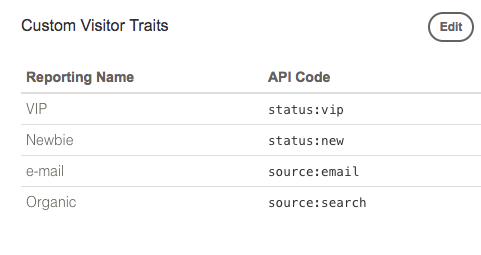
Conductrics will respond with a structure like the following:
{
  "status": 200,
  "data": {
    "features": {
      "status:vip": {
        "name": "VIP"
      },
      "status:new": {
        "name": "Newbie"
      },
      "source:email": {
        "name": "e-mail"
      },
      "source:search": {
        "name": "Organic"
      }
    },
    "types": {
      "status": {
        "name": "Status"
      },
      "source": {
        "name": "Source"
      }
    }
  }
}
Note that there are two types defined, but all four features appear together.
- The
featurespart is an object that contains your traits, keyed by the trait code as a name/value pair, which always includes a colon. Each trait is represented by a nested object that includes the friendlynamefor the trait. - The
typespart is structured similarly. It's an object that contains the trait "types" (the parts before the colons in the trait codes) and each type is represented by a nested object that includes the friendlynamefor the type.
Allowed CharactersLike other "API codes" in Conductrics, the codes for your traits and types may contain letters, numbers, underscores, and slashes, up to 100 characters. The friendly names may contain up to 50 characters.
Ignore the "id"Within the
featuresstructure, you may see an additionalidfield at the trait level (alongside thename) for some of your traits, such asid=#f12or similar. This is an internal identifier and can be ignored. Thecodeis what's important from an integration and usage perspective.
Editing your Custom Visitor Traits
To add or remove traits programmatically (or rename them), issue a PUT request to the same endpoint:
https://api-v3.conductrics.com/admin/acc-xxxxxx/visitor-features
The body of your request should be a JSON object that contains a features structure like the one from the GET request. For instance, if your intention was to add a source:affil feature to the fictitious list from the GET response shown above, you might PUT something like the following:
 {
  "features": {
    "status:vip": {
      "name": "VIP"
    },
    "status:new": {
      "name": "Newbie"
    },
    "source:email": {
      "name": "e-mail"
    },
    "source:search": {
      "name": "Organic"
    },
    "source:affil": {
      "name": "Affiliate"
    }
  }
}
CautionWhatever set of traits and/or types you provide replace whatever was set previously for your account. Therefore, you will probably want to
GETthe existing structure first as shown above, make whatever changes you need on your side, and thenPUTit back.
Updated over 1 year ago