
Conductrics Privacy Server
For companies who want to explicitly control or limit the visitor data used by Conductrics
The Conductrics Higher-Privacy Server (codename "CHiPS") is a simple open-source server which you can run "on-premise" or in your own "cloud" account.
The server sits conceptually "between" Conductrics and your web pages or applications, acting as a kind of gatekeeper or sanitizer. The intent is to provide a way to conduct targeted tests and optimizations while provably respecting user privacy as much as possible.
Privacy Server Overview
The Privacy Server serves several purposes, or "roles":
- Event Proxy, for sending sanitized/anonymized info to Conductrics
- Targeting Lookups, for performing geo and other potentially-sensitive lookups
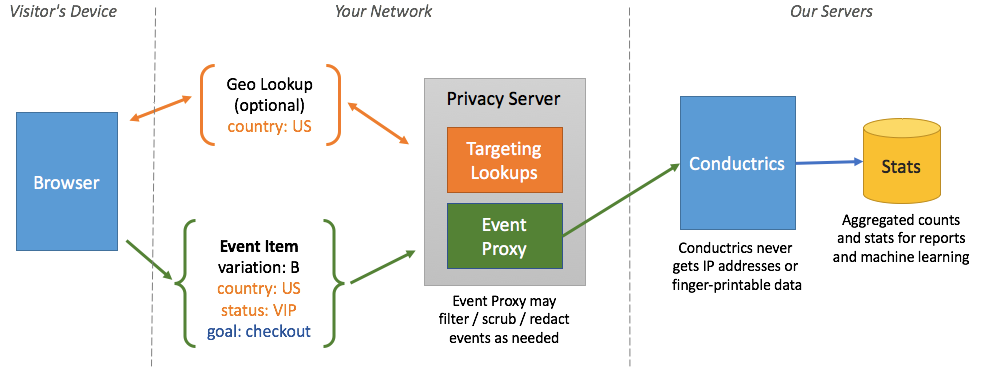
An overview of the privacy server's roles
"Event Proxy" Role
Normally, when selections or reward "events" occur in your site or app, little messages are sent back to Conductrics. These event messages are used to update our reports and machine learning models.
- Agent Code
- Variation Code
- Visitor Traits (if enabled in Conductrics)
- The date/time of the selection
- Reward amounts
You'll note that there is no visitor ID or similar in the messages. That's because Conductrics does not use these messages for individual visitor tracking, only to update its aggregated counts for reporting and machine learning purposes. But you have to take our word for it, and that's hard for you to prove to yourself or to a compliance team.
This is where the Event Proxy role of the Privacy Server comes in. You can tell Conductrics to send the event messages to your Privacy Server, rather than back to Conductrics directly. The privacy server then forwards the message on to Conductrics.
Because the privacy server is sitting"in front of" Conductrics conceptually, you get these benefits:
- IP Stripping - Conductrics doesn't end up getting the visitor's IP address when event messages are sent. The privacy server ends up getting an IP address (due to the underlying mechanics of the network connection), but doesn't forward the IP onto Conductrics. This is a pretty easy way to prevent the IP addresses of your visitors from "leaking" to Conductrics.
- Trait Filtering - The Privacy Server can filter out or "redact" any sensitive visitor traits via a simple whitelisting/blacklisting system. So, even if one team enables some new set of visitor traits from the Conductrics side, the privacy server can be set to refuse to forward them onto Conductrics as pages are actually viewed, etc.
- Blocking - You can tell the privacy server to block certain event messages entirely, again based on a simple whitelisting/blacklisting setting. Or you could block all event messages at the privacy server level if you needed to for some external reason.
Because the privacy server is open-source and very simple, it's easy for your team to read the code and verify the above claims. You can also "fork" the code to add additional filtering features, etc., that we may not have thought of.
"Targeting Lookups" Role
Conductrics comes with some simple "geo lookup" functionality. If enabled, the geo lookups are used to do things like show Domestic vs. International traffic in your Conductrics reports, create filtering or content-targeting rules based on state/region or city, and so on.
Use of the geo-related functionality is entirely optional. You don't have to use it at all. But if you do, a lookup needs to be done based on the visitor's IP address. Normally this lookup is done on Conductrics servers. We don't log or save the IP address for tracking or any other purpose other than to provide the functionality you've configured in Conductrics, but technically the IP address is still coming to us and we're using it to identify the visitor's location.
The Targeting Lookups role of the Privacy Server means that the geo lookups will happen on your privacy server, instead of on Conductrics servers.
Getting Set Up
Some setup is required on your side to run your own privacy server. Your IT or dev-ops teams will likely need to be involved initially.
In general there are three broad steps to get started:
- Get your privacy server up and running, either as a standalone server or on AWS Lambda.
- Configure your privacy server.
- Provide your privacy server's URL to Conductrics.
Running as a Standalone Server
- Clone or download the code from GitHub.
- Edit the .env file to specify required configuration values (see below).
- Use
make standaloneto start the server.
The server will listen on port 80 by default - specify your desired port with CP_PORT.
To actually expose the server to the outside world, you will generally need to place it behind a reverse proxy such as Nginx, HAProxy, Varnish, or similar. Or you may wish to place it behind a CDN or microservice layer of some kind. That's all up to you, as long as the server ends up being accessible via a
https://URL with an appropriate SSL certificate. We recommend using a clear but non-threatening hostname in your main domain, such ashttps://anonymous-data.yourcompany.com.
Keeping the server up via ForeverYou may want to run your standalone server using Forever or similar utility. The privacy server is based on Express, so you can use any such "process manager" typically used for Express applications.
Running on AWS Lambda
You can run the privacy server on AWS Lambda. A simple express-lambda module is provided which uses aws-serverless-express as a bridge between the privacy server and Lambda.
Deploying to Lambda with Claudia.js
You can use the Claudia.js deployment tool to get up and running.
First, make sure you have appropriate access credentials in your aws/credentials file, as discussed in the Configuring Account Credentials section of the Claudia installation instructions. This will probably already have been done if you've used the AWS SDK on your machine in the past.
Next, install Claudia:
npm install claudia -gNow you're ready to deploy using the claudia create command:
claudia create --handler express-lambda.handler --source bin --deploy-proxy-api --region us-east-1Make sure to substitute your desired region at the end of the line. Consult the Claudia command-line documentation for details about the create command. Note that the transpiled "source" files to deploy are in the bin subfolder, and the lambda context handler function is implemented in the express-lambda module (as shown above).
Assuming the deployment is successful, you should now be able to see a Lambda function called conductrics-privacy-aware-server in your AWS Console. There you can add the required configuration parameters, discussed next.
Don't want to use Claudia?We think Claudia makes the process easier, but you are welcome to deploy the code to Lambda manually by creating a "deployment package" by zipping up the contents of the
binfolder (so, express-lambda.js should end up in the root of the zip). The zip should also include the contents of node_modules, so copy your node_modules into the bin folder before you create the .zip file. Now you can deploy the .zip as you would normally with Lambda. See the Lambda documentation for details.
Finally, add the required configuration parameters as discussed in the next section. You can provide them as environment variables in the AWS Console, something like this:
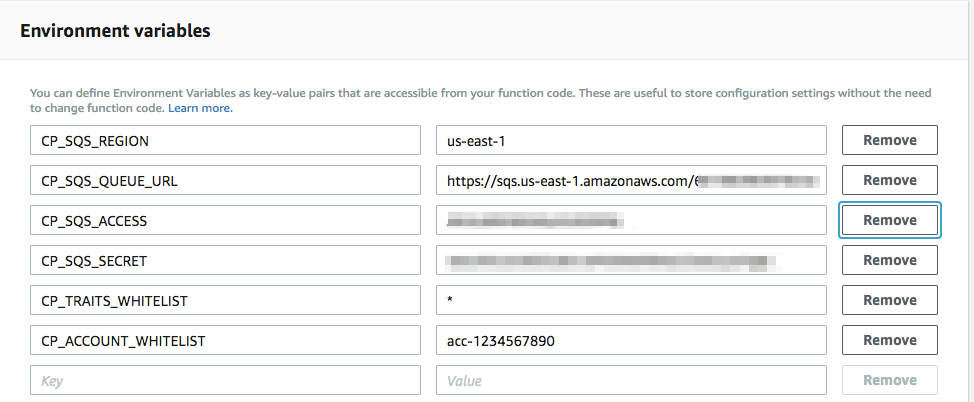
Providing configuration as Lambda environment variables in the AWS Console
There's plenty more you can configure in the AWS Console, such as a custom domain name for accessing your privacy server, its memory and concurrency settings (which affect performance), and more. There's more to it than we can explain here, but if you run into any questions or problems, feel free to contact us at Conductrics.
Adding Configuration Parameters
The next step is to configure your privacy server.
Conductrics will provide you with a set of configuration parameters to get started. A typical set of configuration parameters looks like this:
CP_ACCOUNT_WHITELIST=<your Conductrics account code>
CP_TRAITS_WHITELIST=*
CP_PORT=8000
CP_SQS_REGION=<provided by Conductrics>
CP_SQS_ACCESS=<provided by Conductrics>
CP_SQS_SECRET=<provided by Conductrics>
CP_SQS_QUEUE_URL=<provided by Conductrics>
CP_BATCH_ENABLED=true
Please see the Configuration Reference section below for details on what these parameters do. Contact Conductrics if you have questions about the best values to use for your specific scenario.
Note: The CP_SQS items will be created by Conductrics for use with your privacy server, and should be kept private (especially the "secret" key). Contact Conductrics if you need us to generate new keys for you.
Where to provide these configuration values?If you are running the privacy server in standalone mode, you can provide these either in the .env file in the project's root folder (the same directory as package.json) or as standard environment variables.
If you are running the privacy server on AWS Lambda, provide these as "environment variables" for your Lambda function. You can do this in the AWS admin, or programmatically, via CloudFormation, etc.
Providing Privacy Server URLs to Conductrics
Once configured, the last step is to give Conductrics the URL for your privacy server.
First, make a note of the base URL for your privacy server. It should be a secure/encrypted URL (starting with https:// rather than http://).
- In the Conductrics Admin, go to Settings > Deploy Targets and click Setup for your deploy target.
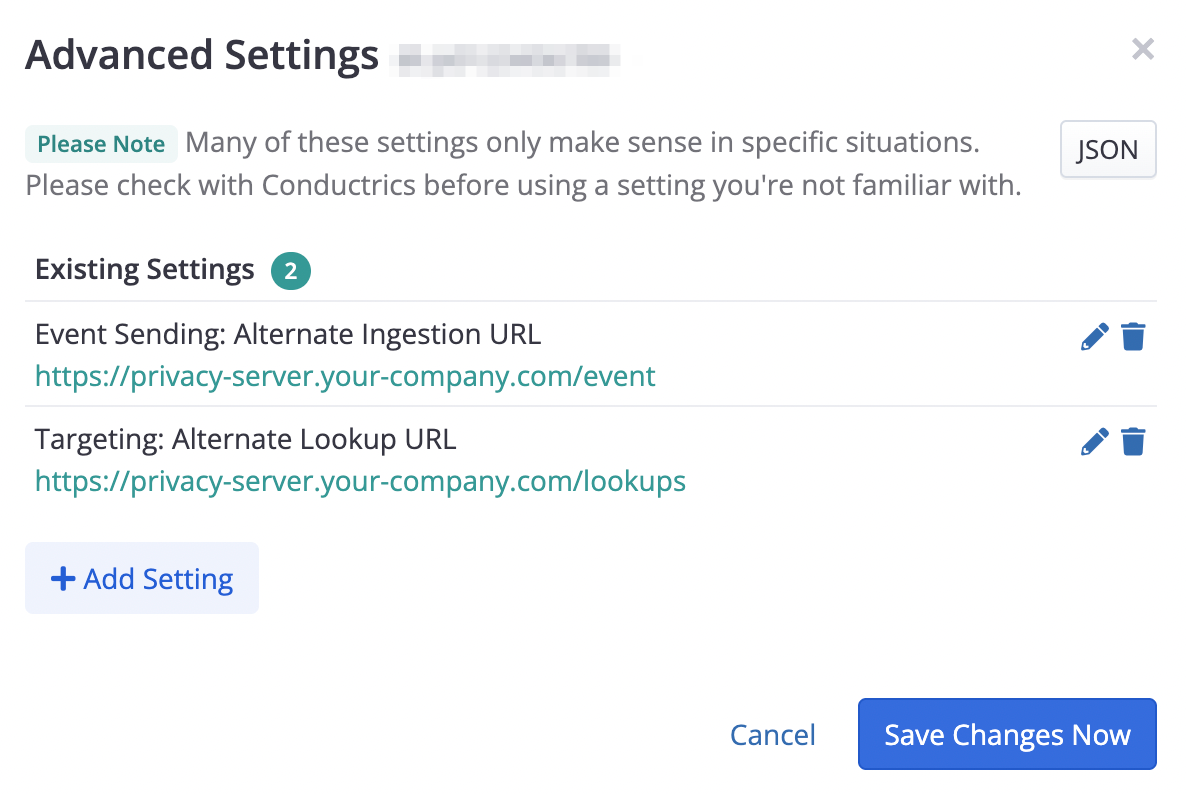
- Click the Advanced tab and then Advanced Settings to bring up the window shown below.
- Provide the URL for your privacy server's
/eventendpoint as the Event Sending: Alternate Ingestion URL setting. - Provide the URL for your privacy server's
/lookupsendpoint as the Targeting: Alternate Lookup URL setting.
Go ahead and save your changes to start routing information through your privacy server. If you use manual deployments you'll need to hit Deploy Now to roll out your new settings.
CSP AdjustmentsNote that if your pages use a restrictive Content-Security-Policy (CSP), you may need to whitelist these URLs in your CSP's
connect-srcdirective. See Content Security Policies for more about using client-side Conductrics with CSPs.
Configuration Values Reference
The available configuration parameters are explained below.
Many of the parameters discussed below are implemented as pairs of "whitelists" and "blacklists", which can each accept multiple values, wildcards, and regular expressions. See the "About Whitelists and Blacklists" section below for details.
Server-wide configuration values:
CP_ROLES_WHITELIST- The "privacy roles" to run on this server. The first two roles are enabled by default, but you can enable/disable them selectively by providing the desired role names (separated by spaces):event-proxy(enabled by default)targeting-lookups(enabled by default)session-store(coming soon)CP_ROLES_BLACKLIST- The "privacy roles" to explicitly not run on this server.CP_PORT- The HTTP port the standalone server should listen on (port 8000 by default). Not relevant when running on Lambda. You also may usePORTinstead ofCP_PORT(butCP_PORTwill take precedence).CP_ACCOUNT_WHITELIST- The Conductrics account code(s) that this server will accept. Set this to your Conductrics account code, which looks likeacc-12345678. If you have multiple account codes, provide them separated by spaces.CP_ACCOUNT_BLACKLIST- Conductrics account code(s) to NOT accept (not generally used).
Values specific to theevent-proxy role:
CP_SQS_QUEUE_URL- The URL for the SQS queue that the server will use to forward event messages to Conductrics, generally starting with something likehttps://sqs.us-east-1.amazonaws.comCP_SQS_REGION- The AWS region for the SQS queue, such asus-east-1CP_SQS_ACCESS- An AWS access key that has permissions to add messages to the SQS queue.CP_SQS_SECRET- The corresponding "secret" for the access key, so the server can add messages to the SQS queue.CP_TRAITS_WHITELIST- Controls the visitor trait strings that the server may forward on to Conductrics. You can use*to allow any trait type, meaning that no traits will be redacted before forwarding the event message to Conductrics. Or you could use a whitelist ofinterest:*to allow traits such asinterest:phonesandinterest:fashionbut redact anything else.CP_TRAITS_BLACKLIST- You can use this blacklist to specifically forbid certain traits from being forwarded onto Conductrics. Any blacklisted traits will be redacted from an event message before forwarding the message to Conductrics. For instance, you could use a blacklist ofgender:* age:*to specifically redact traits such asgender:m,gender:f, andage:adult.CP_BATCH_ENABLED- Set totrueto enable batching of event messages on their way to SQS. Generally recommended for standalone mode to improve throughput and reduce network usage. The default isfalsewhich means that each event message is forwarded to SQS in a separate message. Do not use batching if running on Lambda.
Values specific to thetargeting-lookups role:
CP_LOOKUPS_WHITELIST- Used to control the types of lookup types that the server is willing to make. The default is*for all lookup types. At this time, the only allowable lookup type isgeo.CP_LOOKUPS_BLACKLIST- Can be used to turn off lookup types.
Additional configuration parameters:
CP_LOGS- Enables and controls logging. No logging is done by default. If you wish to enable logging for development, you may provide a Morgan format string (for exampleCP_LOGS=dev), but keep in mind that such logging could itself be a liability in terms of the GDPR or other compliance standard.CP_IP_WHITELIST- Set to*to allow requests from all IP addresses.CP_IP_BLACKLIST- Provide to disallow processing from certain IP addresses.
About Whitelists and Blacklists
Many of the configuration parameters are implemented as a whitelist / blacklist pair.
A whitelist or blacklist can be made up any number of values, separated by spaces.
Each value in the whitelist or blacklist can be one of the following:
- A specific value, such as
status:vip - The
*wildcard alone, which means the list matches all possible values - A simple pattern using
*, such ascust/status:*which would matchcust/status:vipandcust/status:newbie - A regular expression starting and ending with
/, for example/cust/station:[0-9]{3}/which would matchcust/station:001orcust/station:199
For each blacklist/whitelist pair, the blacklist takes priority over the whitelist.
Example 1: Allow all traits:
CP_TRAIT_WHITELIST=*Example 2: Allow all traits, except ones like gender:m or age:adult, etc:
CP_TRAIT_WHITELIST=*
CP_TRAIT_BLACKLIST=cust/gender:* cust/age:*
Example 3: Allow traits like status:vip and station:123 but redact traits like station:009:
CP_TRAIT_WHITELIST=cust/status:* /cust/station:[0-9]{3}/
CP_TRAIT_BLACKLIST=*.009
Example 4: Explicitly redact all traits
CP_TRAIT_BLACKLIST=*The above whitelist / blacklist examples are for whitelisting or blacklisting traits, but the same syntax applies to the other whitelist / blacklist pairs in the configuration reference above.
Updated over 1 year ago