
Mutually Exclusive Agents
A Simple Way to Deal With "Colliding" Tests
Let’s say you want to run two or more test on the same web page, or same ‘area’ in your app. You would like to ensure that each user only gets assigned into at most, one of these tests.
This can be a critical requirement when:
- More than one test is trying to modify the same element in the page or the app. If both test try to simultaneously modify the same object, you would conceptually "break" your site or application.
- You need to keep the tests separate for a business reason.
Solution: Mutually Exclusive Tests
In Conductrics, a Mutually Exclusive Test (MET) defines a set of individual tests that says that any given visitor should only be active in one of the selected tests.
To set up a MET, create two or more test agents in the standard way. You see the agents in your agent list "normally", something like the following:
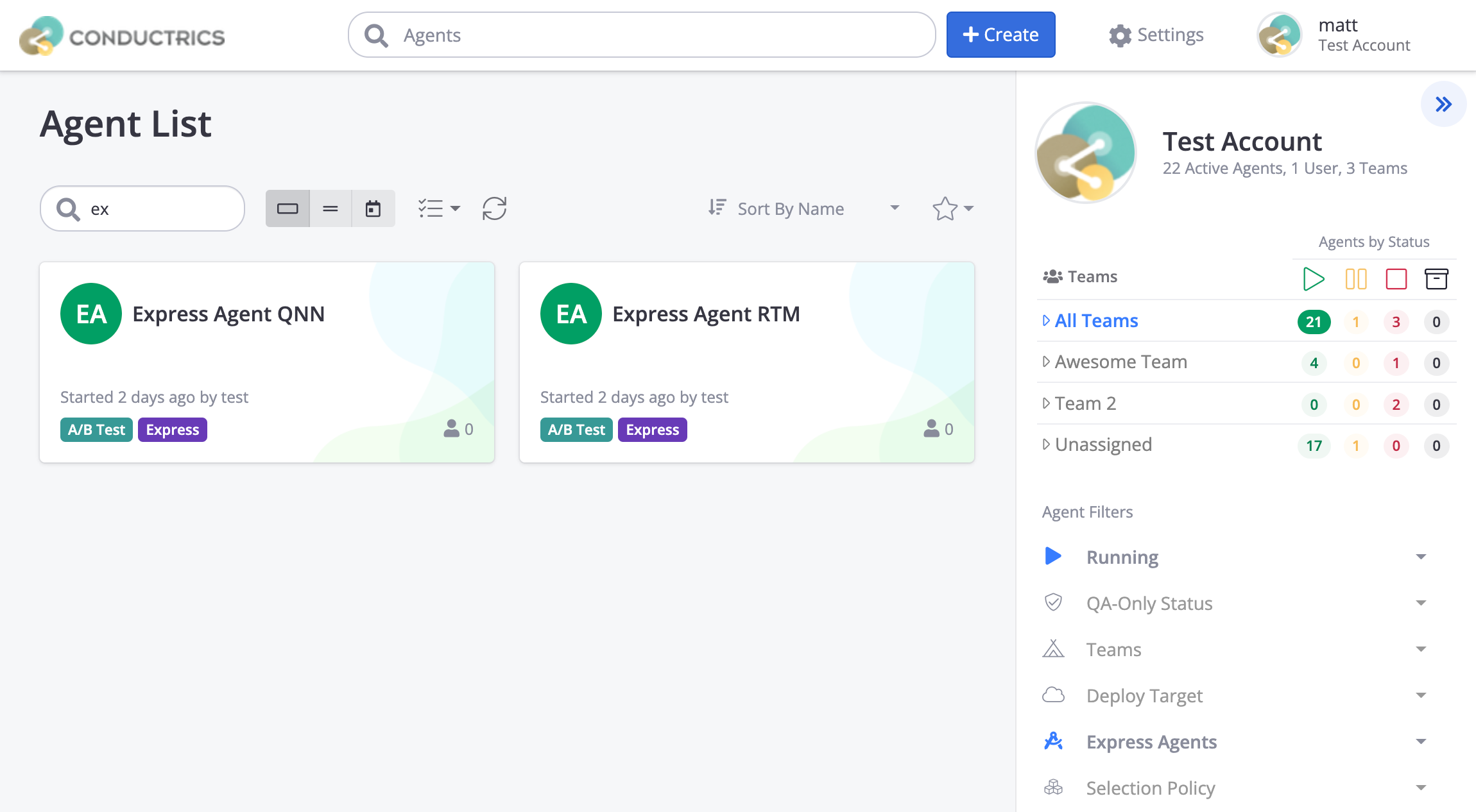
To create the Mutually-Exclusive Test:
- Hit Create at the top of the page (the same button you used to create the individual tests).
- Click Mutually Exclusive near the bottom of the "What's your overall objective?" page, as shown below.
- Choose your two (or more) individual test agents.
- Provide a name for the Mutually-Exclusive "bundle" that you're about to Create.
- If you are using Teams in Conductrics, you can choose the Team that you'd like to assign the Mutually-Exclusive bundle to.
- Hit the Create button to create the Mutually-Exclusive relationship.
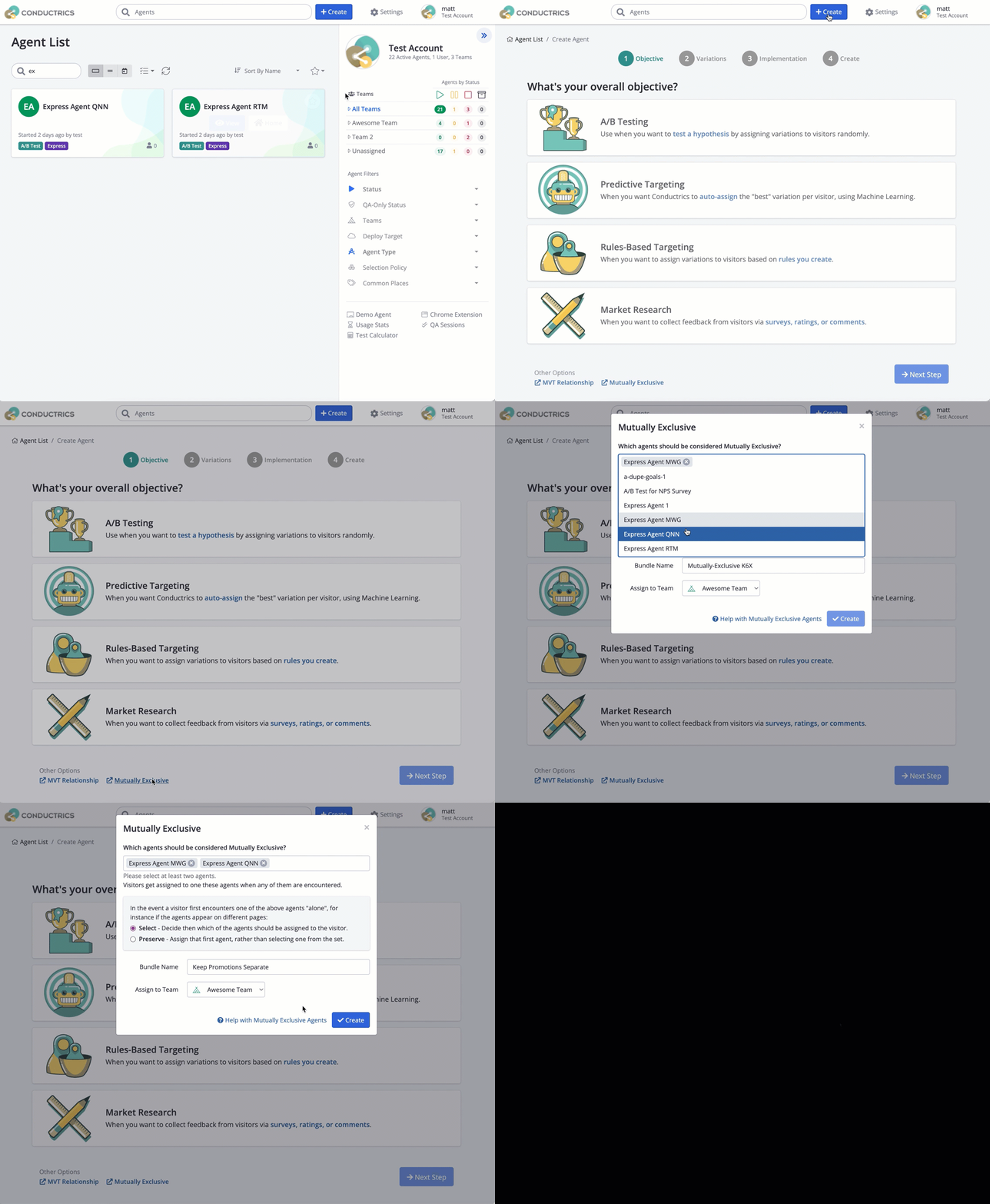
Now the two tests you selected will be considered "mutually exclusive" from one another. When a visitor first encounters either of the individual tests, Conductrics will decide whether that visitor should enter Test 1 or Test 2 (with equal probability).
The selected test assignment will remain "assigned" to that visitor for subsequent views.
Changing the WeightsBy default, the ME relationship will assign equal weighting to the individual tests in the relationship. In other words, if there are two individual tests, about 50% of the visitors would get selected to enter one of the tests, and about 50% would enter the other. If you want to change that weighting, go to the ME "Parent" agent in the Conductrics Admin and hit Manage Variations in the right sidebar. From there you can adjust the weights as you wish. See the next section for more.
Starting the Mutually-Exclusive AgentIf you're creating a Mutually-Exclusive relationship for agents that are already running, you'll need to "Start" the ME agent to activate the relationship. Hit the Stopped button at the top of the ME agent's page and change the status to Running.
If the child agents are Stopped, starting the ME agent will also set the child agents to Running.
The Mutually-Exclusive Relationship is Itself a "Test"
When you create a Mutually-Exclusive Relationship as discussed above, you have essentially created a new Conductrics agent which "oversees" the ME relationship. This means that the ME "Parent" agent can be configured to:
- Use Custom Weights, if you want more visitors to be assigned to one of the individual tests than the others. Go to the ME "Parent" agent in the Conductrics Admin and hit Manage Variations in the right sidebar, then turn on the Custom Weights switch.
- Use Targeting Rules, if you want to assign some visitors to one of the individual tests based on conditions, perhaps using Custom Visitor Traits as the basis for the assignment. See Mutually Exclusive Filtering for details.
- Use Predictive Selections, if you have a scenario where you want Conductrics to "learn" which of the mutually-exclusive tests should be assigned to a given visitor.
Also, since the ME agent is itself just another agent, it needs to be added to the required Deploy Targets. Optionally, you can link Goals to it and that way the MEP’s reporting will give you stats/counts at the “ME Split Level” which could be useful for your future analysis or debugging. Connectors can also be optionally linked to it if needed.
Changing the "Member" Agents In a Mutually-Exclusive Grouping
You may find yourself in a situation where you need to change the agents in a mutually-exclusive grouping. For instance, you may want to remove one of the agents and replace it with some new agent that you're planning on launching.
The Conductrics Admin currently won't allow you to change the "member" agents within an existing Mutually-Exclusive grouping. You can, however, delete the "parent" agent, which should free up the "members" to be included in a new, fresh ME grouping, as follows:
- Click on the ME "parent" agent in the agent list.
- Stop the ME parent.
- Delete the ME parent via the Delete button at the bottom.
This will not delete the member agents, just the ME relationship.
Now you should be able to create a new ME grouping as you did originally (go back to the Agent List and create the new grouping as discussed above).
Deleting Member AgentsLikewise, you'll find that the Admin does not allow you to delete an agent if it is currently a member of an ME grouping. You'll need to delete the grouping as discussed above to make its member agents eligible for deleting.
Calling Mutually-Exclusive agents via the API
If you are using our Runtime API, you can continue to get selections from your mutually-exclusive agents normally. You do not need to explicitly call the "parent" agent - it will be called implicitly for you.
-
If you ask for a selection from an agent that's in a mutually-exclusive relationship, and the agent you're calling is selected for the visitor, you will get back a normal selection response object.
-
If the agent you're calling is not selected for the visitor, you will get back a selection response object with the
c(choice) set to an empty string andp(policy) set toxto indicate that no selection was applicable.
For instance, you might see something like the following in the response from the API:
{"a": "a-agent-1", "c": "B", "p": "r"} // normal selection from "assigned" agent
{"a": "a-agent-2", "c": "", "p": "x"} // non-selection from "other" agent
The sels portion of the API response will contain the same variation codes as the c values above, so something like "sels": {"a-agent-1": "B", "a-agent-2": ""}
Mutually-Exclusive FAQ
Q: What happens if I stop one of the individual/child agents in a ME relationship?
A: The ME "Parent" agent will only assign visitors to "child" agents that are active (that is, Running or Paused). If you stop one of the "child" agents, visitors will no longer be assigned to that child agent (so, if there were only two child agents to begin with, all visitors will be assigned to the other child agent). If a visitor was assigned to a "child" agent in the past, and that child agent is now stopped, they will be re-assigned to one of the other agents.
Note that if you wanted to “stop” one of the child agents but didn’t want the weightings between the individual tests to change, you could “pause” the child at one of its variations (presumably “A”). See next question.
Q: What happens if one of the "Child" agents is running, and another is "Paused"?
A: The "Parent" agent will still be splitting visitor traffic between the child agents, and the child agents will behave "normally". So, assuming two child agents, each with an A and B variation, the "Running" child agent will get 50% of the traffic, with 25% going to its A variation and 25% to its B variation (assuming you haven't adjusted the weightings). The "Paused" child agent will get the remaining 50% of visitors, all of which will get assigned to whichever variation it was "Paused At".
Q: What happens if I stop the ME "Parent" agent?
A: If you stop the ME "Parent" agent via the Conductrics Admin, its "Child" agents are stopped automatically. If you were to re-start any of the child agents, they won't make any selections (because they will think they need an "assignment" from the "Parent" agent). If you want the individual agents to start working individually again, either remove them from the ME grouping (via the ME Options button on the "Parent" agent's page in the admin), or delete the "Parent" agent.
Q: If I'm using Manual Deploys, do I need to re deploy the involved DTs after starting a ME agent?
A: Yes, any changes to any of the agents (including new Mutually Exclusive agents or any of its children) would require a manual “Deploy Now" for them to be live.
Updated over 1 year ago