
Data Layer Support
Using a data layer to pass information to Conductrics or "downstream" analytics
Conductrics provides support for using a "Data Layer" to help with:
- Passing information to Conductrics, such as custom visitor traits or view-state changes.
- Getting information from Conductrics, such as selections made by your agents so you can feed them to analytics or other systems.
You may already be using a Data Layer on your pages, perhaps in conjunction with Google Tag Manager (GTM) as discussed in their documentation. There are many helpful articles about the general concept of a Data Layer and why they can be helpful. We recommend Simo Ahava's introduction or a bit of your own Internet research if you're not familiar.
This documentation assumes that you're using an array-style Data Layer, which is the type generally found in GTM / GA implementations (see Google's doc page), where the Data Layer is typically called
window.dataLayer. It's also common in Adobe Analytics implementations (see Adobe's doc page), where it may be known aswindow.appEventData.If your pages instead use a Tealium-style Data Layer object, aka Universal Data Object (
window.utag_data), please refer instead to our Tealium-Style Data Layer doc page.
If you don't have an existing data layer on your pages currently, but want Conductrics to push events into a similar structure for your own use internally or for integrating with some other tool/service, consider using our Simple Data Layer support.
Enabling Data Layer Support
First, you need to confirm that you have an existing Data Layer in your page or script code. If it doesn't exist already, you'll need to create it. This usually means initializing a plain old JavaScript array in the global window scope called dataLayer, using syntax something like:
window.dataLayer = [];
A few things to note before moving on:
- The name
dataLayeris customary, but your page may use a different name. Make a note of the actual name in use. For instance, if you use Adobe Analytics in your overall analytics implementation, the name might beappEventData. - Your data layer might be "initialized" with some values already in it (between the square brackets above), which is fine. You may also see some values being "pushed" in via
dataLayer.pushimmediately afterward, which is also fine. - Please see the GTM dev guide or Simo's article or other guide online for a complete explanation of creating the data layer initially.
Once you've verified that you have a data layer to work with on your side and know its name, you can set up the Data Layer integration in Conductrics.
If You're Using Conductrics Express
- Go to Settings > Deploy Targets and click Setup for your deploy target.
- Under Data Layer Integration, check Enable Data Layer Integration.
- If your data layer has a name other than
dataLayerin your actual pages, open up the little Options area and supply the custom name there.
If You're Using the JavaScript API
- Go to Settings > Deploy Targets and click Setup for your deploy target.
- Under Data Layer Integration, check Enable Data Layer Integration.
- Provide the name of your data layer as the
dataLayerparameter when you call theClientApiconstructor, as discussed under Additional Parameters in the Runtime API Reference.
Once you've done one of the above as appropriate, you can think of Conductrics as "aware" of your data layer. Now you can take advantage of any of the various integration features explained in the rest of this page.
Passing Custom Visitor Traits to Conductrics
You can pass Custom Visitor Traits to Conductrics via your data layer.
How exactly you "push" the traits into the data layer may depend on how your pages are built, whether you are using Google Tag Manager to monitor or populate your data layer, whether the data is coming from other marketing/analytics software or your own code, and so on.
In any case, "pushing" traits to Conductrics is fairly straightforward. Just use the normal JavaScript push method to add a key/value object to the data layer, as follows:
- The key name should be
conductrics_traits - The value should be an array, with the trait code(s) you want to pass (including the colons).
For example:
dataLayer.push({
  conductrics_traits: ['source:email', 'status:vip']
});The assumption is that you've already defined the custom traits (such as
source:emailshown here as an example) in the Conductrics admin. See Custom Visitor Traits for details. If you attempt pass a custom trait via the data layer that hasn't been defined first, it won't do any harm but Conductrics will ignore it.
By default, Conductrics "listens" for traits using the key/name
conductrics_traits. If needed, you could change the name Conductrics uses in the data layer options.
If you need to add the traits one at a time or at different moments while your page loads, you might want to use "command array" syntax to add traits to the conductrics_traits array in your data layer:
// first, when initializing the data layer...
window.dataLayer = [];
window.dataLayer.push({
  conductrics_traits: [] // empty array
})
// later, when it comes time to push traits into the data layer...
dataLayer.push([
  ['conductrics_traits.push', 'source:email']
])
// and later, and so on...
dataLayer.push([
  ['conductrics_traits.push', 'status:vip', 'pet:cat']
])
About that "push" syntax and other data layer "merging"Internally, Conductrics uses the Data Layer Helper from Google, which means it uses the same conventions to process/merge changes to the data layer as Google Tag Manager. This is why you can use
conductrics_traits.pushto add to an existing array as shown above. We encourage you to become familiar with how keys are merged and overwritten as you add them to your data layer.
A note on the timingWhen Conductrics first executes (during page load), it will look in the data layer to see if any traits have been provided via
conductrics_traitsas suggested above. It will use those in addition to any traits that have been provided to the "Javascript Preboot" as discussed in Custom Visitor Traits.If you are using the Single Page Apps support, Conductrics will look in the data layer again if the view-state changes. Aside from changes to the view-state, traits added to the data layer after Conductrics first loads have no effect.
Passing a View State to Conductrics
If you are using our support for Single Page Apps in Conductrics Express, you can notify Conductrics of the current view state via your data layer. For instance, to let Conductrics know that the visitor has just reached/activated a view state called view-cart, you would use something like the following:
dataLayer.push(
  {conductrics_vstate: 'view-cart'}
)
Any Express agents that are set up to "wake up" at the new state should respond by selecting variations and making the corresponding page changes.
- When Conductrics first runs, it uses the most recent view-state pushed through the data layer (if any) as the initial view-state.
- After Conductrics has run, any subsequent push of a new view-state through the data layer is interpreted as a view-state change.
By default, Conductrics "listens" for changes in the view-state using the key/name
conductrics_vstate. If you wish, you can change the name Conductrics uses in the data layer options.
Any view state code you pass via the data layer must already be known to Conductrics, or it will be silently ignored. See Single Page Apps for more details about view states.
Using Data Layer Values in Agent Conditions
You can use values from your data layer in Conditions within Conductrics.
- For instance, you can use them in "Agent Applies To" conditions to include or exclude certain visitors from a test or optimization.
- Or you can use them in "Targeted Selection" conditions to always expose certain visitors to get the "B" variation.
To use your data layer values in agent conditions:
- In the Conductrics Admin, go to Settings > Visitor Data > Other Visitor Data and look for the Data Layer Parameters option. In there specify the keys/names of the values that you'd like to be able to use in your conditions. Note that you can use dots in the keys/names to access "nested" or values if your data layer arranges its data in a "hierarchy".
- Now return to your agent and note that the keys are available in the dropdown on the left when creating a new condition. You can use a variety of operators to include/exclude visitors or whatever is needed, specify multiple values, various combinations of "and" vs "or" logic, etc.
A note on the timingConductrics reads the current value from the data layer when the condition is actually evaluated. Generally that means when Conductrics first runs, as the page is initially loading. If you are using our support for Single Page Apps, the values will be re-read if a view-state change causes your conditions to be re-evaluated. It's up to you to add any relevant values to the data layer before Conductrics needs them.
Pushing Variations/Selections into your Data Layer
You may want to pass the agent selections that your agents make to your other analytics packages.
Each time one of your agents makes a selection it will push an event item into the data layer. You can easily use a "tag manager" such as Google Tag Manager (GTM) to respond to the event, pushing the information into whatever analytics/marketing systems you wish.
Let's say we're talking about a fictitious agent with code a-a123456789, and it has just selected variation b. Conductrics would push an item into your data layer that looks like this:
dataLayer.push({
  'event': 'conductrics_selection',
  'conductrics_selection': {
    item: {
      a: 'a-a123456789',
      c: 'b',
      p: 'r'
    },
    ep: 'api'
  }
});
Within the event data, the item part is the same response that you would get from the Conductrics Runtime API (see the Runtime API Reference for details):
item.acontains the agent's codeitem.bcontains the selected variation's codeitem.pcontains the Selection Policy, such asrfor random
In addition, the ep value will be set to api if the selection was made in response to a call to the Local Javascript API, or wax if the selection was triggered by Conductrics Express. You would use this to differentiate between Express and API-originated selections in your analytics if desired.
By default, Conductrics uses the key/name
conductrics_selectionwhen pushing selected variations into your data layer. If you wish, you can change the name Conductrics uses in the data layer options.
Triggering Conductrics Goals/Rewards from Data Layer Events
You can have Conductrics watch for certain events being pushed into the data layer, triggering a goal so that your agents get rewarded when the data layer events occur.
When setting up a goal in the Conductrics Admin, just choose "hits Data Layer event" in the "Trigger" section, as shown below. Then provide the event name that should trigger the goal. For instance, if you want to send a goal to your Conductrics agents when an item like {"event": "purchase"} gets pushed into your data layer, you would provide purchase as the event name, as shown below:
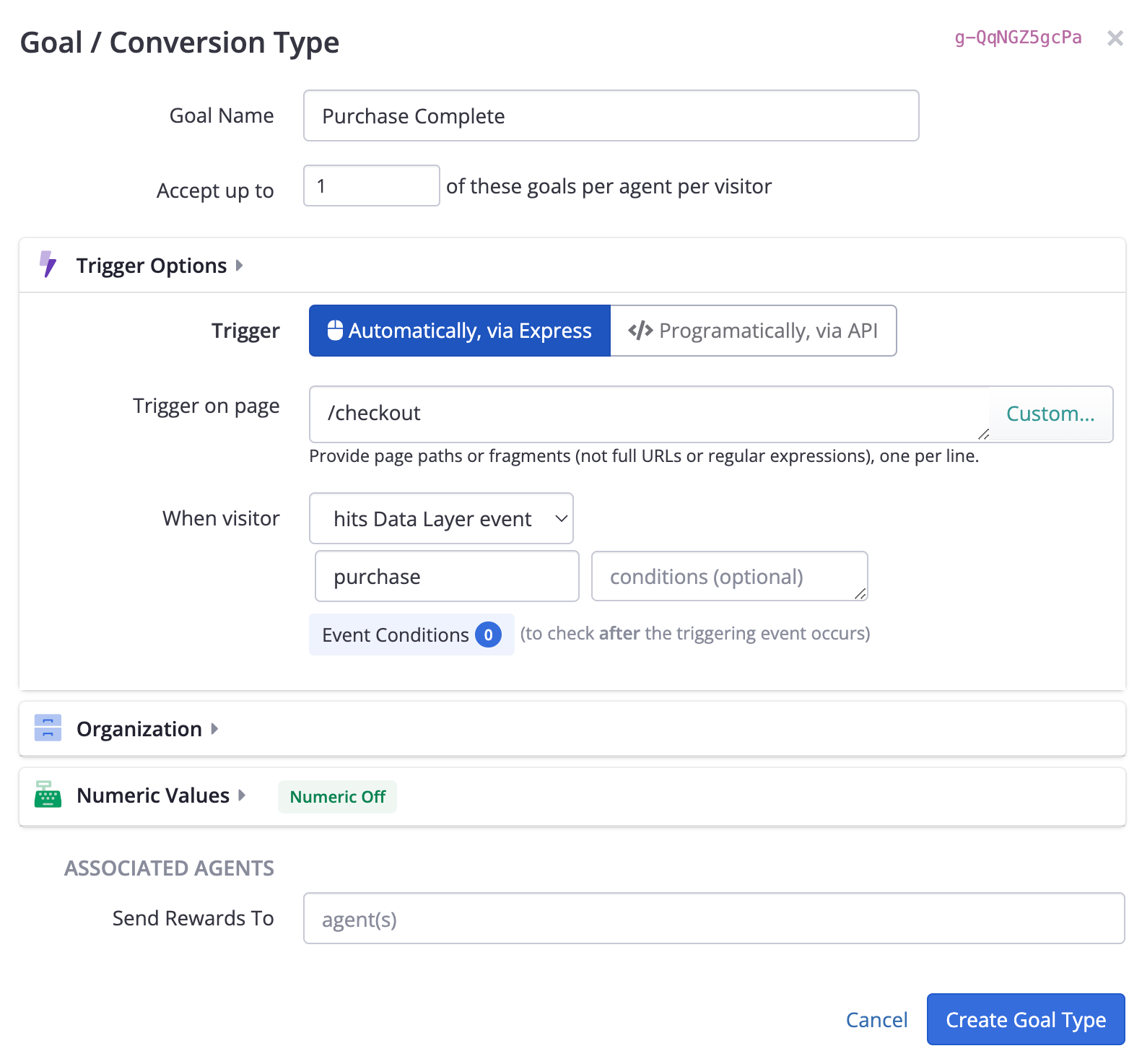
Setting up a goal to be trigger when the "purchase" event is pushed into the data layer
Data Layer Conditions
If needed, you can also provide conditions based on other values in your data layer.
- Provide the data layer key name and value in the "conditions" field shown above, separated with an
=sign. - For instance, if you wanted to specify that the goal should fire for "purchase" events only if the product category is "phones", you could provide something like:
product.category=phones - You can also provide a regular expression using
/notation, such asproduct.sku=/phone-[0-9]+/to match product SKUs such as "phone-123" and so on. - If you need to provide multiple conditions, put each on its own line.
Getting Numeric Reward Values from the Data Layer
For e-commerce and other similar scenarios, you can also have Conductrics read a numeric value for the goal from the data layer. For instance, if the purchase amount will be available in the data layer as something like {"event:" "purchase", "amount": 9.99}, you can provide the key ("amount" in this case) under Pull Value From, like so:
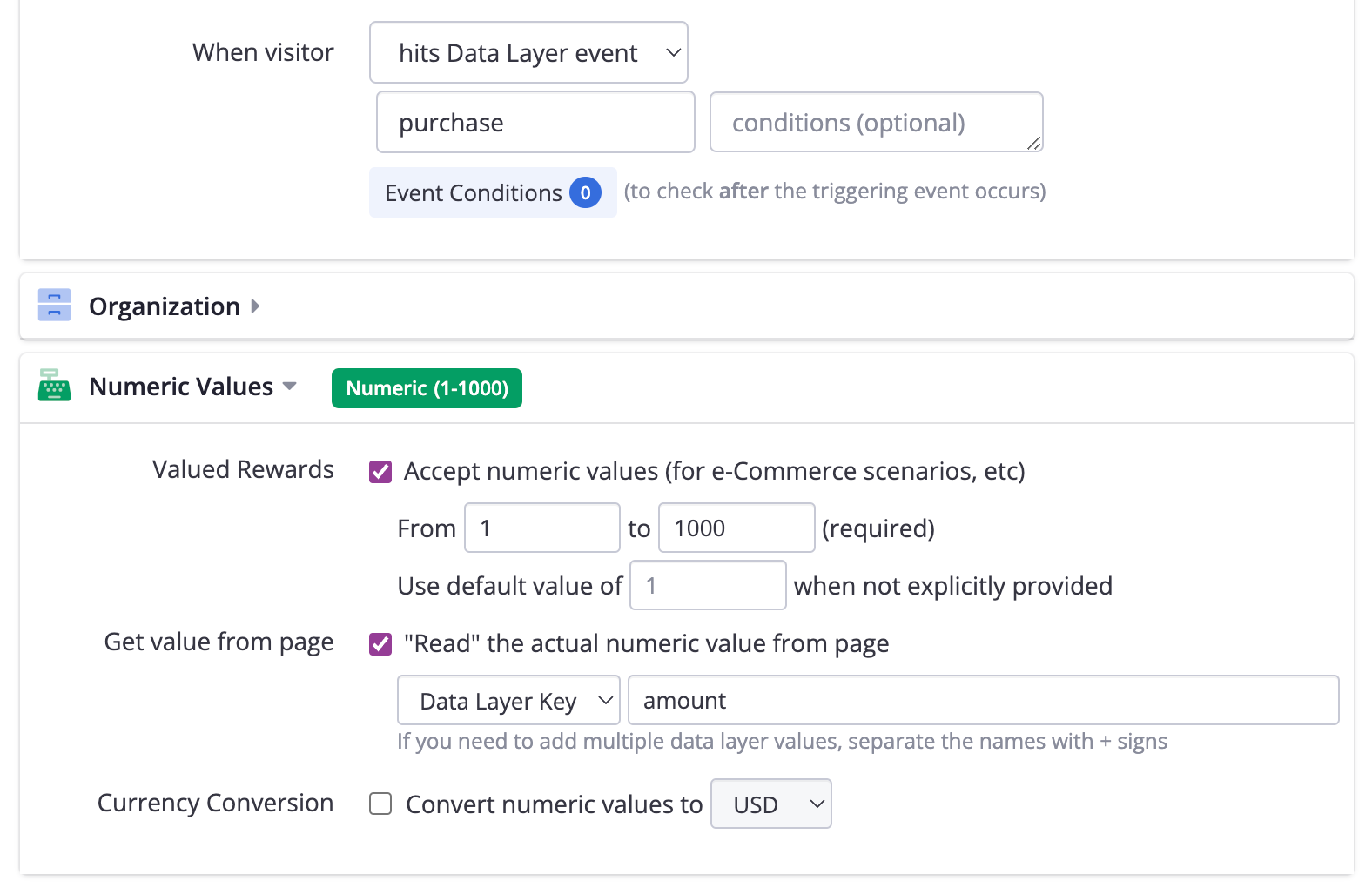
You can have Conductrics read a numeric value from the data layer.
Sending API "Commands" to Conductrics using the Data Layer
If desired, you can use your dataLayer to ask Conductrics to execute "API commands" from its Runtime API. Let's say you want to notify Conductrics that the goal with API code g-123456789 has been been reached (perhaps an important page has loaded, or the visitor has completed a form or reached some other "conversion").
dataLayer.push({
  conductrics_commands: [
    {g: 'g-123456789'}
  ]
});
Please refer to the Runtime API Reference for full details about the "command" items you can provide in the conductrics_commands array, but basically you can:
- Send goals, as shown above. For goal events that have a numeric value conceptually (such as an e-commerce purchase), you can also provide a
vproperty with the actual value, such asv:19.99. - Make agent selections. Send in a selection command with the appropriate agent code, such as
{a: 'a-bYFPtzHxbL'}. Conductrics will make the selection as soon as possible, and push the selection it makes into your data layer (see Retrieving Agent Selections via your Data Layer above). In this way you can interact with the Conductrics selection engine entirely through the data layer in many cases.
If you wish, you can use the API Testbed to assemble the "commands" to send into the data layer. That way you'll ensure that you have the correct codes for each goal or agent, etc.
By default, Conductrics looks for the key/name
conductrics_commandsto detect when you've pushed API commands into your data layer. If you wish, you can change the name Conductrics uses in the data layer options.
Advanced Data Layer Options
Excluding Selection Events by Policy
You can tell Conductrics to filter out variation selection events by Selection Policy. For instance, you may want "random" selection events (that is, for agents that are running an A/B test) to be pushed into the data layer, but not "fixed" selection events (that is, agents that make their selections via fixed targeting rules).
Go to the "Advanced" settings for your deploy target (under Settings > Deploy Targets) and add the Data Layers: Exclude Selection Policies setting, with the policy (or policies) that you would like to exclude as the value of the setting. For example, you would provide f to exclude "Fixed" selections, or r to exclude "Random" selections.
Data Layer Key Names
In some situations you may might want to customize the keys/names that Conductrics uses to access the Data Layer. Go to the "Advanced" settings for your deploy target (under Settings > Deploy Targets) and provide the new names as needed.
- Override
conductrics_traitswith Data Layer: Key Name for Traits setting - Override
conductrics_vstatewith Data Layer: Key Name for View State setting - Override
conductrics_selectionwith Data Layer: Key Name for Selections setting - Override
conductrics_commandswith Data Layer: Key Name for Commands setting
Updated over 1 year ago