
Visitor Data & Privacy
Understanding what is, and is not, "tracked" by Conductrics
Conductrics is designed to be particularly useful in situations where less "tracking" is desirable. Conceptually, we only collect the bare minimum amount of data to drive our reporting and predictive engine. This section will help you understand how to use Conductrics to be compliant with your company's privacy policies and regulations (e.g. GDPR).
Types of Information and Where Each is Stored
1) Session State - This is a record of the variations that have been selected for each agent, the goals/conversions that have been reached, and any Custom Visitor Traits for the visitor, plus a few other timestamps and such. This record is needed to ensure that if a visitor has been selected for Variation B in the past, they continue to get that selection on subsequent page views, and so on.
-
When using Conductrics Express, or the Local JS API, the Session State is kept in the browser. The session state is not sent to or shared with Conductrics for ad-hoc "tracking", and no unique identifier is shared with or sent to Conductrics.
-
When using our REST-style API (aka Web Service), you have a few options as to whether the Session State should be stored on your side or by Conductrics. See the next section for details.
-
If using our Native Mobile support, the Session State is stored on the user's device. Conductrics does not retain visitor-level information in this configuration.
2) Event Messages - These are small pieces of data that are sent to Conductrics, to power our reporting and predictive engine. As these event messages come streaming in, we use them to update our internal counts/statistics, and then we throw the messages themselves away.
There are two types of event records (examples of each are in the next section):
-
Selections made by agents ("Agent 1 just selected Variation A for a visitor").
-
Goals reached by visitors ("A visitor just reached Goal X for Variation A").
3) Counts / Statistics - Maintained on Conductrics servers, these are the aggregated counts of selections made and goals reached per variation.
-
Aggregated counts of selections, with breakdowns by date, variation, and visitor traits.
-
Aggregated counts/totals of goals, with breakdowns by date, variation, and visitor traits.
How is the Session State Stored?
Again, the "Session State" is a record that includes the variations that have been selected for each agent, the goals/conversions that have been reached, and the associated visitor traits (if any), plus a few other timestamps and such.
Where this record is stored depends on how you're using Conductrics:
-
If you're using our client-side JavaScript support (includes Conductrics Express and the Local JS API), the Session State record is stored in the browser's Local Storage by default. There's also an option to store the record as a client-side cookie instead (necessary if you want the visitor state to be shared between multiple "subdomains"). See Script Tag Installation for details.
-
If you're using our REST API (aka Web Service), you have some choices:
- You can use the Self-Storage Mode for REST API, in which case the Session State record remains "on your side" in your own database or other datastore. Conductrics does not retain visitor-level information in this configuration.
- Or you can use our REST API using a more-traditional unique identifier approach, in which case the Session State record is maintained on our servers. This means that the REST API may not be appropriate in scenarios where unique identifiers aren't allowed, or where you want to strictly limit what third parties have any visitor-level records at all. After a period of inactivity for a given visitor (30 days by default), the record is discarded automatically.
- You can also self-host our REST API as an AWS Lamdba function within your own Amazon Web Services account, in which case the Session State is kept in a datastore that you provide. Conductrics does not retain visitor-level information in this configuration.
-
If you're using our "On-Device Mobile" support, the Session State record is stored on the user's device using the normal app-data-storage API provided by the mobile OS (SharedPreferences for Android, UserDefaults for iOS, AsyncStorage for React Native). There is also an option to use the REST API for native mobile apps. See Options for Mobile for more.
What do the Event Messages look like?
Here is an example of the event message sent when a variation is selected:
{
  "t":"d",
  "a":"acc-0123456789:my-test-id:p",
  "c":"C",
  "p":"r",
  "fs":["cust/cat:shoes"],
  "dts":1506458807
}-
The
tline means the "type" of message is "d" for "decision" (aka selection). -
The
aline identifies the Conductrics agent (which "test" is this message for?). -
The
cline indicates the variation that was selected (in this case, Variation C). -
The
pline indicates that the variation was selected using a random selection policy. -
The
fsline indicates the Visitor Traits that the visitor had (at the time of selection). In this example, there's one trait being sent (presumably indicating that the visitor is viewing a product category page about shoes). Which visitor traits get sent is up to you, and the codes for your custom visitor traits do not have to be semantically meaningful (they can just be a bunch of random letters, etc). -
The
dtsline indicates when the selection was made (as a timestamp).
Here is an example of the event message sent when a visitor reaches a goal:
{
  "t":"r",
  "a":"acc-0123456789:my-test-id:p",
  "c":"C",
  "p":"r",
  "fs":["cust/cat:shoes"],
  "dts":1506458807,
  "g": "my-goal-id",
  "v": 19.99
}
As you can see, this record is very similar, except that:
-
The
tline indicates a "type" of "reward" (aka goal). -
The
gline indicates the code for the goal that was reached. -
The
vline indicates the numeric value of the goal, if applicable (for instance, in an e-commerce scenario, you might have a goal value of19.99or similar). Otherwise, this value will generally be1.
Note that neither type of message includes a unique identifier for the visitor.
Visitor traits should not be personally identifiable (No PII)Visitor traits are meant for maintaining statistics in the aggregate.
- You may use them to help "categorize" or "segment" your visitors - so things like product categories, registration status, paid search campaigns, or similar are examples of helpful and appropriate data to pass as visitor traits.
- You may NOT use them to identify your visitors (so, you may not send IDs, account numbers, or the like as visitor traits). Doing so would be a violation of your terms of service, and would also not be helpful in terms of reporting or improving agent predictions. We limit the number of actual visitor trait values ("cardinality") to ensure that you don't accidentally provide identifying values. See Custom Visitor Traits for further discussion.
What about IP Addresses and so on?
IP Addresses
-
Conductrics does not store the visitor's IP address.
-
It's worth noting that when the event messages (see above) are sent to Conductrics, the underlying HTTP request does include the visitor's IP address (as all HTTP requests do). But we do not store it.
User Agent
-
Similarly, Conductrics does not log or store the visitor's user-agent string (which identifies the browser and operating system they are using).
-
Also similarly, the user-agent string is included in the underlying HTTP request when event messages are sent to Conductrics, but we don't store it.
Anonymizing via a Proxy ServerIf desired, you could put a proxy server in between, which receives the event messages and forwards them on to us. That way, the IP address and User Agent can be "stripped out", thereby formally "proving" that Conductrics does nothing with them. If this is of interest, please contact us to discuss the use of the Conductrics-Higher Privacy Server or a similar proxy of your own.
What about Geo-Targeting?
Conductrics includes optional features which, if you use them, result in lookups of "geo" information such as Continent, Country, Region/State, etc. For instance, if you set up targeted selection rules or filters for an agent based on the visitor's Region or State, that will force Conductrics to do a "geo lookup" based on the visitor's IP address.
-
If you're using Conductrics Express or the Local JS API, the browser communicates with our servers to complete the geo lookup. The looked-up geo data (the Country, or Region/State, etc) is returned to the browser, and our JavaScript uses the geo data to honor whatever your rules are. The geo data is also retained locally in the browser as part of the Session State (see above) so that the same lookup doesn't have to be repeated on the next page view.
-
If you're using the Web Service API, the lookup is performed on the server as part of the overall processing.
If you need to avoid such lookups, talk to Conductrics about disabling the geo and other similar features for your account.
What about third parties, selling of data, and so on?
Any and all data that Conductrics collects is yours. It is not sold or shared with other parties, with the exception of other analytics vendors if you enable one of our Analytics Connectors or other similar integration features.
Your Conductrics environment is hosted using one of the well-known cloud service providers (generally Amazon Web Services, or Google Cloud upon request), but they do not have access to any data.
What about tests/targeting across domains or subdomains?
You may have web pages that appear at multiple subdomains (such as my-company.com vs. www.my-company.com vs. shop.my-company.com) or "main" domains (such as my-company.com vs. my-company-signup.com). There are some things to consider if you want to be able to conduct tests or optimization / targeting agents across such pages.
If you are using our REST-style API, you provide the visitor identifier when you call the API. Therefore, if you have a visitor ID that remains stable/consistent between domains (commonly the case if the visitor logs in on both domains, or has in the past), you can provide that to the API and the visitor's selections should be kept consistent and their goals/conversions should be counted correctly.
If you are using our client-side solutions, including Conductrics Express and the Local JS API:
- For multiple subdomains, you can tell Conductrics to store its visitor state information as a cookie which is shareable between the subdomains. Go to Settings > Distribution in the Conductrics Admin, then go to the JavaScript tab for your Deploy Target. Under Visitor Data Storage, choose "Cookies" and provide the common portion of the domain name (preceded with a leading dot) as shown in the screenshot below.
Leaving the Cookie Domain field blankThere are cases where a same Deploy Target is being used by multiple domains, and thus setting one specific domain in this field wont do. One option here is to leave the field blank, which will set the cookie domain to the result of
document.location.hostname.split('.').slice(-2).join('.')
which executes at runtime
- For multiple "main" domains, the "Cookies" option will not help because the visitor's browser will not be willing to share the cookie between completely different domains (even if they both have your company name in them). If you run client-side tests/agents that span the domains, a person that goes from one domain to another will appear to Conductrics as a different visitor. In practice this means that you can't ensure the visitor gets the same variation over different domains, and goals/conversions won't be counted correctly over different domains.
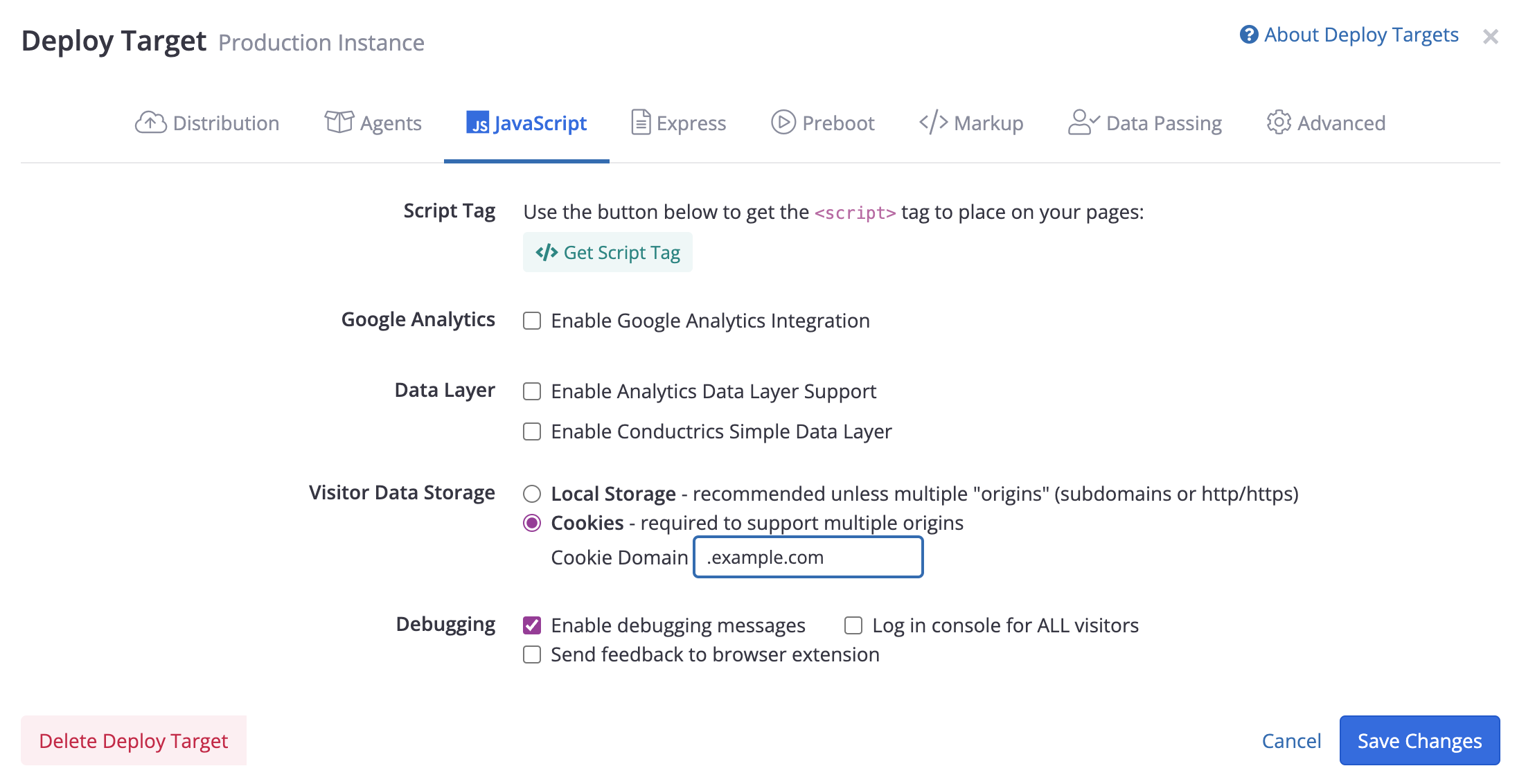
The "Cookies" option allows for cross-subdomain support in client-side Conductrics implementations.
Of course, please feel free to contact Conductrics if you have any questions about how agent selections and goals are tracked. Our intention and focus is on keeping the minimal amount of information needed to conduct tests or optimizations.
Data Retention, Usage and Removal
Data Usage
Conductrics will not merge, join, share, or otherwise use any client customer data outside of any use explicitly requested by the client. Conductrics does use volume, and request status data to manage and scale servers to ensure servers are performative for client.
Location
Client Conductrics servers (Dedicated) are geolocated based on the client request. This means that data stays in the geolocation of the clients choosing. For example, clients in the EEA will have their data retained solely in the EEA.
Retention
When using the REST API with a visitor/session identifier, the default retention period for the "Session State" data described above is 30 days; this retention period can be adjusted upon client request.
Other account information (including the aggregated "Counts / Stats" described above and other account information such as current and past Conductrics Agents or Tests) is retained until the termination of contract. When contract is terminated, client account information, server, data, and backups are deleted within 7 days.
Client can also request data to be deleted at anytime during contract - data will be deleted within 72 hours of written request. Upon deletion, Conductrics will notify client.
Updated over 1 year ago