
Using the REST API
For running A/B Experiments and other Conductrics Agents via a simple HTTP-based API
This is for the REST-style APIThis page explains how to use the REST-style "flavor" of the Conductrics Runtime API, which you can call via HTTP. We also offer a Local JavaScript flavor of the API, which is has almost the same capabilities but which "runs" in your visitor's browsers rather than on our servers. Please see the Runtime API Overview for more about these two ways to access the API.
See AlsoFor a high-level conceptual overview of what an integration with our REST API might look like for your application, site, or tool, check out our Guide for Server-Side Usage.
What You'll Need
To use the REST API, you'll need:
-
A Runtime API Key, which you can get or create via Settings > API Keys / Info in the Conductrics Admin. Please see Managing API Keys for details.
-
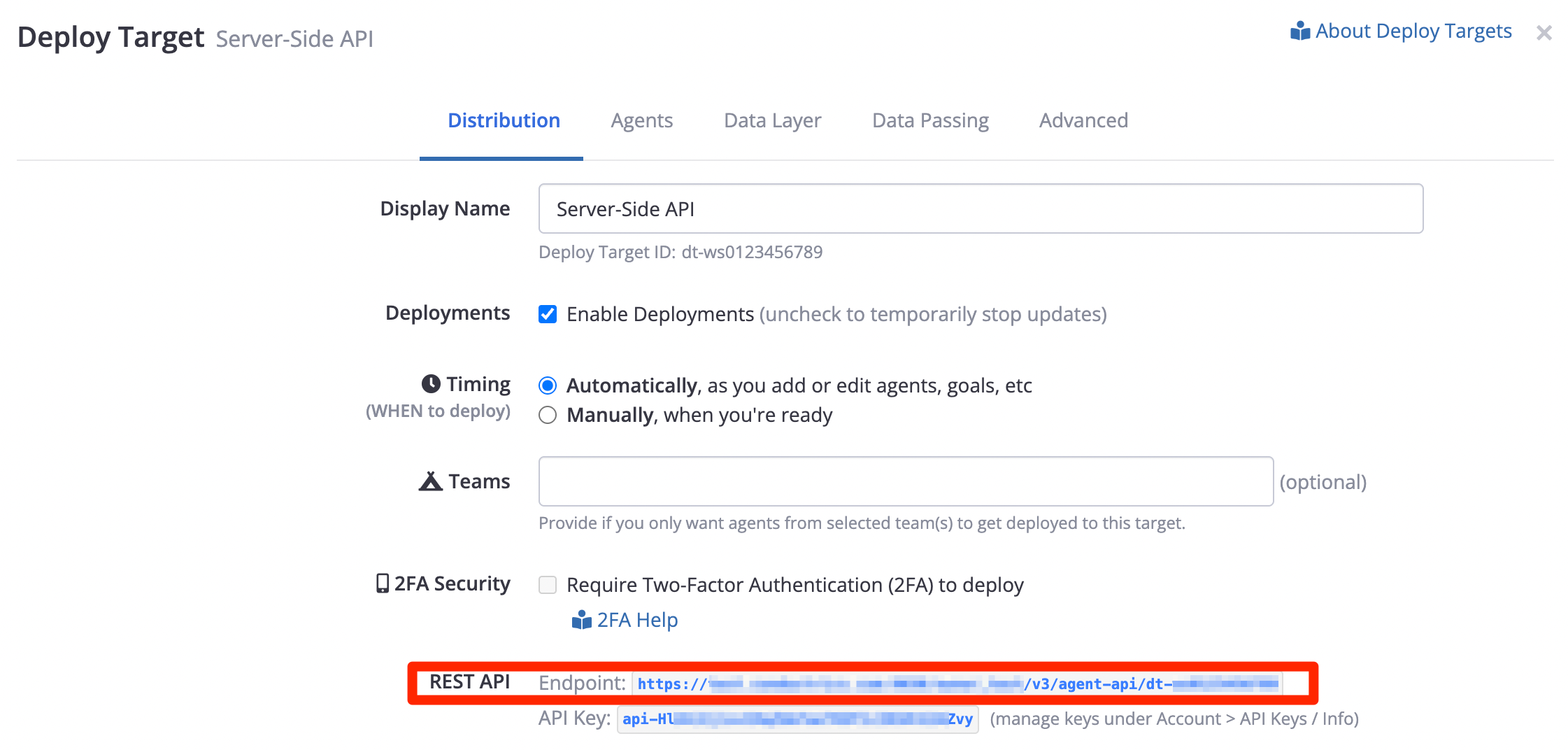
The REST API Endpoint for your REST API Deploy Target, which you can get via Settings > Deploy Targets as shown below.
Please note that this URL is specific to your account. It contains your account's code (starting with
acc-) and it may have a customized domain name if you've arranged for that with Conductrics.
REST API Usage
With your API key and Web Service URL in hand, you can start using your agents in your own code.
The basic steps are:
- Assemble the command(s) you'd like to pass into the API. As discussed in the Runtime API Overview, the commands you'll use most often will either get a selection from an agent, or send a reward.
- Make up or obtain a session identifier.
- POST the commands to the web service URL, as a JSON array. Include the session identifier in the query string.
API Testbed, BTWIf you like, you can use the API Testbed to assemble commands with the appropriate agent codes, etc.
When you get the response back, you can use any agent selections your commands called for to do whatever is appropriate on your side (include or omit elements from a web page on the fly, change something about how search queries are processed, determine whether the visitor is eligible for an offer, etc).
Example: Getting a selection from the server
For instance, to get a selection from an agent, you would use something like the following. This assumes an agent with code my-agent-1, which is selecting between two variations, a and b. Substitute your agent and variation codes (available in the admin).
POST https://api.v3.conductrics.com/owner_xxxxxx/v3/agent-api?apikey=api-1234567890&session=123

{
  "commands": [
    {"a":"my-agent-1"}
  ]
}
Getting selections from multiple agentsIf you would like to get selections from multiple agents on a same call, you can do it by adding more objects to the commands array:
{
  "commands": [
    {"a":"my-agent-1"}, {"a":"my-agent-2"}
  ]
}
The server will reply with a JSON-formatted response that looks something like this (whitespace added for clarity):
{
  "items": [
    {"a": "my-agent-1", "c": "B", "p": "r"}
  ],
  "traits": [],
  "sels": {
      "my-agent-1": "B"
  }
}
So, on your side, you would now look at sels['my-agent-1'] to know which variation the agent selected. In this case the agent selected B.
Use the selected variation in whatever way is appropriate for what you're trying to accomplish (modify content in a web page, show or hide something in a mobile app, try modified behavior in a back-end process, etc).
Use theselsobject or theitemsarrayThe returned
itemsarray will contain one "response item" for each command you sent in. So, you could also look atitems[0].c, which would also give you the same thing (the selected variation code). Whether it makes sense to useselsoritemson your side will depend on the nature of your own code (for instance, whether it is written in a way that's specific to the use case for a particular agent, or more generalized/abstracted for a CMS, etc).
Providing Visitor Traits
If you would like to provide Custom Visitor Traits along with the selection request, you can provide them as an array of strings called traits in the body of your POST request, alongside your commands. For example:
POST https://api.v3.conductrics.com/owner_xxxxxx/v3/agent-api?apikey=api-1234567890&session=123

{
  "commands": [
    {"a":"my-agent-1"}
  ],
  "traits": ["faves:lana-del-rey", "status:vip"]
}
Alternatively, you can provide the traits as a comma-separated list of traits as a query parameter, as in &traits=status:vip,source:email. See the Runtime API Reference for details.
Example: Sending a reward to an agent
To send a reward, the overall process is the same, except you send in a reward "command" instead of a selection command. Simply provide the Goal's unique API Code as the g attribute, as shown below:
POST https://api.v3.conductrics.com/owner_xxxxxx/v3/agent-api?apikey=api-1234567890&session=123

{
  "commands": [
    {"g":"g-video-start"}
  ]
}
If the Goal / Conversion event has an associated numeric value conceptually (common in e-commerce situations, such as a "purchase" or "reservation completed" type of conversion event), you can provide the actual numeric value as the v attribute. For instance, if the visitor has just purchased something for $19.99 (or whatever currency), you might do something like this:
POST https://api.v3.conductrics.com/owner_xxxxxx/v3/agent-api?apikey=api-1234567890&session=123

{
  "commands": [
    {"g":"purchase", "v": 19.99}
  ]
}
In general, sending goals is conceptually a "fire and forget" type of operation, in that your code probably doesn't need to know exactly how the reward was processed by the API. That said, the reply from the server would look something like this, indicating that the goal was accepted by agent my-agent-1 (from the first example snippet above):
{
  "items": [
    {
      "g": "g-video-start", "rs": [{"a": "my-agent-1", "v": 1}]
    }
 }
Numeric Reward ValuesYou could also include a
vfield with a numeric value if the conceptual value of the goal in question is dynamic in nature (for instance, a "checkout" type goal in an e-commerce application, where the value of the goal is the actual amount of money spent by the user/visitor, or similar scenario). You can also specify a currency via thevcparameter for goals that have currency conversion enabled.See Goals / Conversions for details about numeric goals, and see also the Runtime API Reference for all details about the parameters to include in the g command.
Updated over 1 year ago