
Conductrics Edge Overview
Making changes to pages "at the edge" rather than applying them client-side
Conductrics now offers a "Conductrics Edge" solution that will allow you to set up tests/agents that "run" at a CDN Edge location rather than being powered by a script tag on your pages. This way, each visitor will get the page with the appropriate variation content already applied, rather than the changes being applied via JavaScript during the page-load process.
You can:
- Set up your page changes via our WYSIWYG editing mode
- Or provide your own page-manipulation code via Edge-Side JavaScript
- Create "Redirect Agents" to test out alternate versions of pages already built
- Simply add custom HTTP Headers that get interpreted at your origin
The intent is to make your tests/optimizations render faster and more reliably.
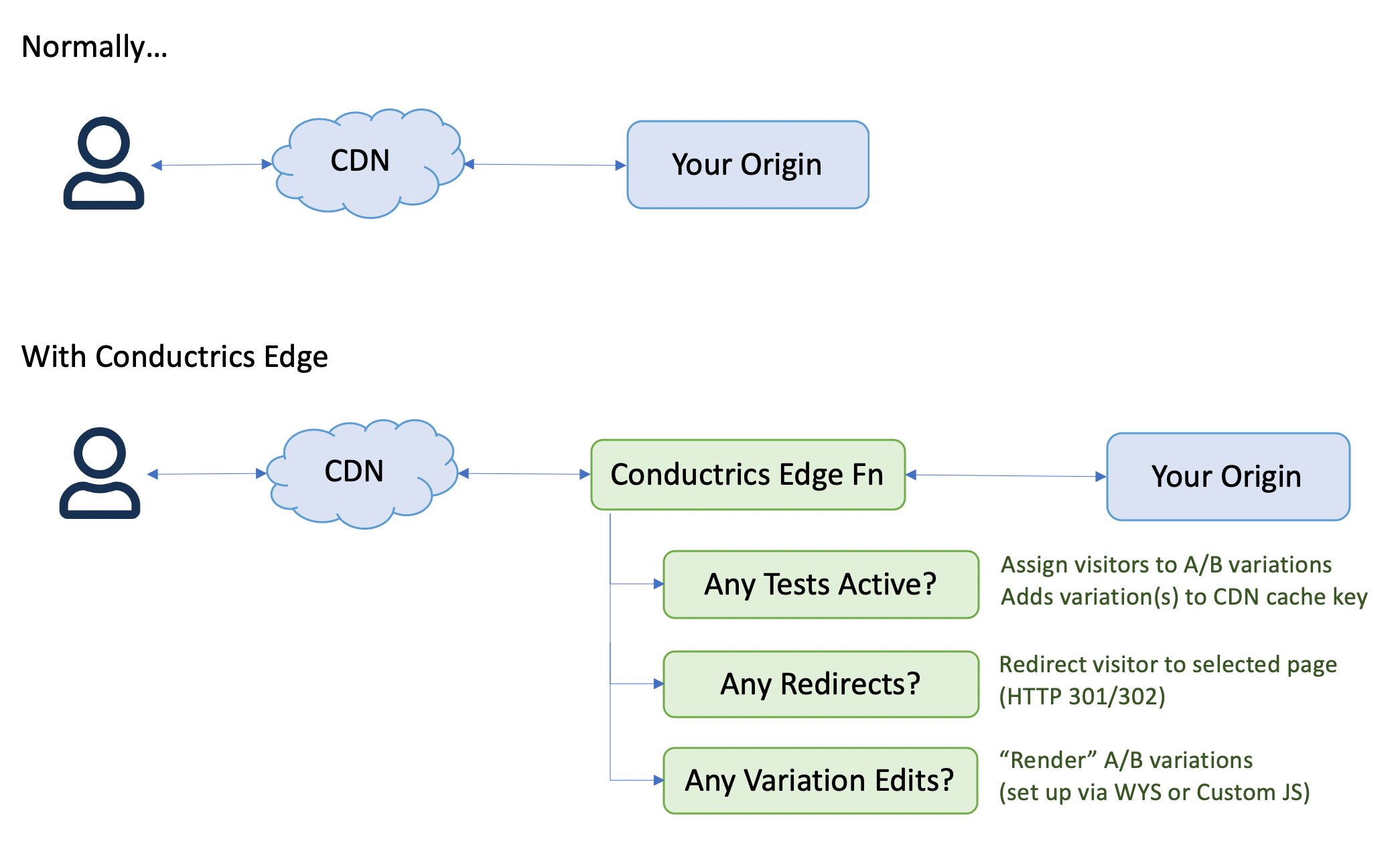
(click diagram to enlarge)
What's Supported?
At this stage, we are intentionally limiting the scope of Conductrics Edge. The intent is to enable dynamic targeting/testing on "normal" web pages, supporting the most common use cases first.
Most of the page changes you can make with "normal" Express are supported, via the normal "WYSIWYG" tools in the Conductrics Admin. The changes will be "rendered" at the edge, before being returned to the visitor.
- Insert Content - You can change text or HTML.
- Change Style - You can change CSS styles, such as
background-color,visibility, etc. - Change Attributes - You can change DOM attribute values, such as the
hreffor links, thesrcfor images, and so on. - Change Images - You can replace images on your pages with alternate imagery.
- Remove - You can remove elements completely.
- Show/Hide - You can use the Show/Hide change types with Express Edge.
You can also create tests that run custom JavaScript:
- Client-Side JS: You can provide JavaScript that runs in the page, client-side. So, if the visitor is selected for a "B" variation, the JS that you provide is inserted into the page, and runs normally in the browser.
- Edge-Side JS: Alternatively, you can provide JavaScript that "runs" at the edge, altering the page's structure as needed (replacing text, adding or removing sections, etc). The resulting version of the page is returned to the visitor's browser, without running any scripts client-side. See Edge-Side JavaScript for details.
Conductrics Edge shows up within the Conductrics Admin as a special type of Deploy Target, which means that you can create multiple Conductrics Edge targets for your Production vs Staging environments, or for different sites/properties, etc. You can QA an agent/test via a Staging target first, then "roll it out" to a Production target by associating the agent with that target in the Conductrics Admin.
Also supported:
- Redirect Agents - You can use Conductrics Edge to run "Redirect Tests" where you test different versions of complete pages against each other. You can choose whether the redirect should happen via a traditional redirect (where the browser URL bar reflects the redirected URL), or as a purely edge-side redirect (where the URL doesn't change as far as the browser is concerned).
- Conditions - Most conditions for including/excluding visitors or targeting rules should work. You can base conditions on the current URL, referring URL, cookie values, or the Conductrics built-in targeting.
- Goals - You can set up Goals / Conversions that get recorded when pages load (for instance, your
/checkoutpage or similar), when an element is clicked, or in response to custom JavaScript events that already fire on the page. - Predictive Analytics - You can set up your agents to make predictive selections based on our built-in machine learning models.
- A/B and Multivariate Tests - You can set up your agents to make random selections for testing use cases.
- Analytics Connectors - You can enable Analytics Connectors to pipe variation selections to your analytics package (Adobe, GA, etc).
However, some important parts of the "normal" Express functionality are not yet available at the edge:
- Custom Traits - We don't yet have a way to pass Custom Visitor Traits to Conductrics Edge. (You can, however, create custom traits that get set by Conductrics based on URLs of prior pages.)
- Google Analytics - The client-side Google Analytics Integration doesn't work with Conductrics Edge at this time. The Analytics Connector for GA does work, however. You can also have Conductrics Edge populate a Data Layer on the page, which you can use to pass the selected variation(s) to GA or other analytics services.
- Express Macros - Express macros are not supported at this time (but probably could be, though the syntax available to use in the macro's JavaScript would be somewhat different).
There are some restrictions on the types of pages you can use with Conductrics Edge:
- HTML pages only - At this time, we only support web pages with a Content-Type of text/html, and the character set must be UTF-8. In the future we may allow for manipulation of other content types, but for now it's HTML5 only.
- GET requests only - At this time, Edge processes HTTP GET requests only. Support for other request methods such as POST may come at a later time. What this means in practice is that you generally can't use Conductrics Edge to make changes to pages that appear in response to a form submission.
Of course, we welcome any feedback about whether the above limitations are too restrictive for your use.
Updated over 1 year ago