
Self-Hosting the Conductrics Script
Conductrics Express (and our Local JS API) are powered by a <script> tag on your pages (see installing the Conductrics Script Tag for details).
That <script> tag causes the visitor's browser to load the latest deployed version of the JavaScript file, which contains information about current Conductrics agents and associated Goals / Conversions, View-States, Custom Visitor Traits, and other settings. Each Express/JS Deploy Target gets its own script tag.
Normally, Conductrics "hosts" the script, which means that the <script> tag comes from servers that Conductrics controls. We use a Content Delivery Network (CDN) to help distribute the files so that they load more quickly for visitors worldwide.
If desired, you can instead "self-host" the script, which means that the browser will load the script from your own servers rather than ours.
While self-hosting the script may very well make sense for you, we encourage you to discuss these options and (any potential downsides for your specific site) with Conductrics before moving forward.
Why Self-Host the Conductrics Script?
- Performance - Depending on your site, self-hosting via your CDN may be slightly faster than when Conductrics hosts the script, especially if the full domain name is exactly the same as your website's. This is mostly because the browser generally won't require separate DNS lookup and HTTPS/TLS handshake steps when requesting the script (because it will generally already have a connection to your servers from when it requested the page itself). That said, this is a simplification of a complicated chain of events, and "your mileage may vary" depending on where exactly the Conductrics script sits in your pages and other factors.
- Security Policies - While Conductrics supports 2FA/MFA, SSO, and Two-Factor Deploys to keep your account secure, some companies may consider it better security practice to limit as much third-party-hosted script content as possible. You also have the opportunity to make the script inaccessible in certain regions, or apply any other similar restrictions.
- Simpler CSPs - If your site uses a restrictive Content Security Policy (CSP), you probably will no longer need a separate entry to whitelist the script's URL via script-src or script-src-elem (see Content Security Policies for details).
- Syncing with internal code cycle - Some companies prefer that the Conductrics script get "checked in" and "rolled out" with all the other script files and other assets used by your site. This may ring true if your Conductrics implementation is led mainly be developers or people who are otherwise "close to" the "sprint cycle", or if you are mainly using the Local JS API, or if you simply don't want Conductrics admin users to be able to create A/B tests and similar without going through your normal internal review process.
- Ad Blockers - Some ad blockers block Conductrics domains, but may not block the Conductrics script if self-hosted.
You can always start with the normal Conductrics hosting, and move to self-hosting later as your needs change.
Setting up Self-Hosting on Your Side
For the most part, how exactly you do the self-hosting is up to you. You just need to get our script content available at a URL that you control, preferably using the same domain/hostname as your web pages themselves (to avoid additional DNS lookups).
At a high level, you'll do the following:
- Determine what URL the script will be available at and loaded from.
- Optionally provide the hostname (full domain name) to Conductrics, so that we can make it appear in various places within the Conductrics admin instead of the normal Conductrics-hosted URL.
- Determine how you want to keep the Conductrics script content up to date:
- CDN Approach - You can configure your CDN to "sit in front of" or "proxy" the normal Conductrics script URL. The exact steps to accomplish this will be different depending on the CDN, but you would basically get the Script URL for your Express/JS Deploy Target from the Conductrics Admin (under Settings > Deploy Targets > Get JS Tag) and configure your CDN to use that URL as its "Origin".
- Manual Approach - You can decide to use "Manual Deploys" to manually "copy and paste" the current version of the Conductrics script after you've made relevant changes to your Conductrics agents, goals, or other settings. Conductrics will provide buttons to either save the JS as a file or copy the updated JS to your clipboard. From there you'll add it to your site's normal file repository or CMS system as appropriate. See "Deploying to Your Internal Systems" under Deployment Options for details.
- Webhook Approach - You can also have Conductrics notify your systems via a Webhook when relevant changes are made to your Conductrics agents, goals, or other settings. You can use that as a signal to refresh the version of the file that you're self-hosting. See Deploy Webhooks for details.
- Replace the normal Conductrics script tag (see Script Tag Installation) on your pages with one that uses your self-hosted URL as the
src(instead of the original Conductrics-hostedsrc). - Test that the script loads correctly on your pages, and decide how you'd like to handle "purging" your CDN (assuming that you'll be using one) when the content of the script changes, such as when new Conductrics agents are launched, Goals adjusted, or any other related settings change.
In general, the "CDN Approach" described above is probably the most straightforward option, but feel free to contact Conductrics to discuss the above options.
Options for Purging Your CDN Cache
When Conductrics is hosting the script file for you, we can "Purge" the CDN whenever you make changes in Conductrics that result in an updated version of the Conductrics script.
In a self-hosted setup, you'll need to decide how and when your own CDN should be purged after relevant changes are made to your Conductrics agents, goals, or other settings.
Let Conductrics "Auto-Purge" for You
At this time, we support auto-purging for these CDNs:
We may be able to add support for other CDNs if there is an appropriate API available from the CDN vendor. Please reach out to Conductrics to discuss.
We'll need a few bits of information to complete the configuration on the Conductrics side. There isn't a way for you to configure this information yourself at this time. Please reach out to your usual Conductrics contact to discuss.
- For Cloudflare, we will need your Zone ID and an API Token. You should create an API Token with Cache Purge permissions ONLY, and ONLY for the appropriate Cloudflare Zone (aka Website), and the token should be used ONLY for this purpose. See the Cloudflare Documentation for details about creating an API Token.
- For CloudFront, we will need your CloudFront Distribution ID. We will also need an Access Key and Secret Key for use with AWS's Purge API. The Access Key should have the cloudfront:CreateInvalidation Role ONLY, and ONLY for the appropriate CloudFront Distribution. See the AWS Documentation for details about creating an Access Key.
- For Bunny CDN, we will need your Pull Zone ID and your account's API Key. Please note that this API Key has full access to your account. You may therefore want to consider using a separate Bunny CDN account for this purpose.
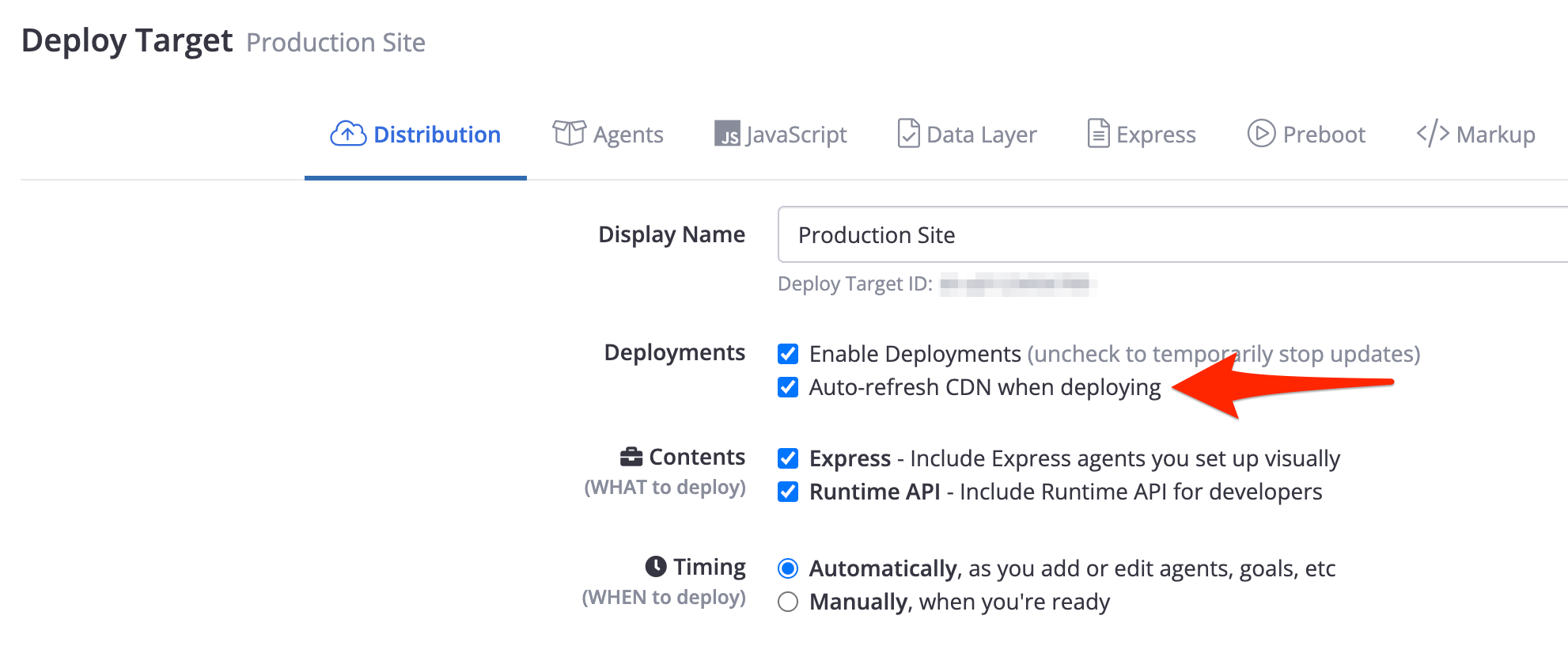
Once the above has been set up on our side, you should be able to check the Auto-refresh CDN when deploying option for each Express/JS deploy target, if it's not checked already:
Use a Webhook to purge from your side
Alternatively, you could have Conductrics notify your systems via a Deploy Webhook when changes are made on the Conductrics side. You would then kick off a CDN purge via whatever code / method of your choosing.
Purge Your CDN Manually
Finally, you could simply purge your CDN manually when you've made changes on the Conductrics side, using whatever purging mechanism is provided by your CDN vendor (there's usually a prominent "Purge Now" button or similar). This may be cumbersome, depending on the scope of your projects and the number of people making changes in Conductrics.
Use a Short Cache TTL
If none of the above purging mechanisms work for you, you can simply configure your CDN to use a short TTL ("time to live") for purposes of serving the Conductrics script. For instance, if the TTL is set to 10 minutes, then at least you should only need to wait up to 10 minutes before your Conductrics changes are reflected by the CDN.
HOWEVER, this means that you're giving up some of the performance benefit of self-hosting via your CDN for your actual visitors.
If you use a separate Deploy Target for your Staging environment, you could use a short TTL (such as 5 seconds) for the Staging script, and a longer one (such as one hour) for the script on your public/production site. Conductrics does NOT recommend using a short TTL in production.
Feel free to discuss any of these options with us!
Updated over 1 year ago