
Bots and Crawlers
Understanding how Conductrics behaves with respect to search crawlers and other "bots"
How are "Bots" Treated in Conductrics?
Our bot detection is based on simple pattern matching of the visitor's User-Agent string. If the User-Agent string provided by the visitor's browser or device contains certain "keywords" (substrings), the visitor is considered to be a "bot" for purposes of processing the current page or request. See the "Bot Lists" section below.
Default Behavior
If a given visitor is "detected" to be a bot (based on the user-agent string presented by their browser), Conductrics will still treat the visitor normally, but will exclude them from reporting.
For instance, say you have a Conductrics agent running for an A/B test on your home page.
- When a "bot" visits the page, Conductrics will "flip a coin" and assign the bot to A or B as it would normally (assuming that your eligibility criteria and so on are otherwise met).
- However, the variation selection is NOT sent to Conductrics for counting in our reporting.
- The selection is also NOT added to your Data Layer or sent via our Analytics Connectors if you are using those.
Why Aren't Bots Totally Excluded?
You might be wondering why Conductrics doesn't simply exclude bots instead, so that the "bots" don't get exposed to your A/B tests and other experiments at all. The reason is that this can be considered "cloaking" by search engines, which could have an adverse effect for your site.
For example, see the guidance about "cloaking" in this article from Google's Search Central documentation:
https://developers.google.com/search/docs/crawling-indexing/website-testing
REST API and Bots
For the bot detection to work when calling our REST API, we need the visitor's user-agent string.
Assuming that you're calling the REST API "server-side" from your back-end systems, you'll need to "pass" the User-Agent string provided by the visitor's browser/device. It's generally easiest to provide it as the ua parameter (see the Runtime API Reference for details). Alternatively, you can provide it as the User-Agent header in your outgoing request to your Conductrics REST API endpoint.
If not provided, the only User-Agent string we'll have will be from your own server or back-end process, so the "detection" won't work, so no requests will be considered to be from bots (even if they really are).
If you are calling the REST API from the browser (via
FetchorXMLHttpRequestor similar), the browser's User-Agent string will already be provided as part of the HTTP request, so you do NOT need to provide it yourself when calling the REST API from the front-end. But you do need to pass it along explicitly in back-end ("server-side") usage.
Bot Lists
Basic Bot Detection
The default bot detection keyword list is very simple. Any user-agent string that contains any of the following (case-insensitive) are considered bots:
botspidercrawlersearchtrackpingmonitorsyntheticgoogletwitteryahoobingakamaiy!j
Custom "Bot" Strings
You can also add additional bot strings that will affect your Conductrics account only.
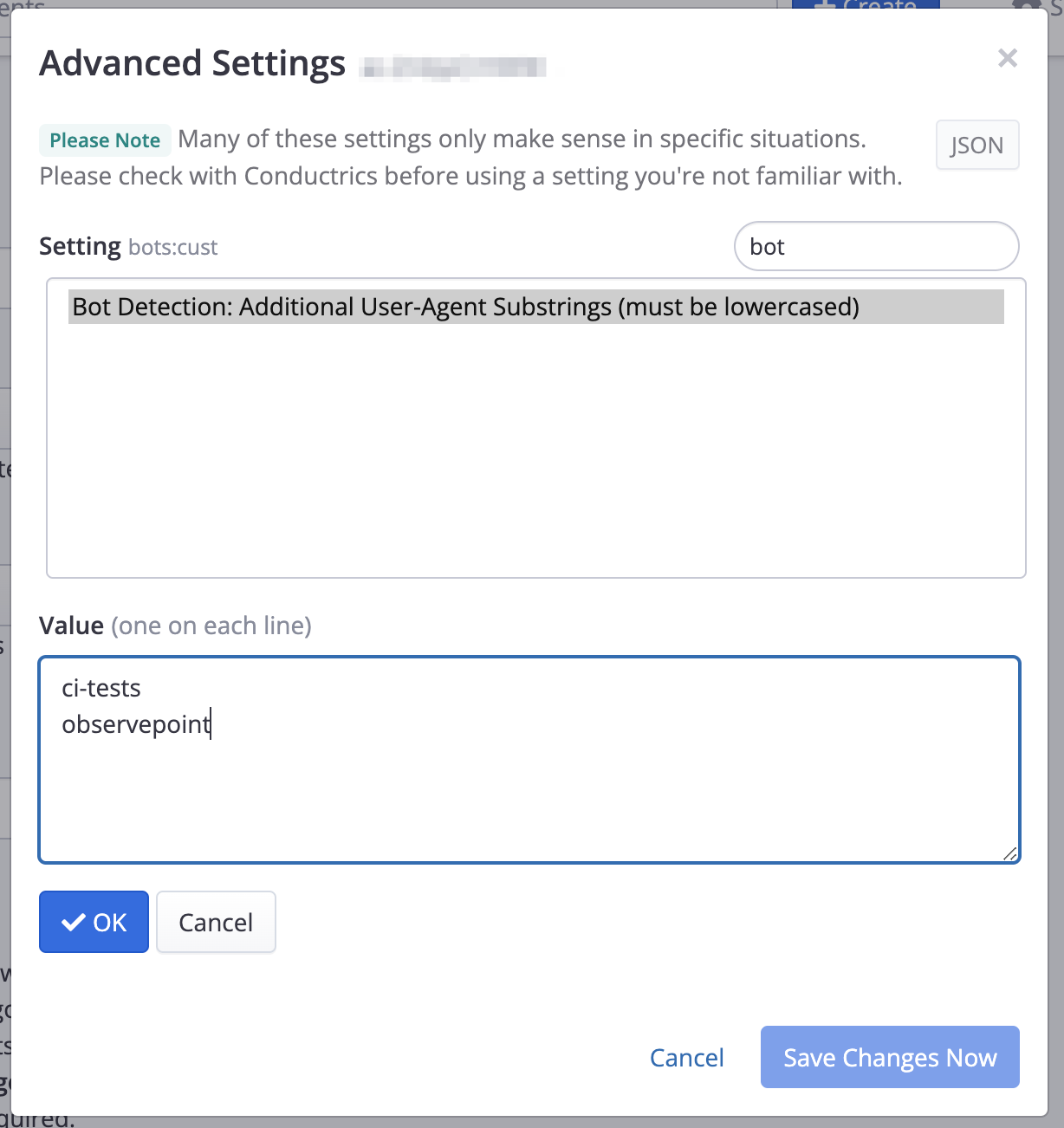
In the Conductrics Admin, go to Settings > Company Preferences, then hit Advanced Settings and add a Bot Detection: Additional User-Agent Substrings setting. For the Value, provide each substring, one per line, that you want to be treated as a bot.
- Please note that you are providing substrings in this field, one per line.
- The values you provide are expected to be lowercased, which will be compared to the lowercased version of the user-agent string for each "visitor" (in other words, the matching is case-insensitive).
- So, in the example shown below, any User-Agent string that contains
ci-testsorCI-TESTSorobservepointorObservePointwould be considered a bot. - You can also provide full user-agent strings, but they should still be lowercased.
- Regular expressions are not supported here at this time.
For instance, the following would add ci-tests and observepoint as keywords (substrings) that Conductrics will use in addition to the built-in list discussed above:
Updated over 1 year ago