
Conductrics Admin MCP Server
For use by LLMs, coding agents and other AI agents
Coming SoonThe Conductrics Admin MCP Server is currently evolving, based on feedback from our customers. We expect stability in late 2026. Please reach out to Conductrics if you'd like to try it out before general availability.
About the MCP Server
Conductrics provides an MCP Server, designed for use with coding agents such as Codex, Claude Code, and other LLM-powered AI tools.
Like most MCP Servers, it mainly provides a set of "Tools". If you give your coding agent or other AI tool access to our MCP Server, it can use the tools to do things in Conductrics on your behalf.
The official MCP project website at modelcontextprotocol.io is a good place to start for more information about MCP Servers in general.
Common Use Cases
We're hoping you'll find the MCP useful for a variety of administrative and management tasks, such as the following. Let us know if you've got something in mind that doesn't seem to be supported yet.
Creating Agents / Experiments
The MCP Server provides tools for and updating your Conductrics Agents. For instance:
- "Create a Conductrics Experiment that adds a small Welcome Back banner at the top of the home page for repeat visitors."
- "Create a Conductrics API agent called Upsell Promo 2 from our Content Metadata Template, then add the usual calling mechanics on our side."
- "The JS for our B variation on the experiment I created yesterday isn't working, it's supposed to change an image but the image keeps getting changed back. Please help!"
Keeping Track of What's Happening
- "Any traffic spikes or drops in Conductrics over the past week?"
- "Give me a list of Conductrics Agents that seem to be stalled In QA, with admin links for each."
- "How many experiments did we create per month last year, broken out by month and by team?"
Basic Experiment Analysis
- "Please summarize the findings for last week's tests in the checkout funnel."
- "How many of our recent A/B experiments on mobile have achieved a significant result?"
See the Admin MCP Tool Reference for the complete list of "Tools" provided by the MCP Server.
Focus on Safety
We built the MCP Server with a focus on safety. We want you to be able to use Conductrics with your coding agents and other AI tools, but without allowing them to "go rogue" and deploy unwanted or dangerous changes.
What you can do:
- Get general information about your Conductrics Agents, including each agent's status, how long each has been running, goal associations, and so on.
- Get reporting data about your Conductrics Agents, such as number of visitors, conversion rates, and experimentation-style statistics such as confidence bounds and p-values.
- Answer questions about general agent configuration, such as associated goals, teams, and deploy targets.
For Conductrics Express Agents:
- Create new Express agents in Draft mode (from a Template for consistency).
- Provide Custom JS for your variations (a coding agent presumably will be writing the actual JS), as long as the agent is in Draft mode.
- Provide the URL Conditions that control which pages the Express Agent activates on (these are evaluated first, before Eligibility Conditions)
For Conductrics API Agents:
- Create new API Agents in Draft mode (from a Template for consistency).
- Answer questions about variation-level metadata, and provide metadata if the agent is in Draft mode.
What you can't do:
- Make changes to agents/experiments unless they are in Draft mode.
- Change an Conductrics Agent's status to Live or Done.
- Change an Conductrics Agent's status to In QA. This means that a coding agent has no way to "do its own QA" on something that it's created. We know this is a limitation and are thinking through how to safely support MCP-driven QA use-cases.
- Create Survey Agents or MVT / Mutually-Exclusive relationships.
Please don't give your AI Tools direct access to ConductricsWe can't stop you from allowing your AI tools from accessing the Conductrics Admin directly, but we strongly advise against it. Most of today's AI tools are still prone to occaisonal "hallucinations" and are at least theoretically vulnerable to "prompt injection attacks". They are also non-deterministic, which means that while they usually will do what you ask, they may sometimes get things wrong, so as many guardrails as possible are a good thing.
Instead, use the MCP Server, discussed here.
Getting Set Up
To use the Admin MCP Server, you'll need:
- At least one Admin API Key with the For Admin MCP Server option set. These will show a red Admin MCP badge in the list of Admin API Keys under Settings > API Keys.
- If you want your AI or other tools to be able to create Conductrics Agents via the MCP, you must have at least one "Template" agent for the new Conductrics Agent to be created from. See Allowing For Agents To Be Created below.
Get Authorized
To connect to the MCP Server, you will need a "Bearer Token" which maps to an API Key in your Conductrics account. This is like a "password" for the MCP Server.
-
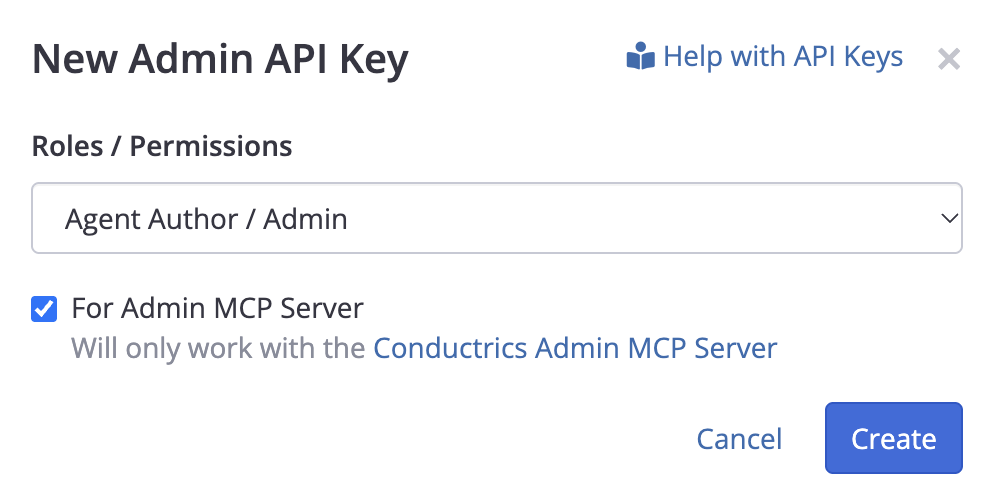
Go to Settings > API Keys, then hit New Admin Key. Choose a Role / Permission level, check the For Admin MCP Server checkbox as shown below, then hit Create.
-
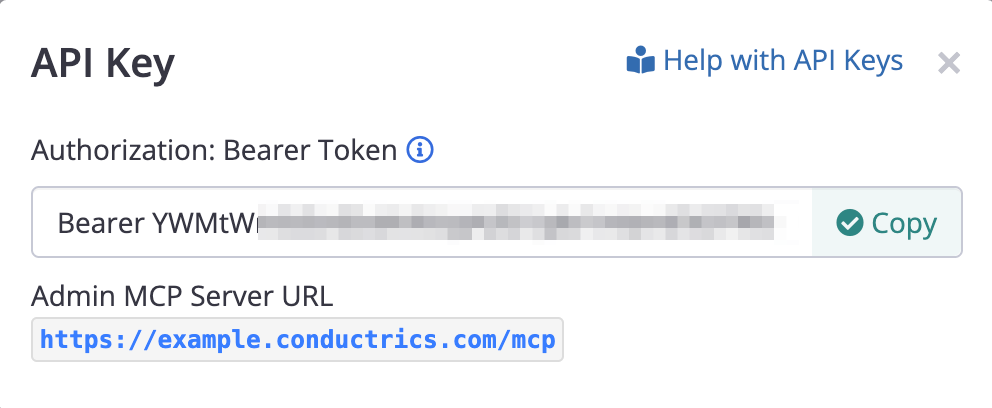
Now hit Reveal for the API Key you just created. You'll be asked to confirm, then the Bearer Token will be revealed as shown below. Hit Copy to copy the Bearer Token to your clipboard.
Connect Your Tool
To connect your AI tool (Claude or Claude Code, ChatGPT / Codex, Cursor, etc) or other MCP Client, you will need to follow whatever the "Add MCP Server" procedure is for the tool you're using. The exact process varies depending on the tool, but you'll generally need to:
- Provide the MCP Server URL, which is displayed when getting your Bearer Token (see above).
- Choose Streamable HTTP as the transport type.
If your tool supports stdio but not Streamable HTTP
Some developer tools only support MCP servers running "locally", via the "stdio" transport, in which case mcp-remote is a common workaround. For instance, if you're using the Claude Desktop App, you can try adding a something like this to your
mcpServersblock inclaude_desktop_config.json:"mcpServers": { "Conductrics-Admin-MCP": { "command": "npx", "args": [ "-y", "mcp-remote", "https://example.conductrics.com/mcp", "--header", "Authorization: Bearer ac-xxxxx:admin-yyyyyyyyyyy" ] } }, - Provide the Bearer Token to authenticate. Depending on the tool, you may need to choose "Bearer Token" or similar as the Authorization type (as opposed to OAuth).
- Your tool may support reading the Bearer token from an environment variable that you set, perhaps stored in a secrets manager on your side. If so, you probably should omit the word Bearer.
- Or you can configure your tool to add an Authorization header, where the value is the Bearer token value you got from the Conductrics Admin (see above section).
- If there's a choice for Protocol Era, choose "Modern" (may also be labeled "2026-07-28" or "2026" or "Sessionless"). If there is no such option, it should work anyway.
Once set up, you can try a simple operation such as getting a list of agents. If you're using a chat-style AI tool, try something like "Use the Conductrics MCP to get a list of current agents". Once that's working, you can tell it to use the MCP Server by default for any Conductrics-relevant tasks (so that it doesn't try to figure out how to use the Conductrics Admin UI for you).
For DevelopersYou can also use the publicly-available MCP Inspector tool with our Admin MCP Server, perhaps to experiment before deciding to use it with your coding agent or other AI tools. See Using the MCP Inspector for details.
Allowing For Agents To Be Created
The MCP Server provides tools to create new Express or API Agents.
These tools require the MCP to specify a "Template" agent. So, if you want your AI or other tools to be able to create Conductrics Agents via the MCP, you must have at least one "Template" agent for the new Conductrics Agent to be created from.
- If you want to be able to create API Agents via the MCP, create a new API Agent like you would normally, then hit the Template button at the bottom of the agent's page to turn it into a Template.
- Similarly, if you want to be able to create Conductrics Express agents, create a new Express Agent and then turn it into a Template via the Template button at the bottom of the new agent's page.
When you create new agents from the Template, they will inherit the Template's various settings and associations, such as Eligibity Conditions, Variations, Weights, Tags, and so on.
- This also includes associated Goals, Traits, Deploy Targets, and Analytics Connectors.
- For Express agents, this also includes Page/URL Conditions, Custom JS, Change Sets, View-States, etc.
- For API Agents, this also includes any Meta Data provided for the template agent's variations.
MCP Tools Available
The MCP Server provides a variety of "tools" designed to support:
- Creating Experiments and other Conductrics Agents (though it can't start them).
- Answering questions about what Conductrics Agents are running, etc.
- Getting reporting data, for answering questions about experiment results, etc.
For the complete list, see the Admin MCP Tool Reference page.
Or just ask your coding agent! 😅
Updated 1 day ago