
Two-Way Redirect Agents
For when you already have your variations as separate web pages
Before You StartIf you haven't already, check out Using Redirect Agents for a general overview and guidance about when to use "One-Way" versus "Two-Way" Redirect Agents.
Prerequisites
- You should already have the Conductrics Script Tag on your site.
- You should have your variation pages already created, with the URLs for each handy
Creating a Two-Way Redirect Agent
- If you haven't already, hit the Create button at the top of the Conductrics Admin to start Creating an Express Agent.
- When you get to Step 3, select Conductrics Express and then Page Redirect.
- Select the Two-Way Redirect option (as opposed to "One-Way").
- Fill out the Redirect URLs and other options as discussed below.
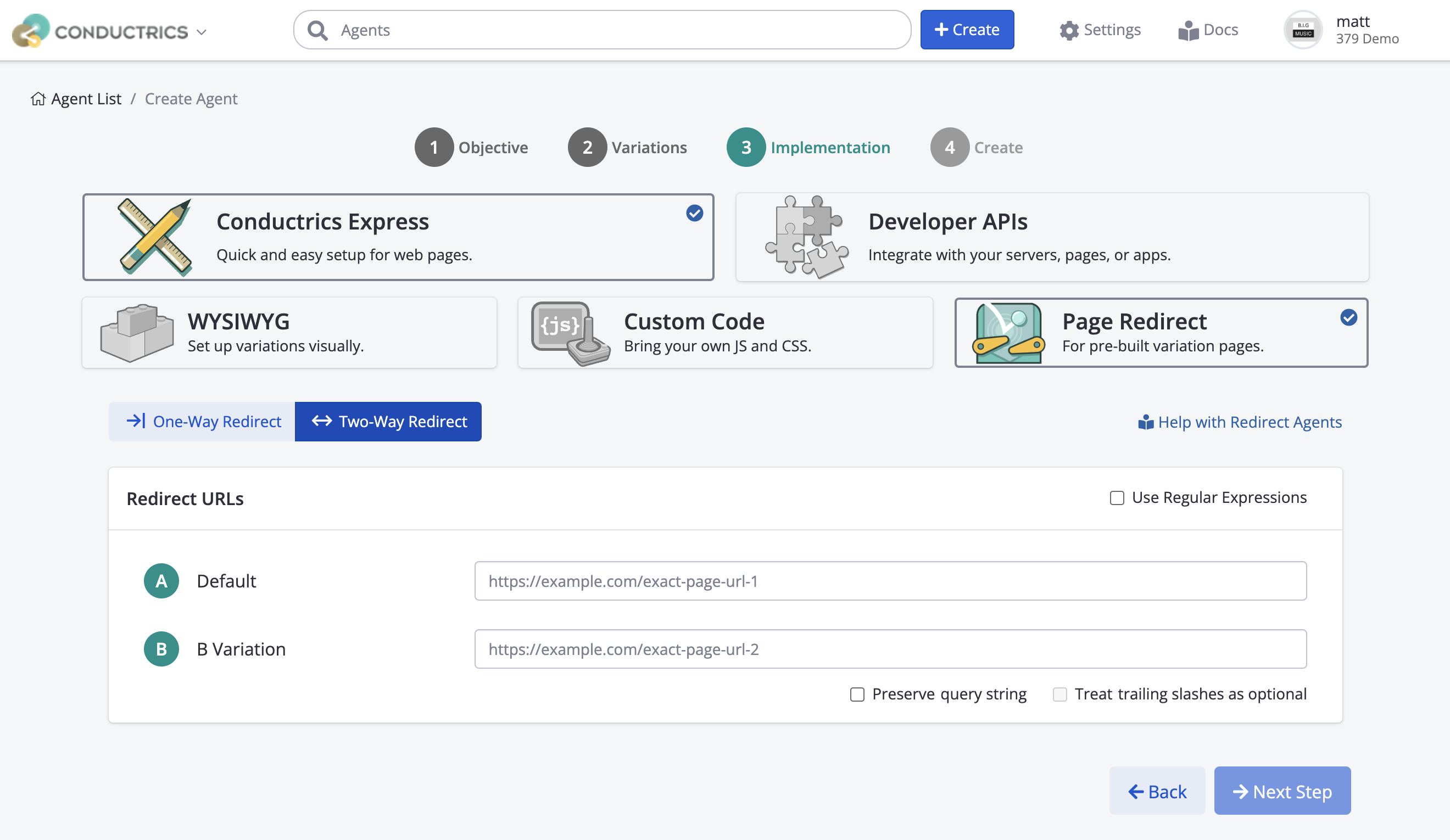
For each of your variation pages:
-
Provide the full URL for the variation page, including the
https://part at the start, etc. Generally it's best to copy-and-paste the URLs from your browser, just to make sure you get them exactly right. -
Select the Preserve Query String option if there will be important URL parameters that you want to "survive" when a visitor gets redirected.
-
For instance, perhaps you know a campaign ID might be present in the URL when the visitor lands at your home page. Let's pretend that's
https://www.example.com?cid=my-campaignfrom the animated screenshot above. -
So, turning on the Preserve Query String option would cause the "B" visitors to get redirected to
https://www.example.com/welcome?cid=my-campaignin such a case. If another visitor arrives at justhttps://www.example.com(with no URL params), then they would just get redirected tohttps://www.example.com/welcome(assuming they were selected for the "B" Variation). -
If for whatever reason you don't want URL parameters to be preserved / forwarded to the redirected page, just leave the Preserve Query String unchecked.
-
Select the Treat Trailing Slashes as Optional option if any of your visitors might arrive at the page(s) via a link that includes a trailing slash and others may not. In such a case
https://www.example.comandhttps://www.example.com/will be treated as synonymous for the purpose of determining whether the visitor should be considered for a redirect.
Once you've filled out the URLs and any additional options shown above, click Next Step to finish Creating your Agent.
Don't worry, the agent will be in Draft mode initially, which means that nothing actually rolls out to your site yet. Nothing will happen on your actual live pages until you specifically change the agent's status to Live.
If You Need Wildcard / Pattern Matching
You can check the Use Regular Expressions option if you need to create redirects between whole sections of a site, or any other situation where you need to provide wildcards or pattern matching to accomplish the needed redirects.
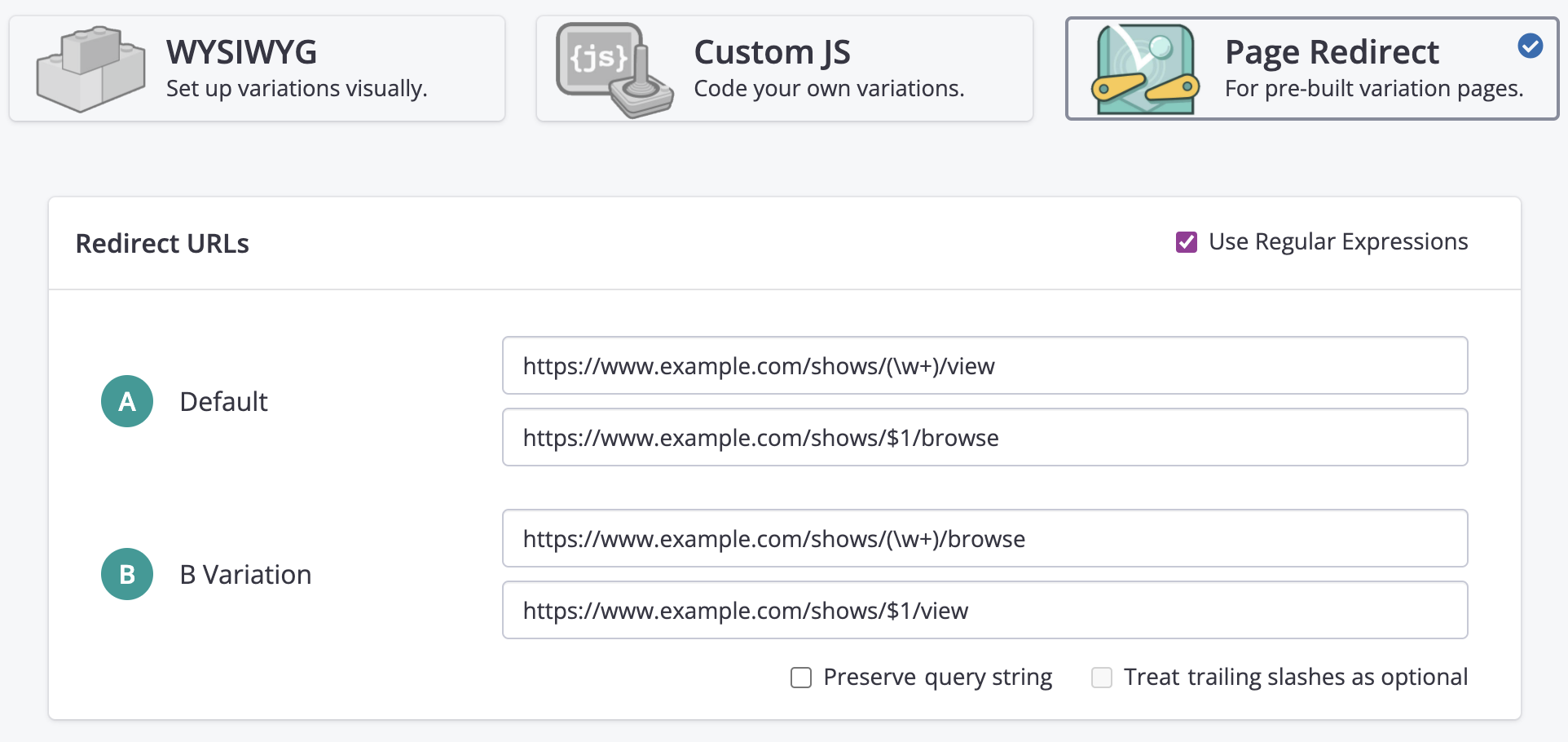
In this mode, each variation gets two URL fields:
- The top field is a Regular Expression that matches whichever pages should be considered one of that variation's pages. Use parentheses to establish regex-style "groups", if needed.
- The bottom field is a substitution pattern, which can contain regex-style substitution tokens (such as
$1,$2to use values from the regex "groups") needed to carry out the redirect.
For instance, consider a situation where you want https://www.example.com/shows/XXX/view to redirect to `https://www.example.com/shows/XXX/browse for 50% of visitors, where XXX would be something like lana or music or concerts or latest or whatever other category might show up in that spot.
In such a case you could set up a redirect agent using Regular Expressions, something like this:
What Happens When Visitors Come to Your Pages?
After you start your agent, your Redirect Agent will start selecting page variations for each relevant visitor and redirecting them as appropriate.
For each page view, the Conductrics scripts check whether the visitor just arrived at any of the page URLs for your redirect agent.
If the visitor is at one of your variation pages:
-
Your Conductrics agent selects a variation for the visitor, using random selection, predictive analytics, or your own targeted selection rules (see Selection Policies. If there was a prior selection for the current visitor, the same selection will be used, to maintain consistency between page reloads or subsequent visits.
-
If the agent selects one of the other variation pages, the Conductrics script redirects the visitor to the selected page.
-
On the other hand, if visitor is already at the selected variation page, nothing more needs to be done.
For all other page views - that is, when the visitor is not at one of your Page Variation URLs as defined in your Redirect Agent - your agent does nothing. (Of course, some other Conductrics agent might make its own changes.)
Next Steps
Now that you've created your Redirect Agent, the rest is the same as a normal Conductrics Express agent:
-
You should assign at least one Goal / Conversion so that your agent knows what its success metrics are.
-
You can create rules to include/exclude certain visitors, or target one of your page variations to certain visitors, etc.
-
When you're ready, go ahead and Start Your Agent.
-
Once it's running, you can view its reports, such as the Activity Report, A/B Testing Report, or Audience Report.
Adjusting Redirect Options for Existing AgentsIf you want to view or adjust the URLs for your page variations, hit Redirect Options in the sidebar of the redirect agent's main page in the Conductrics Admin. That will bring up the same options that you used to create the agent originally (see screenshots above).
Updated over 1 year ago