
Deploy Webhooks
For kicking off internal processes when changes happen in Conductrics.
Webhooks are a simple integration mechanism for getting your systems notified when important things change in Conductrics.
Deployment Webhooks
You can have Conductrics notify your systems when a deployment occurs for one of your Deploy Targets.
You could use Deployment Webhooks for:
- Saving a copy of the newly-deployed JavaScript code to your internal source control system;
- Publishing the newly-deployed JavaScript code to your CMS or CDN;
- Kicking off an automated QA or build process;
- Any other internal process that needs to be "notified" when the content of the Conductrics script tag changes.
To set up a deployment Webhook:
- Implement the Webhook endpoint on your side, using whatever web server technology you prefer. Your server simply needs to receive an HTTP POST request at whatever URL you provide to Conductrics.
- Go to Settings > Distribution in the Conductrics Admin and hit Setup for your deploy target.
- Under Deploy Webhook, Provide the full URL for your Webhook endpoint and save your changes.
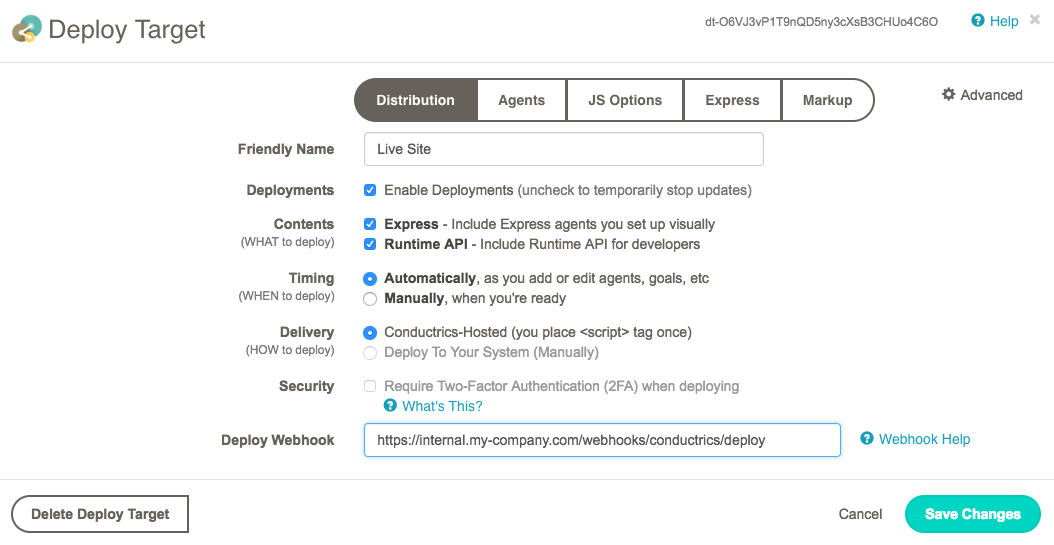
The above screenshot uses the fictitious URL
https://internal.my-company.com/webhooks/conductrics/deployfor illustration, but it's up to you to define the URL and implement the code that does whatever you want your Webhook to do when Conductrics calls it.
Once you provide your Webhook URL, Conductrics will issue a HTTP POST request to your Webhook URL whenever a new deployment occurs for the deploy target.
- If the deploy target is set to deploy "Automatically" as shown in the screenshot above (explained further under Deployment Options), then your Webhook URL will be called each time something changes that causes Conductrics to re-deploy (such as a new or changed agent, etc).
- If the deploy target is set to deploy "Manually", your Webhook URL will be called after each manual deployment (that is, when a user clicks "Deploy Now").
The body of the POST request will be a JSON-formatted object, something like this:
{
	"distro": "dt-C0aPjg1mcNhPhUEs16LQv3sfVp7TUH",
	"name": "Default Site",
	"agents": ["a-6VDg4EMBEO","a-Pa974uY1gQ"],
	"ts": 1520812756,
	"js": "(JavaScript appears here)"
}
The JSON object has the following properties:
-
distro- The unique code of the deploy target (aka "distro") that was just deployed. If you use the same webhook URL for multiple deploy targets, you could use the code to distinguish between them. The code is shown at top right of the deploy target window (see screenshot above). -
name- The name of the deploy target that was just deployed. -
ts- The time of the deployment, as a UNIX-style timestamp (in seconds). -
agents- The agent codes that were included in the deployment. -
js- For JavaScript / Express deploy targets, the JavaScript code that was just deployed. Not provided for Server-Side deploy targets.
Trying it outTo verify that your Webhook is working, make a trivial change to one of your agents (such as changing its status to "Stopped" and back again, etc). After a few seconds, your webhook should be invoked. Please feel free to contact Conductrics if you need help.
Example CodePlease see Webhook Example: Git with Node.js for a simple example that uses Node.js to receive the Webhook notifications and commit the deployed JavaScript code to a Git repository.
Updated 20 days ago