
Simple Data Layer for REST API
Sometimes you may have a situation where you are running A/B Tests or other Conductrics "Agents" on your servers via the Conductrics REST API, but also would like to make the selected variation(s) available to client-side logic that works with our Simple Data Layer.
Practically speaking, the Simple Data Layer (SDL) is just a plain JavaScript array. So, if we dynamically populate the page so that it contains a SDL with the variation selections that were made on the server, then at runtime the SDL can reflect both server-side and client-side selections.
For instance, the Contentsquare integration with Conductrics looks for the "Simple Data Layer" on the client side. This is one way to allow that integration to work for experiments that you run either server-side with the Conductrics REST API, or client-side via Conductrics Express.
Enabling the Simple Data Layer option for the REST API
First, enable the "Simple Data Layer" for your Conductrics REST API endpoint:
- Go to Settings > Deploy Targets in the Conductrics Admin
- Hit Setup for your REST API Deploy Target, then check the Enable Conductrics Simple Data Layer option (under the Data Layer tab).
Optionally, you can also enable the Include Friendly Names option if you want friendly names for your agents and selected variations to be included. - Your calls to the REST API should now include an additional
ext.cdlproperty, which you can use to include the appropriate data structure in the page you send back to the browser.
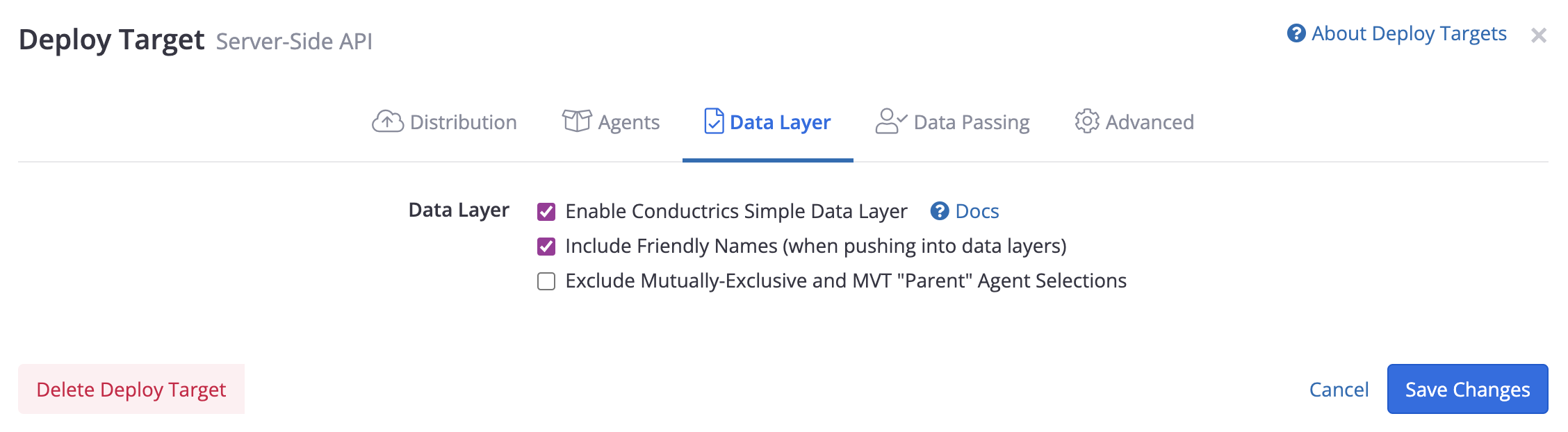
Enabling the Simple Data Layer option at the Deploy Target level
Populating the "Simple Data Layer" Server-Side
On your side, you would generally want to:
- Emit a
<script>tag that includes the contents ofext.cdl, using the Array.push method to insert each of them to the client-side "Simple Data Layer" object. - We suggest that you use
JSON.stringifyas shown below to do the "including". - The object should be named
window.c_conductrics_data_layerwhen the page runs.
Assuming JavaScript on the server as an example, if the response from our REST API is in the server-side variable api_response:
// Make dynamically-populated script tag to insert into page (this runs on server)
var sdl_snippet = `
<script>
    var sdl = (window.c_conductrics_data_layer = window.c_conductrics_data_layer || []);
    var sdl_items = ${JSON.stringify(api_response.ext.cdl || [])};
    sdl_items.forEach(function(item) { sdl.push(item) });
</script>`
This example assumes that you're using a JavaScript environment such as Node.js on the server, but the overall steps would be the same for other languages or server environments.
Note that the above example uses backticks and "template literals" to "dynamically" populate the sdl_items variable in the page using the server-side variable of the same name. There are various ways to achieve this dynamic population step; feel free to approach it differently.
Alternatively, if you are inserting the dynamic script tag in the <head> portion of the page, before the Conductrics script tag and any other JavaScript code that might be "looking" for the Simple Data Layer, you could simplify the above snippet down to:
var sdl_snippet = `<script>window.c_conductrics_data_layer = ${JSON.stringify(response.ext.cdl)}</script>`Finally, emit / insert the value ofsdl_snippet into the page, using whatever code is appropriate given the type of server environment you're working with. We don't have an example of that final step here, since there are so many server-side languages and frameworks, but feel free to reach out to Conductrics if you have questions.
Expected Result
Let's say that you're running an A/B test using a Conductrics agent with API Code a-123456. When you call the Conductrics REST API, you would get back an answer something like the following.
{
  "items": [
    {
      "a": "a-123456",
      "c": "B",
      "p": "r",
      "s": "ok"
    }
  ],
  "sels": {"a-123456": "B"},
  "traits": [],
  "ext": {
    "cdl": [
      {
        "ep":"api",
        "item": {
          "a": "a-123456",
          "c": "B",
          "p": "r",
          "a_name": "My Test Agent",
          "c_name": "My B Variation"
        }
      }
    ]
  }
}
Note the addition of the
ext.cdlportion, which is what's been enabled. See the Simple Data Layer doc page for an explanation of the values.
We would expect the <script> tag to then be included in the page's HTML like so:
<script>
  function() {
    var sdl = (window.c_conductrics_data_layer = window.c_conductrics_data_layer || []);
    var sdl_items = [{"ep":"api","item":{"a": "a-123456","c":"B","p":"r","s":"ok"}}];
    sdl_items.forEach(function() { sdl.push(item) });
  }()
</script>
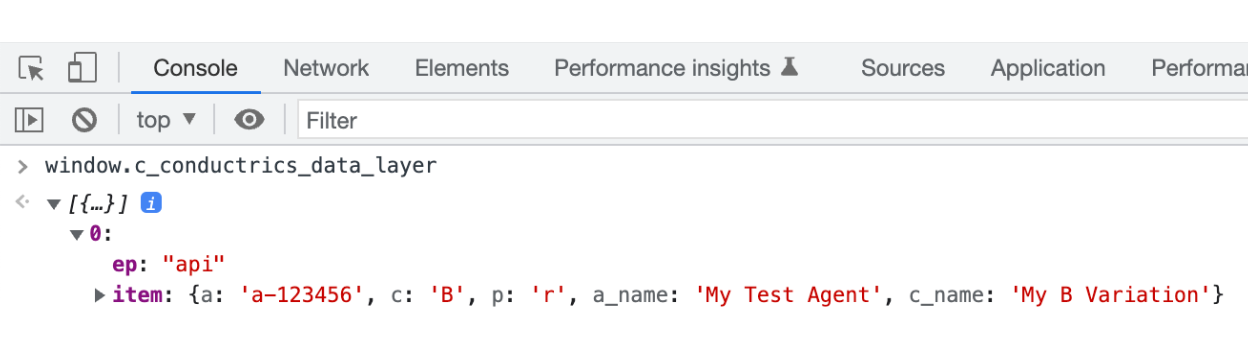
When the page actually runs in the browser, we would then expect to be able to type window.c_conductrics_data_layer in the browser's JS Console and see something like this:
Updated 4 months ago