
Agent Edit History API
The Conductrics Admin API includes read-only access to the history of edits for a given agent.
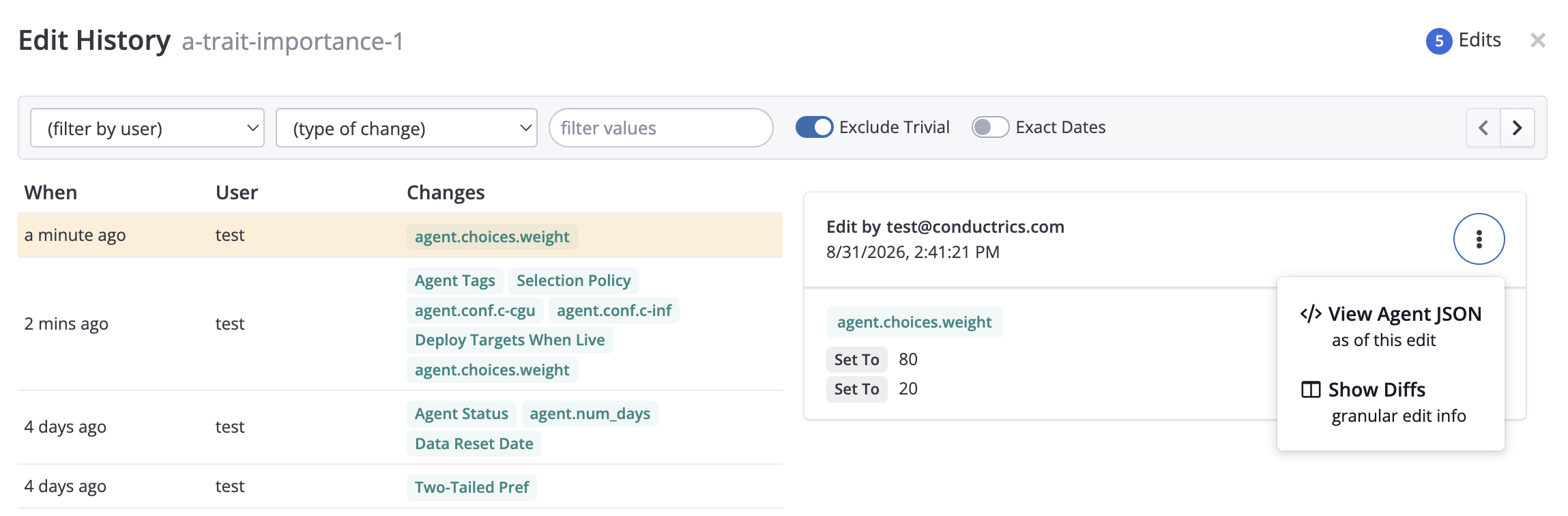
This is the same information shown in the "Edits" view in the Conductrics Admin, shown below:
Fetching the Edit history for an agent
Issue a GET to a URL like the following, substituting your account and agent identifiers as appropriate:
https://xxxxx.conductrics.com/admin/acc-xxxxx/agents/agent/a-xxxxx/edits
You'll need an API Key to use this API endpoint. See the Agent Management API page for details.
You'll get back an array of Edit records (the most recent one listed last), like so:
{
  "status": 200,

  "data": {
    "edits": [

      // each edit record looks like this
      {
        "id": "xxxxxxxxxxxxxx",

        // what exactly changed?
        "diffs": [ array of diffs/changes ],
        "meaningful_diffs": [ array of diffs/changes ],

        "edited": { agent object as of this edit, after the changes },

        // either a user or an apikey, to indicate the party that made the edit
        "user": "[email protected]", // user making the edit (null if via API)
        "apikey": "admin-xxxxxxxx", // apikey making the edit (null if by a user)

        // when was the edit made?
        "ts": 1708373439 // unix-style timestamp, in seconds
      },

      // additional edit records
      { ... }
      { ... }
      { ... }

    ]
  }
}
If all you need is to get the prior state of an agent, just look at the edited field, which will give you the normal Agent Record that would have been returned via the plain agents/agent/a-xxxxxx route (see Retrieving an Existing Agent Record on the main Agent Management API page).
If you need to understand what exactly changed in a given edit, look at the diffs or meaningful_diffs array. Generally speaking, the meaningful_diffs is probably more helpful, as the plain diffs array includes various bits of information used only by our Admin UI. The UI has a "Exclude Trivial" switch which toggles between showing the meaningful_diffs vs all the diffs.
Understanding the Diffs
The diffs and meaningful_diffs arrays contain information about what actually changed. Generally speaking, the meaningful_diffs is probably more helpful, as the plain diffs array includes various bits of information used only by our Admin UI.
Each diff record looks like this:
{
  "kind": "E", // see possible values below
  "path": [ ...xpath-style path to the change... ],
  "lhs": <the old value>,
  "rhs": <the new value>,
}
For instance, let's say an agent has two variations, and the weights are currently 90 and 10, respectively. If a user edits those weights to instead be 80 and 20, the diffs array would look something like this:
[
  {
    "kind": "E",
    "path": [ "agent","choices",0,"weight" ]
    "lhs": 90
    "rhs": 80
  },
  {
    "kind": "E",
    "path": [ "agent","choices",1,"weight" ]
    "lhs": 10
    "rhs": 20
  },
]
Please see the Agent Management API page for more details about the various fields that you'd typically see in an Agent Record. Changes to those fields will show up as diffs like the above.
The Edits view in the Admin UI provides a "Show Diffs" context menu that displays a JSON structure like the one shown above.
Please note that changes to an agent's associations with Goals and Deploy Targets are not included in the Edit History API (in the internal data model, those are changes to the Goals or Deploy Targets, not the agent itself).
Updated about 1 month ago