
Starting / Stopping Agents
When you first create a Conductrics agent, it starts out in "Draft" stage, meaning that it hasn't actually "rolled out" for actual usage yet. When it comes time to roll out your agent, you can change its stage to "QA" or "Live".
Changing Your Agent's Stage
To change your agent's Stage, use the Stage menu on the agent's main page in the admin. The same menu also appears in the agent list. For instance, to start your agent:

Here are the possible agent statuses and what they mean:
| Agent Status | For Express Agents | For API Agents |
|---|---|---|
| Stopped The initial status for a newly created agent. | The agent doesn't make any changes for your actual visitors. | The agent does not return a selection. |
| Running For normal agent operation. | The agent makes a selection, applies the appropriate page changes, and records the selection for reporting/learning. | The agent makes a selection normally and records it for reporting/learning. |
| Paused To temporarily force all visitors to get a particular variation. | The agent "pretends" to have selected whatever variation it has been "paused" at, and applies the appropriate page changes. The selection is not recorded for reporting/learning. | The agent always selects and returns the "paused at" variation, regardless of what variation the visitor may have received in the past. |
| Archived When you're done with a test or optimization and want to get it out of your way. | The agent doesn't make any changes for your actual visitors. | The agent does not return a selection (empty response). |
If you're using the API, the "policy" part of the response will change depending on the agent's status. A random agent will return policyrwhile running, andpif paused, etc. See the Selection Policies section for details.
Pausing an Agent at a Given Variation
You can "pause" your agent at a given variation, forcing it to select the same variation for all visitors.
This can be handy to temporarily suspend a test or optimization. For instance, you might have a special sale or event during which you don't want to do any experimentation. In such a case, you can pause the agent to temporarily say that all visitors should get the default (or other) variation.
The paused status can also be handy for initial testing of an agent, especially if you're using the API.
Just use the same status menu to select Pause At. You'll be prompted to select the variation to pause the agent at, like so.
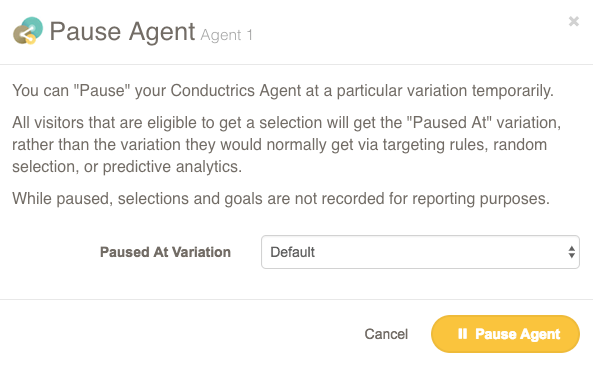
Now all visitors will get the variation you select, regardless of what the agent would do normally. To return to normal operation, just set the status back to Running or Stopped as desired.
Archiving an Agent
When you're done with an agent, you can change its status to Archived. The archived status behaves the same as Stopped, but archived agents don't appear in the agent list by default. So the Archived status is mainly to get older agents "out of your way" for your normal day-to-day work.
You can still view reports for your archived agents. Go to the agent list and select "Archived" to reveal your archived agents. Then you can view their setup and reports normally.
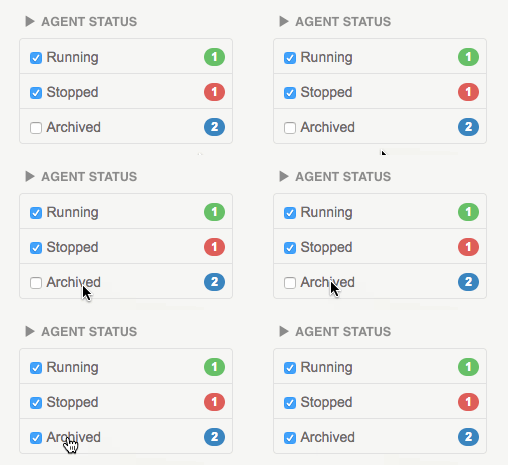
You can also un-archive an agent from the agent status menu. The status will change to Stopped, and from there you can start or pause it normally.
Updated 12 months ago