
Visitor Data Storage Options
For client-side Conductrics usage, via Conductrics Express or our Local JS API
As described in our Visitor Data & Privacy page, Conductrics needs to keep a little "record" of which variations a visitor has been exposed to, as well as which Goals / Conversions they have encountered and any Custom Visitor Traits you may have set.
When using Conductrics client-side, this record is stored locally on the visitor's device, in either Local Storage or as a Cookie, and is not shared with Conductrics.
Viewing or Changing the Options
To view or change the Local Storage vs Cookies option:
- Go to Settings > Deploy Targets in the Conductrics Admin (see Deployment Options).
- Hit Setup for your client-side Deploy Target (one with the Express and/or JS API badge).
- Look for Visitor Data Storage under the JavaScript tab. You can switch between these options if needed, but see the Switching Between Local Storage vs Cookies section if you already have agents/experiments or surveys live in production.
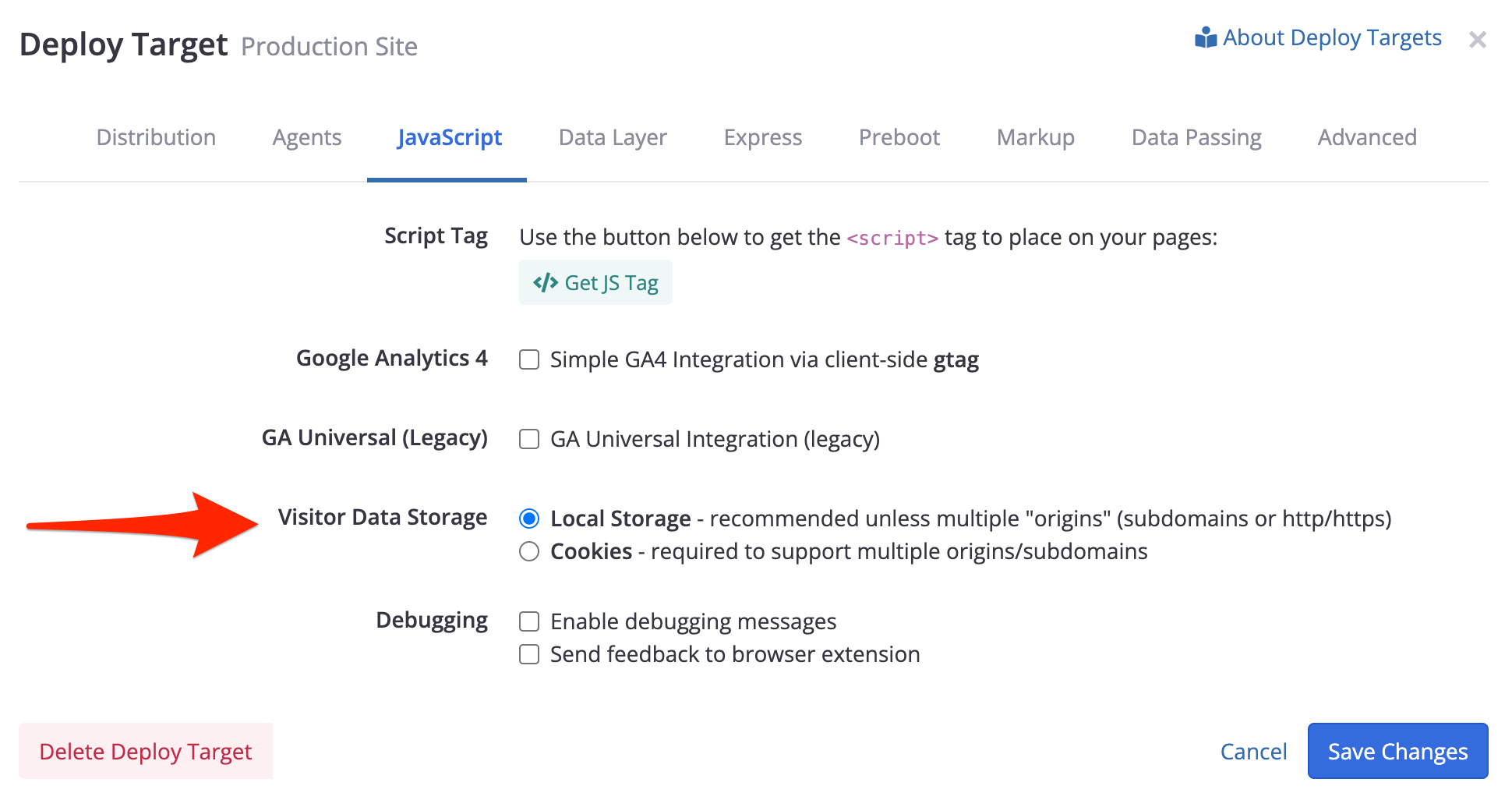
Providing the Cookie Domain
If you choose Cookies, you should also specify the Cookie Domain, as shown below:

For the Cookie Domain:
- In general, you should provide your "main" domain, traditionally preceded by a dot.
- For instance, if your website runs at
www.example.comyou probably should provide.example.comfor the Cookie Domain. If your website runs atwww.example.co.ukthen you probably should provide.example.co.ukfor the Cookie Domain.
More details about cookie domains are available at MDN but feel free to reach out to Conductrics if you have questions.
Subdomains vs Totally Different Domains
Due to the way cookies and Local Storage restrict data sharing:
- If all your pages are at the same "subdomain" (aka hostname), you can and probably should continue to use the Local Storage option.
- If your pages are at a variety of "subdomains" such as
www.example.comandshop.example.com(and perhaps plainexample.com) then you must use the Cookies option and provide the "main" part of your domain name (traditionally preceded by a dot as shown above). - If your pages live within multiple completely different domain names, such as
example.comandexample-store.com, orexample.comandexample.net, orexample.comandexample.co.uk, then Conductrics will simply not be able to track the visitor between the "main" domain names.
Feel free to reach out to Conductrics if you have questions.
Switching Between Local Storage vs Cookies While Live
The Local Storage vs Cookie option is meant to be a "set it and forget it" preference. We don't expect you to need to switch between these modes on any kind of regular basis.
However, if you find that you need to "migrate" your production Conductrics implementation from Local Storage to Cookies mode or vice-versa, Conductrics provides an Advanced setting which you can turn on temporarily.
- Go to Settings > Deploy Targets in the Conductrics Admin
- Hit Setup for your client-side Deploy Target (one with the Express and/or JS API badge).
- Under the Advanced Tab, hit "Advanced Settings" and then add the Storage: Migrate between Cookie and LocalStorage mode (client-side only) setting. If you don't see this setting, please reach out to Conductrics to have it added for you.
While this option is on, the Conductrics script will check whether there is an existing Visitor State Record in the "other" place. For example, if you're now using Cookies, the script will check whether there is an existing cp-sess record in Local Storage. If so, the value is copied to a cookie (and the Local Storage item is deleted) before normal Conductrics processing starts.
Turning this option on adds a small amount of additional processing at runtime. While probably negligible in the grand scheme of things, Conductrics recommends turning this option back off after a reasonable period of time, such as a few weeks (after which point a meaningful return visit becomes less likely).
Without the "Migrate" option on, Session State will be lost when switching between. All visitors will be totally "new" visitors as far as Conductrics is concerned. This means that all visitors may get assigned to different variations, and will show up anew in the Conductrics reporting.
Reducing Visitor State Record / Cookie Size
If using Cookies (as opposed to Local Storage), Conductrics provides a few advanced options to reduce the size of the actual cookie value that gets saved.
You can turn these options on via the Advanced tab for your Deploy Target.
These options also apply to Deploy Targets that use the default Local Storage option. But they are really only important if using cookies, because browsers generally enforce a limit of 4kb per cookie (see MDN page), whereas the Local Storage quota is much larger. You're unlikely to encounter problems with the Visitor State Record size when using Local Storage.
Conductrics plans to make both the Reduce size and Base64-encode options enabled by default in a future version.
Storage: Reduce size of 'cp-sess' cookie/storage item
This option causes Conductrics to use a more compact JSON format when saving the Visitor State Record.
- You should be able to turn this option on without affect existing agent/experiments (no loss of visitor state). Existing visitor records will be "upgraded" the next time each visitor encounters a page with the corresponding Conductrics script tag installed.
- Turning this option off, however, does NOT preserve the prior state of existing visitors. If you later switch back to false you will lose existing selections/state for visitors that visited while it was true (all such visitors will appear to be "new visitors" to Conductrics). This affects all agents and surveys for the Deploy Target.
In other words, we support "upgrading" to "Reduced Size True" without losing state, but we don't support "downgrading" to the non-reduced format.
Storage: Base64-encode 'cp-sess' cookie/storage item
This option causes Conductrics to "encode" the the Visitor State Record as Base64, using the built-in atob and btoa methods provided by the browser.
- If you look at the actual value under the Local Storage or Cookies part of your browser's Dev Tools, you'll see that it looks "scrambled" when this option is on, versus looking like "normal JSON" when off.
- If using cookies, turning on the Base64 option tends to reduce the actual size of the record if using cookies, because it avoids the use of special characters (quotes, colons, commas, braces) that would normally have to be "percent-encoded", inflating the final cookie size.
- If using Local Storage, this option causes the size to be inflated a bit, though that is generally not a concern for Local Storage.
Updated over 1 year ago