
Node.js Support
What's This?
You can use the Conductrics JavaScript API "natively" within your Node.js projects.
- You can get selections from your Conductrics Agents, send rewards, and so on. It's up to you to supply the different "experiences" for whichever variations are selected.
- The processing is done "locally" from within your Node.js process, so you get your agent selections back right away (without waiting for a REST-style network call to be made over HTTP).
- Information about selections and rewards are sent back to Conductrics asynchronously. This keeps the reporting and machine learning for your agents up to date, without slowing your code down. For more information about the information that gets sent back to Conductrics, see Visitor Data & Privacy.
Why use this instead of the REST API?
The Node.js API described here has nearly the same functionality as our REST-style API (aka Web Service), which you could also call straightforwardly from your Node code. The difference is that the Node.js API does its processing "locally" within your Node.js process, rather than "going out over the wire" to Conductrics servers for each API call.
- So, the main reason to use the Node.js API is performance. It was designed for applications where low response times are very important, and where traffic/load is expected to be high. You also don't have to worry about Conductrics being "up" (even though our uptime is good).
- On the other hand, if you aren't expecting high traffic and aren't on a strict latency diet, it may make sense to use the REST API instead. For instance, perhaps you prefer not to introduce a new dependency. Feel free to contact Conductrics to talk it though!
Installation
The Node.js support is packaged up a little differently from most other Node.js packages. Rather than being published in npm, you get your Node.js package from Conductrics. The package is custom-built, pre-configured for your account.
- Go to the Settings > Distribution page in the Conductrics Admin.
- Hit Add Deploy Target and select the Node.js Module option.
- On the Node.js tab, copy the
npm installline and run it in your shell/terminal.
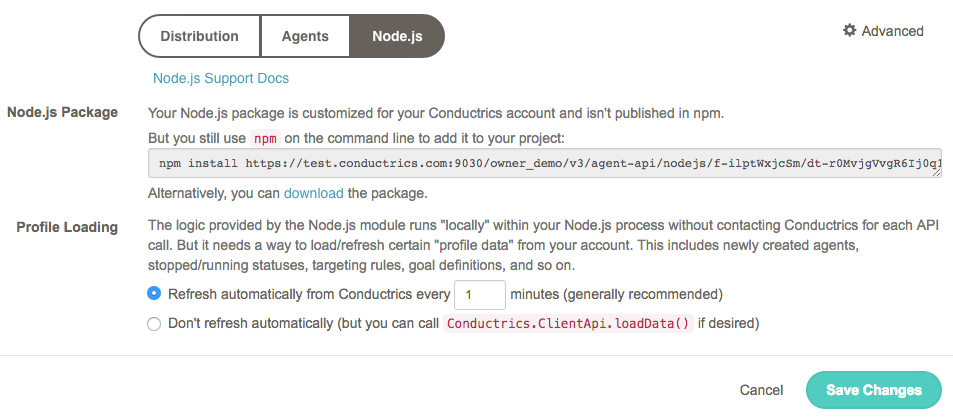
Getting the npm install command from the Conductrics admin
Once the npm install command completes, the package should be installed to your node_modules, and you should be ready to use Conductrics in your Node.js code.
Node.js Requirements and DependenciesThis support should work with version 8.x and higher of Node.js. At this time, the only dependency is on the popular node-fetch package, which is used internally to send selection and reward "events" back to Conductrics via HTTP.
Using the JavaScript API in your Node.js code
Usage is nearly the same as if you were using the JavaScript API in the browser.
The basic operations will likely be:
- Getting variation "selections" from your Conductrics agents. Depending on how you have your agents set up, they will select variations randomly, or "adaptively" via our predictive machine learning, or using targeting rules you may have set up in the admin, etc.
- Sending "goals" back to your Conductrics agents when "conversion events" happen within your Node.js app.
- See the basic Express code provided below for a Node.js-specific example. See also the API Usage via Local JS page for details about getting selections and sending rewards. See also the Runtime API Reference for additional options.
Session State
The main difference between Node.js usage and browser usage is how visitor state gets persisted.
By "visitor state", we mean the little record that needs to be kept to remember which variations have been selected for the visitor in the past, which goals have been achieved, which visitor "traits" have been assigned to the visitor, and so on. When you use the Conductrics REST API, we save the visitor state on our servers.
Because you're not interacting with our servers in real time, we ask that you store the visitor state for us.
- When you call the Node.js API, you'll get back a value called
sessas part of the response. - Please store the
sessvalue somewhere that will be associated with the visitor. In a web application, one way to do this is to simply set thesessvalue as a cookie. Or you might store thesessvalue in some kind of internal database that you're already using for session management. - The next time you call use the API for the same visitor, pass the same value back to the
sessoption to the Conductrics.ClientApi constructor.
The structure or format of thesessobject may change in the future. It is not documented or supported. Please do not write code that depends on looking at or manipulating thesessobject.
Would you like us to persist the session data for you?Let us know if you don't like the fact that you need to persist and provide the session data. We like this implementation because it doesn't introduce additional dependencies. That said, we are considering support for an embedded datastore, or perhaps supporting certain "cloud" databases out of the box (though doing so may re-introduce network latency). Please feel free to reach out to your contact at Conductrics to discuss.
Example Express App
For instance, here's a very simple Express app that shows how you might use the Node.js API.
This example app:
- Calls a fictitious Conductrics Agent with API code
home-page-campaign. - The answer from the API contains the selected variation (
AorB). - The app returns a web page that shows a cute kitten for the "B" variation, or a plain grey placeholder image for the "A" variation.
- The
sessobject is passed back and forth as a browser cookie calledctrx-sess.
var Conductrics = require('conductrics-nodejs');

// This example uses Express to build a simple demo webserver
var express = require('express');
var app = express();

// This example uses a simple cookie to persist the Conductrics "sess" object
var cookieParser = require('cookie-parser');
app.use(cookieParser());

// Handle requests for the "home page"
app.get('/', function(req, res) {

  	// Get reference to Conductrics API
	var api = new Conductrics.ClientApi({
		// Here we're assuming that the "sess" object will be kept as a cookie
		// Alternatively, you could get the "sess" object from your internal database
		sess: req.cookies['ctrx-sess']
	});

	// Now can call Conductrics API
	// Here we'll get a simple selection from an agent called "home-page-campaign"
	api.exec([{"a": "home-page-campaign"}], function(err, answer) {
		console.log("Conductrics answer:\n" + JSON.stringify(answer, null, 2));

		/*
		**  DO SOMETHING HERE ¯\_(ツ)_/¯
		**  Here's where you do something to "show" or "do" the selected variation.
		*/
		var campaign = answer.sels["home-page-campaign"];
		var image = campaign === 'B' ?
			'http://placekitten.com/200/300': // "B" image is a wonderful kitten
			'http://placeholder.pics/svg/300' // "A" image is a boring placeholder

		// Again, we're assuming that the "sess" object will be kept as a cookie
		// Alternatively, you could persist the "sess" object to your internal db
		res.cookie('ctrx-sess', answer.sess);

		// Emit adjusted HTML page
		res.send('<html><body><img src="' + image + '"></body></html>');
	})
});

app.listen(3000);
Updated over 1 year ago